In the UK, a digital right-to-work check is simply a modern way for employers to confirm someone has the legal right to work here. It uses government-approved digital identity services, which means you no longer have to physically handle and inspect passports or birth certificates for every new hire. This shift has become absolutely essential, especially as more and more companies embrace remote or hybrid working.
Why Digital Right to Work Checks Are Non-Negotiable

Let's be clear: getting this wrong can be costly. A lot of businesses still get caught out, often because of simple human error, inconsistent processes, or just not keeping up with the latest Home Office guidance.
Failing to conduct a proper right-to-work check can result in a civil penalty of up to £60,000 per illegal worker. That's a staggering figure that could cripple a small or medium-sized business. It’s not just about the money, either; you could also face criminal charges, reputational damage, and even lose your sponsor licence.
This is precisely why having a robust, digital-first approach to pre-employment checks isn't just a "nice-to-have" – it's a fundamental part of modern HR management.
Bringing it all into Microsoft Dynamics
For businesses already using Microsoft Dynamics, the answer isn’t to bolt on yet another separate system. The real power comes from an integrated solution. For instance, Hubdrive’s HR Management for Dynamics 365 weaves compliance right into the fabric of your existing workflows.
This kind of approach makes your HR operations secure and audit-ready from the moment you onboard a new employee. By plugging directly into your Microsoft environment, it gets rid of tedious manual data entry and creates a single, reliable source of truth for every employee's right-to-work status.
Getting to Grips with the Home Office Rules
Figuring out the Home Office's guidance on digital right to work checks can feel like wading through treacle. The language is very specific, the rules are rigid, and the consequences of getting it wrong are genuinely severe. At the core of it all is a solid understanding of regulatory compliance.
The recent Home Office clampdown on illegal working has led to a huge spike in enforcement, which is why so many businesses are now turning to digital checks. With workplace raids on the rise and civil fines jumping to as much as £60,000 for repeat offences, not to mention the risk of criminal charges, the pressure is on. You can get a sense of this shifting government focus by exploring the latest enforcement trends.
The key phrase you need to know is ‘statutory excuse’. This is your legal shield. If you carry out a right to work check correctly and can prove it, you have a statutory excuse against a civil penalty, even if it later turns out that the employee didn't have the right to work in the UK.
IDVT, IDSPs, and the Official Online Service: What's the Difference?
When you start digging into the details, you'll come across a few acronyms. Knowing what they mean is crucial for picking the right verification method for each person you hire.
-
Identity Document Validation Technology (IDVT): Think of this as the smart software doing the heavy lifting. It uses technology like biometric facial recognition and advanced document scanning to confirm that an ID document, like a passport, is real and that it belongs to the person in front of you.
-
Identity Service Providers (IDSPs): These are the government-certified companies that offer IDVT services to employers. If you're checking a British or Irish citizen with a valid passport, you must use one of these certified providers to establish a statutory excuse.
It's really important not to mix this up with the Home Office's own online system. The free-to-use Home Office portal is for checking candidates who are not British or Irish and hold a digital immigration status (like an eVisa or a biometric residence permit). These individuals give you a share code, which you then enter on the GOV.UK website to see their right to work details directly from the source.
Choosing the Correct Right to Work Check Method
Which method you should use isn't a matter of preference; it's dictated entirely by the candidate's nationality and the documents they have. Getting this step wrong means your check is invalid, and you lose your statutory excuse. It’s like having a set of keys – you have to use the right one for the right lock.
For example, you can't ask a British citizen for a share code; it simply doesn't apply to them. You have to use a certified IDSP for a digital check of their passport. On the flip side, you can't use an IDSP for a candidate with an eVisa; you must use their share code on the official government portal.
One of the most common pitfalls is trying to use a one-size-fits-all process. The Home Office guidance is crystal clear: the candidate's immigration status and nationality determine the check you must perform.
The table below breaks down which check to use for different types of workers, helping you avoid these common and costly mistakes.
Choosing the Correct Right to Work Check Method
| Worker Type | Permitted Check Method | Key Considerations |
|---|---|---|
| British & Irish Citizens (with a valid passport or passport card) | Digital check via a certified IDSP or a manual in-person check. | Remote checks are only possible with an IDSP. You cannot use the Home Office online service for these individuals. |
| Non-British/Irish Citizens (with a digital immigration status, e.g., eVisa, BRP, BRC) | Home Office online service using a share code. | This is the mandatory method for those with an eVisa. You no longer have the option for a manual check of a physical BRP. |
| Individuals with older documents (e.g., indefinite leave to remain vignettes) | Manual in-person check of original documents. | These individuals may not have a digital status. A digital check is not an option here; the physical document must be inspected. |
Mapping out these distinct pathways is the only way to build a compliant and efficient onboarding process that truly protects your business.
This is where a good HR system really proves its worth. A solution like Hubdrive’s HR Management for Microsoft Dynamics 365, for instance, can be configured to guide a recruiter down the correct path based on the candidate’s details. It takes the guesswork out of the equation, ensuring every hire is checked correctly and that the evidence is stored securely right inside your own Microsoft environment.
Integrating Digital Checks Within Your Microsoft Ecosystem
If your organisation runs on Microsoft, the last thing you want is another piece of standalone software for right-to-work checks. Juggling separate systems is a recipe for disaster—it creates confusing data silos, opens the door to manual errors, and makes staying compliant a real headache. The smart move is to weave these essential checks directly into the fabric of the systems you and your team already use every day.
Picture this: a candidate accepts a job offer. That one click automatically kicks off the right-to-work check process inside your central HR platform. No more switching screens, no more re-keying data, and definitely no more chasing down paperwork. This is how you turn a tedious but mandatory task into a slick, automated part of your onboarding experience.

The Power of a Unified HR Platform
Sure, a standalone system for right-to-work checks gets the job done, but it’s working in a bubble. An integrated solution, like Hubdrive’s HR Management for Microsoft Dynamics 365, is a far more powerful and secure way to operate. Because it’s built natively on Microsoft Dataverse, it doesn’t just talk to your Microsoft environment—it lives and breathes inside it.
This native approach brings some huge advantages:
- A Single Source of Truth: Every piece of evidence, from IDSP reports to Home Office share code confirmations, is captured and stored directly against the employee’s record in Dataverse. This kills off duplicate files and ensures everyone in HR is working from the same, up-to-the-minute information.
- Fewer Manual Errors: Automation takes the risk of typos, missed steps, or lost documents right out of the equation. The system pilots the process, making sure every single check is completed consistently and compliantly.
- Tighter Security: By piggybacking on your existing Microsoft setup, you get enterprise-grade security without needing to configure anything new.
The goal here is to move past simply ticking a compliance box and build an intelligent, connected system. When your right-to-work data sits in the same place as payroll, performance reviews, and personal details, you get a complete, 360-degree view of your workforce.
Securing and Auditing Your Compliance Data
You’re dealing with incredibly sensitive personal data here—passport details, biometric information—so security has to be rock-solid. An integrated Microsoft solution gives you a robust security framework straight out of the box.
Using Microsoft Entra ID (what used to be Azure Active Directory) for access control means you can be incredibly specific about who can see or manage right-to-work documents. You can set up granular permissions so that only authorised HR staff can get near this sensitive information, which creates a clear and defensible audit trail.
Better yet, with all your compliance data stored securely in Dataverse, you’re audit-ready 24/7. If the Home Office ever comes knocking for evidence of your checks, you can pull a comprehensive report in minutes, not days. That ability to prove your diligence on the spot is what maintains your statutory excuse.
From Raw Data to Actionable Insights
One of the best, and often overlooked, benefits of keeping all your HR data in one place is the ability to actually use it. With verification data stored in Dataverse alongside other employee metrics, you can fire up Microsoft Power BI and create dashboards and reports that tell a real story.
Imagine being able to see, at a glance:
- Onboarding Bottlenecks: Pinpoint exactly where in the process things are slowing down.
- Compliance Status: Get a live overview of the right-to-work status for your entire company.
- Recruitment Trends: Analyse the visa types of new hires to help shape your future talent-sourcing strategy.
This isn’t just about compliance anymore; it’s about turning that data into genuine business intelligence. The Hubdrive solution provides a full framework for this, covering the entire hire-to-retire journey. You can learn more about how it all fits together in our overview of Dynamics 365 for HR. By building digital right-to-work checks into your core Microsoft ecosystem, you create a more efficient, secure, and insightful HR function—ready for any audit and fit for the future.
At DynamicsHub.co.uk, we help you experience an HR transformation built around your business. Hubdrive’s HR Management for Microsoft Dynamics 365 is the premier hire‑to‑retire solution—more powerful, more flexible, and more future‑ready than Microsoft Dynamics 365 HR.
Ready to see how an integrated solution can transform your compliance process? Phone 01522 508096 today, or send us a message to get started.
Managing Data Retention and GDPR Compliance
Getting a candidate’s right-to-work check ticked off is a crucial first step, but your compliance journey doesn’t end there. The moment you take a copy of a passport or handle biometric data, you’re holding highly sensitive personal information. This immediately brings the General Data Protection Regulation (GDPR) into play, and frankly, managing this data correctly is just as important as the initial check itself.
You’re standing at the crossroads of Home Office immigration rules and strict data protection law. This isn’t just about storing a file; it’s about processing what’s known as ‘special category data’. That classification demands the highest level of security and a rock-solid legal basis for everything you do. Simply having the data isn’t good enough—you must be able to prove why you have it, how you’re protecting it, and crucially, when you’re going to destroy it.
The Legal Basis for Processing and Retention
Under GDPR, you need a lawful reason for handling any personal data. When it comes to right-to-work checks, your legal obligation to comply with the Immigration, Asylum and Nationality Act 2006 gives you that justification. This provides a clear, legally mandated reason to collect and keep copies of identity documents and any verification reports.
But this legal cover comes with strict, non-negotiable retention rules from the Home Office.
- During Employment: You must hold on to a clear, complete copy of the right-to-work evidence for the entire time an individual works for you.
- Post-Employment: After an employee moves on, you are required to keep their right-to-work check records for an additional two years.
- After Two Years: Once that two-year post-employment window closes, the data must be securely and permanently deleted.
Keeping this data for any longer “just in case” is a clear breach of GDPR’s storage limitation principle and could land your business in hot water with some very significant fines.
A classic mistake we see is businesses lumping right-to-work documents into the general HR filing cabinet, where records might be kept for six years or more. This is a compliance trap. Right-to-work data has its own specific lifecycle, and your systems have to be set up to manage it properly.
Automating Compliance to Avoid Costly Breaches
Trying to manually track these retention deadlines for every employee is an administrative nightmare and a huge source of risk. Think about it: an employee leaves, and two years down the line, who is going to remember to dig out a specific PDF and delete it? This is where an integrated HR system really proves its worth.
A solution like Hubdrive’s HR Management, built on Microsoft Dataverse, can put this whole process on autopilot. By configuring automated retention policies, the system can flag records when they hit their destruction date. This ensures you meet both Home Office and GDPR rules without anyone having to lift a finger, protecting your organisation from accidental data breaches and the painful penalties that come with them. A broader understanding of how to protect digital information by following established laws and industry standards is essential. For further guidance, refer to a practical guide on information security compliance.
Navigating the Future of Digital Compliance
The UK government is pushing hard for the full digitalisation of all right-to-work checks. This clear policy direction, combined with a sharp increase in enforcement and fines now reaching up to £60,000 per violation, is putting immense pressure on HR teams to find reliable digital solutions. For companies already invested in Microsoft Dynamics 365, this really highlights the value of integrated tools that use the Power Platform to run seamless, GDPR-compliant digital checks, all within the security of your own Microsoft 365 tenant. The need to build a fully GDPR-compliant HR software ecosystem isn’t a future goal anymore; it’s a here-and-now necessity.
At DynamicsHub.co.uk, we help you experience an HR transformation built around your business. Hubdrive’s HR Management for Microsoft Dynamics 365 is the premier hire‑to‑retire solution—more powerful, more flexible, and more future‑ready than Microsoft Dynamics 365 HR.
Ready to automate your compliance and secure your data? Phone 01522 508096 today, or send us a message to find out how.
Your Roadmap to a Seamless Implementation
Moving to a digital right-to-work check system can feel like a huge undertaking. The good news? It doesn’t have to be. By breaking the project down into a clear, manageable plan, you can shift away from risky manual methods and towards a compliant, automated process that works from day one.
This roadmap is built for HR and IT leaders who want to create a system that’s not just efficient, but completely watertight when it comes to Home Office rules. It all starts with proper planning and getting the right people involved. You need to look hard at what you’re doing now, find the weak spots, and then choose the right tech to fix them before training your team to use it properly.
Phase 1: Initial Planning and Discovery
First things first: you need a solid understanding of your current process. This means getting granular and auditing every single step of your existing onboarding and right-to-work checks. Map out exactly how you collect documents, who verifies them, and where that crucial evidence is stored. This discovery phase is vital—it tells you exactly what needs to change.
With that baseline established, it’s time to choose a certified Identity Service Provider (IDSP). For businesses already embedded in the Microsoft ecosystem, integration is everything. You’ll want an IDSP that plays nicely with your existing HR platform. For example, the Hubdrive HR Management for Dynamics 365 solution can be integrated with these services. This is a smart move, as it prevents data from being scattered across different systems and keeps all your compliance information stored securely in your own Microsoft Dataverse environment.
Phase 2: System Configuration and Automation
Once you’ve picked your IDSP, the work moves to the technical setup. This is where your IT team or implementation partner will configure your HR platform to handle the new digital workflows automatically. The goal is to make the right-to-work check a seamless, automated step triggered at just the right moment in a new hire’s onboarding journey.
A critical part of this phase is setting up your data retention rules. Remember, you must keep the check evidence for the entire duration of employment plus two years. By automating this policy in your system, you guarantee that data is purged on schedule. This keeps you on the right side of both Home Office regulations and GDPR, neatly sidestepping the risk of an accidental data breach.
The lifecycle for this data is straightforward.
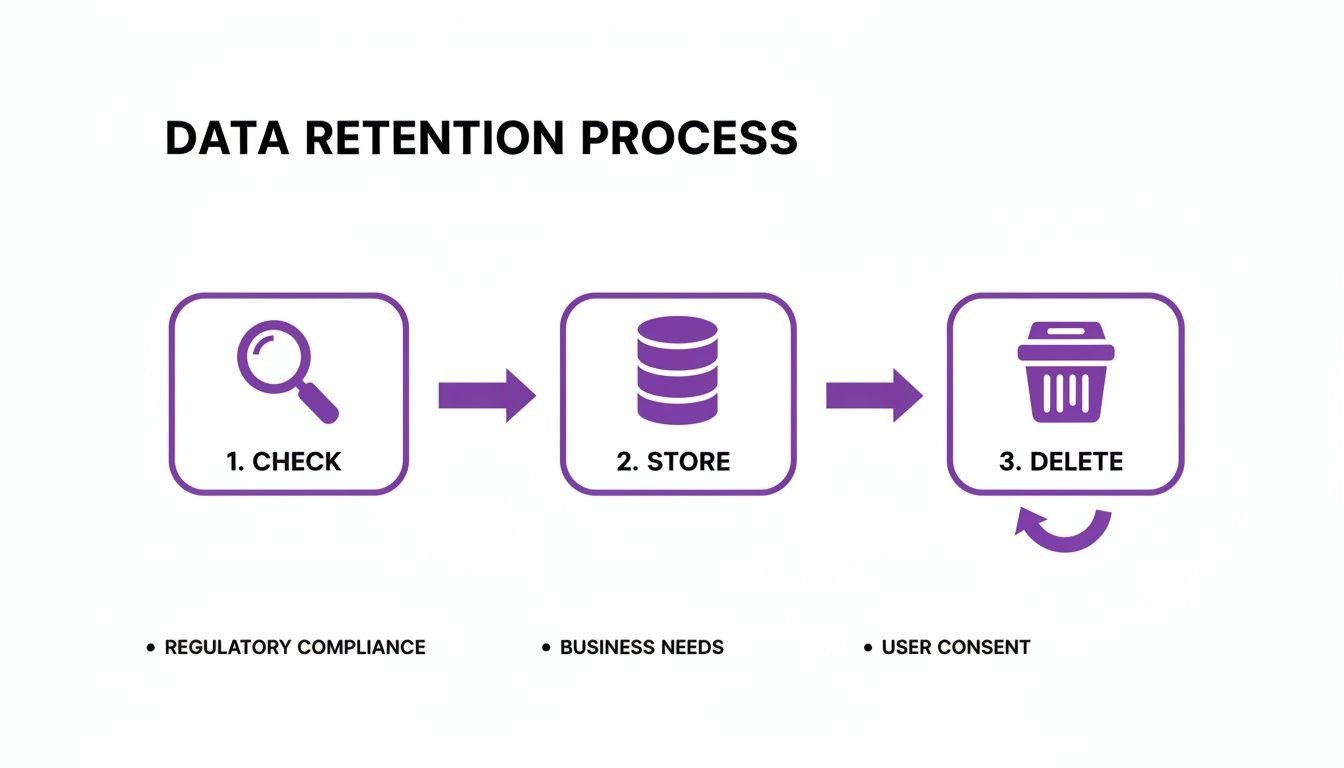
This simple Check, Store, Delete flow is the heart of compliant data management, balancing legal duties with your own business needs.
Phase 3: Training and Go-Live
Great technology is only half the battle; your people are the other half. A solid training plan is absolutely non-negotiable. Your HR team, recruiters, and hiring managers need to feel completely confident using the new system. The training shouldn’t just be a “click here, then click there” exercise. It needs to cover the why behind the change, driving home the importance of getting compliance right every single time.
Finally, think about your new hires. You need a clear communication plan that explains how the digital check works, what they’ll need to do, and who they can turn to for help. Getting this right creates a smooth, professional start for every new employee, which reflects brilliantly on your organisation.
To help you get started, here’s a practical checklist to guide your implementation from start to finish.
Digital Right to Work Implementation Checklist
This checklist provides a step-by-step guide to help your organisation adopt a compliant and efficient digital checking system, ensuring all key actions and stakeholders are considered.
| Phase | Action Item | Key Stakeholders |
|---|---|---|
| 1. Discovery & Planning | Audit current right-to-work processes and identify compliance gaps. | HR, Legal/Compliance, IT |
| 1. Discovery & Planning | Define project scope, budget, and timeline. | Project Manager, Senior Leadership |
| 1. Discovery & Planning | Research and select a certified IDSP that integrates with existing systems (e.g., Dynamics 365). | IT, HR, Procurement |
| 2. Configuration & Tech Setup | Configure the IDSP and HR platform to automate check requests and workflows. | IT, Implementation Partner, HR |
| 2. Configuration & Tech Setup | Establish and automate data retention policies for check evidence (employment + 2 years). | IT, Legal/Compliance |
| 2. Configuration & Tech Setup | Conduct user acceptance testing (UAT) with a pilot group of users. | HR, Pilot Users, IT |
| 3. Training & Go-Live | Develop training materials and deliver sessions for all relevant staff (HR, recruiters, managers). | HR, Training Department |
| 3. Training & Go-Live | Create clear communication guides for new candidates and employees. | HR, Internal Comms |
| 3. Training & Go-Live | Set a go-live date and provide post-launch support. | Project Manager, IT, HR |
Following this roadmap will set you up for a smooth transition, allowing you to use your existing Microsoft infrastructure to achieve effortless compliance.
At DynamicsHub.co.uk, we help you experience an HR transformation built around your business. Hubdrive’s HR Management for Microsoft Dynamics 365 is the premier hire‑to‑retire solution—more powerful, more flexible, and more future‑ready than Microsoft Dynamics 365 HR.
Ready to build your roadmap? Phone 01522 508096 today, or send us a message to discuss your implementation.
A Partner to Help You Get It Right
Let’s be honest, navigating the world of digital right-to-work checks can feel like a minefield. With fines on the rise, regulations constantly shifting, and GDPR breathing down your neck, it's a lot for any business to handle. The risks are very real, but with the right approach, you can turn this compliance headache into a smooth, almost invisible part of your hiring process.
If your organisation is already built around the Microsoft ecosystem, finding a solution that fits right in is key. At DynamicsHub.co.uk, our focus is on helping you build better HR processes, where compliance is simply a natural result of doing things well, not a constant source of stress. That’s why we implement and support Hubdrive’s HR Management for Microsoft Dynamics 365 for organisations in the UK.
The Hire-to-Retire Solution Built for Microsoft
Hubdrive’s HR solution is the most comprehensive ‘hire-to-retire’ platform available for the Microsoft world—it's more powerful and flexible than even Microsoft's own standard HR offering. Its real magic lies in its deep, native integration with Microsoft Dataverse.
This isn't just about connecting two systems; the solution genuinely lives inside your existing Microsoft environment. Because it operates natively on Dataverse, it doesn't just simplify right-to-work checks; it streamlines the entire journey of an employee, from their first application to their last day.
What does this deep integration actually mean for you?
- One Source of Truth: All your HR data, including the crucial evidence for right-to-work checks, is kept securely in one place. No more hunting through different systems.
- Smarter Workflows: Onboarding tasks, including the identity verification steps, can be automated. This cuts down on the manual admin and the risk of human error.
- Rock-Solid Security: It uses your existing Microsoft Entra ID for security, giving you precise control over who can see sensitive employee information.
When compliance is embedded directly into the platform you already use every day, you get rid of messy data silos and ensure you’re always ready for an audit. It’s not about bolting on another feature; it’s about fundamentally improving how your business works.
The result is an HR function that’s efficient, secure, and robust. It protects your business from risk while giving your new starters a much better, smoother experience from day one.
At DynamicsHub.co.uk, we help you experience an HR transformation built around your business. Hubdrive’s HR Management for Microsoft Dynamics 365 is the premier hire‑to‑retire solution—more powerful, more flexible, and more future‑ready than Microsoft Dynamics 365 HR.
Ready to see how a fully integrated solution can transform your HR processes and lock down your compliance? Phone 01522 508096 today, or send us a message to get started.
Got Questions About Digital Right to Work Checks?
Even with a solid plan, moving to a new compliance system always throws up a few questions. Let's tackle some of the most common queries HR teams have when they're getting to grips with digital right to work checks.
Can We Still Do Manual, In-Person Checks?
Yes, but it’s becoming the exception. Manual, face-to-face checks are still an option, but mainly for edge cases—think of someone with an older indefinite leave to remain vignette in their passport who can't use the digital systems.
The reality is the Home Office has moved to a digital-first world. For British and Irish passport holders, a remote check using a certified IDSP is now the only way to secure a statutory excuse. Committing to a consistent digital process is your best bet; it slashes the risk of human error, tightens up security, and gives you a much stronger, easily-auditable defence if you ever need it.
What’s the Difference Between an IDSP and the Home Office Online Service?
This is a really common point of confusion, but getting it right is crucial for staying compliant. The two services are designed for completely different groups of people.
- Certified Identity Service Providers (IDSPs) are specialist third-party companies. They use government-certified tech to verify the identity of British and Irish citizens who hold a valid passport or passport card.
- The Home Office Online Service is the official government website. It's free and is used to check the immigration status of non-UK nationals who have a digital status (like an eVisa or Biometric Residence Permit). They give you a ‘share code’ to do this.
You simply can't mix and match. Trying to check a British citizen with a share code or a foreign national through an IDSP will invalidate the check, leaving you exposed and without a statutory excuse.
How Much Do Digital Checks Cost in the UK?
The cost really depends on which route you need to take. The good news is that using the Home Office's online service for foreign nationals is completely free.
On the other hand, certified IDSPs are commercial services and do charge a fee. You’ll typically pay on a per-check basis, with prices in the UK generally falling somewhere between £2 and £10 per check. While it’s an added expense, integrating this into an HR platform like Hubdrive’s HR Management for Dynamics 365 means you can manage these costs as a seamless part of your recruitment budget. It’s a small price to pay for rock-solid compliance and a perfect audit trail.
What Should We Do if a Digital Check Fails?
First off, don't panic. A failed check doesn't automatically mean the candidate is ineligible to work for you, but you do need to handle it carefully.
A failed check could be anything from a simple technical glitch or a poor-quality photo to a recent name change that hasn't filtered through to official records yet. The trick is to have a fair, consistent process for sorting it out.
Here’s what to do next:
- Talk to the Candidate: Let them know the check was unsuccessful and explain the next steps. It's vital they are treated fairly and without any prejudice.
- Use the Employer Checking Service (ECS): If the digital check has failed but you still have good reason to believe the candidate has the right to work, you must use the Home Office's Employer Checking Service. This is your official fallback. If the ECS check comes back positive, it grants you a statutory excuse for six months.
- Document Everything: Keep a clear, detailed record of every action you take—all communication with the candidate, the failed check result, and the outcome of your ECS request. This paperwork is your proof of due diligence.
At DynamicsHub.co.uk, we help you experience an HR transformation built around your business. Hubdrive’s HR Management for Microsoft Dynamics 365 is the premier hire‑to‑retire solution—more powerful, more flexible, and more future‑ready than Microsoft Dynamics 365 HR.
Ready to clear up your compliance questions for good? Phone 01522 508096 today, or send us a message to find out how.