

Choosing the best time and attendance software isn't just about ticking boxes on a feature list; it's about finding that sweet spot between powerful capabilities and a genuinely simple user experience. For most UK businesses, especially those already running on Microsoft 365, a native solution that slips right into your existing toolkit often provides the biggest wins in both efficiency and security.
Why Modern Time and Attendance Software Is Essential
Relying on spreadsheets to track employee hours just doesn't cut it anymore. It's a relic from a different era. With the rise of hybrid work, flexible schedules, and ever-present labour laws, sticking with manual methods is a massive gamble. You're opening the door to everything from glaring payroll errors to serious compliance breaches.
Good software takes this entire headache away. It automates the whole process, giving you a reliable, accurate, and transparent system that works for everyone.
Think of it this way: you wouldn't navigate a cross-country trip with a tattered paper map anymore, would you? You'd use a GPS. The map might get you there, but it’s clumsy, prone to mistakes, and gives you zero real-time information. A GPS automates the journey, adjusts on the fly, and gives you data to make smarter decisions. That's exactly what modern time and attendance software does for your business.
The Strategic Shift from Manual Tracking
At its core, this technology is all about systematically recording when people work. It logs start and end times, breaks, and any time off. This is absolutely fundamental for paying your staff correctly and making sure you’re compliant with UK laws like the Working Time Regulations 1998.
But the real value goes much deeper than just clocking in and out. The best systems become a goldmine of data, helping you manage your workforce more effectively, smooth out the payroll process, and gain insights that were previously invisible.
Modern time tracking is a foundational element of effective workforce management. It equips businesses with the tools to improve workflow efficiency, control costs, and create an environment that supports sustained growth and employee accountability.
Why Modern Time and Attendance Software is Essential
Here’s a quick overview of the key advantages UK businesses gain by upgrading from manual tracking to an automated software solution.
| Key Advantage | Impact on Your Business |
|---|---|
| Flawless Payroll Accuracy | Eliminates human error from timesheet calculations, preventing costly overpayments and frustrating underpayments. |
| Effortless Compliance | Automatically creates a digital audit trail, making it simple to prove compliance with UK labour laws. |
| Increased Productivity | Provides clear insights into how time is spent, helping managers optimise schedules and identify productivity trends. |
| Empowered Employees | Gives staff self-service tools to check schedules and request time off, increasing transparency and reducing HR admin. |
By automating your time tracking, you see immediate and long-term benefits that touch everything from your bottom line to team morale.
As you start looking for the right fit, it’s worth exploring what dedicated time and attendance systems can do. For any business already embedded in the Microsoft ecosystem, a native solution is a no-brainer—it offers a secure, familiar experience that’s fully integrated with the tools your team already uses every single day.
Essential Features for Modern UK Businesses
When you start shopping for time and attendance software, the sheer number of features can feel overwhelming. But here’s the thing: not all systems are built equal, especially when it comes to the unique challenges of UK businesses. The right tool is more than just a digital punch clock; it becomes the command centre for managing your workforce.
To cut through the noise, it helps to have a clear idea of what’s truly essential. These are the non-negotiables—the features that deliver accuracy, give your team more control, and provide managers with the insights they need to run things smoothly.
Automated and Real-Time Timesheets
Let's be honest, manual timesheets are a nightmare. They’re a black hole for administrative time and a breeding ground for human error. Modern software takes this entire headache away by automating the process. The moment an employee clocks in, their timesheet is updated—instantly and precisely. No more chasing people down or trying to decipher scribbled notes at the end of the month.
This live data is a game-changer. Managers can see exactly who’s on-site, who’s on a break, and who’s running late, all in real-time. It turns the timesheet from a dusty old record into a dynamic operational tool, allowing you to make quick adjustments to staffing and keep the workday on track.
Flexible Rostering and Scheduling Tools
The old-school, rigid 9-to-5 schedule just doesn't cut it anymore for many UK companies. Whether you’re juggling complex shift patterns, managing flexible working requests, or coordinating project teams, you need scheduling tools that can keep up. The best systems make it simple for managers to build, share, and tweak rosters without any fuss.
Look for tools that make life easier, not harder:
- Drag-and-Drop Interfaces: Let you visually build schedules in minutes.
- Shift Templates: Save you from recreating common shift patterns from scratch.
- Employee Availability: Allow staff to input their own availability, which helps managers create rosters that actually work for everyone.
- Automated Conflict Alerts: Flag any potential clashes or overtime risks before they become a problem.
A powerful scheduling tool does more than just assign hours; it helps you optimise your workforce, control labour costs, and improve employee satisfaction by creating fair and predictable rosters.
Mobile Access and Geolocation
Work doesn't just happen within four walls anymore. For your remote, hybrid, and field-based staff, mobile access is an absolute must-have. A good mobile app lets them clock in from their smartphone, check their upcoming shifts, or book a day off, no matter where they are.
This is often backed up by optional geolocation tracking. It’s a simple feature that verifies an employee is at the right location when they clock in—perfect for adding a layer of accountability for off-site teams without being intrusive. This mobile-first approach is becoming the norm in the UK as businesses adapt to new ways of working. As recent research into UK market trends highlights, cloud-based, mobile-friendly solutions are now standard for managing hybrid teams effectively.
Seamless Payroll and HR System Integrations
A time and attendance system should never be an island. Its real power comes from how well it connects with the other software you rely on every day. A smooth integration with your payroll platform, whether it’s Xero or Sage, is absolutely critical.
This connection lets you push approved timesheet data directly into payroll with just a click. Think about that: no more manual data entry, a dramatically lower risk of expensive payroll mistakes, and hours of admin time saved every single pay run. Likewise, integrating with your HR system ensures all your employee information stays perfectly in sync across the board.
Navigating UK Compliance and Microsoft 365 Integration
Choosing the right time and attendance software in the UK is about much more than just clocking hours. It’s about building a connected digital workplace and, crucially, protecting your business from very real legal risks. For any UK company, compliance isn’t optional—it’s the law. A modern system is your first line of defence.
The big one here is the Working Time Regulations 1998. These aren't just guidelines; they're strict rules covering maximum weekly hours, required rest breaks, and holiday pay. Trying to track all this manually is a minefield. One slip-up, and you could find yourself in front of a tribunal, facing hefty fines and a damaged reputation.
Meeting UK Legal Standards with Automation
The right software takes the human error out of the equation. It automatically creates a precise, tamper-proof digital record of every hour worked, every break taken, and every minute of overtime. This isn’t just for convenience; it’s about having a rock-solid audit trail. If HMRC ever comes knocking, or an employee raises a query, you can pull up detailed, accurate reports in seconds.
This automated approach is a game-changer for several key areas:
- Minimum Wage Compliance: The system ensures every hour is accounted for, preventing accidental underpayments that would put you in breach of National Minimum Wage laws.
- Overtime Management: It automatically flags and calculates overtime according to your own company rules, ensuring everyone is paid fairly and correctly.
- Rest Break Adherence: The software can actively monitor and enforce statutory rest periods, which not only keeps you compliant but also looks after your team’s wellbeing.
By automating these processes, you get a system that’s both reliable and transparent. That's genuine peace of mind.
The Power of Native Microsoft 365 Integration
While staying on the right side of the law is non-negotiable, you also need a system that actually works for your business day-to-day. For the millions of UK organisations already running on Microsoft 365, a time and attendance solution built natively inside that ecosystem is a massive advantage. We're not just talking about a basic connector that shuffles data back and forth. We mean software that lives and breathes inside the tools your team already knows and uses.
A native Microsoft 365 solution means your time and attendance data doesn't just connect to your environment—it resides securely within it. This centralises your HR information, enhances security, and provides a truly unified user experience.
Think about it. No more juggling different usernames and passwords. With native integration, your team uses their existing Microsoft login details thanks to single sign-on (SSO). It’s a simple change that dramatically reduces IT headaches and boosts security. All your sensitive employee data stays within your own secure Microsoft tenant, giving you complete control. This is also a cornerstone of creating a GDPR-compliant HR software setup.
This deep-rooted connection flows into apps like Outlook and Teams. An employee could get their weekly rota sent straight to their Outlook calendar, or even clock in and out directly from a Teams channel. When time tracking feels like a natural part of the daily workflow instead of another chore, everyone wins. It’s this seamless experience that separates the good from the great in modern time and attendance software.
For a streamlined, compliant, and deeply integrated approach to workforce management, call us on 01522 508096 today or send us a message to discuss your needs.
How to Select the Right Software for Your Business
Feeling a bit lost in the sea of time and attendance software options? You're not alone. The market is packed, and picking the right platform can feel like a huge task. The good news is that a bit of structured thinking can cut through the noise and lead you straight to a solution that actually works for your business.
The first, and most important, step is to look inwards. Before you get dazzled by fancy features you’ll probably never use, take a moment to map out what your business genuinely needs. It’s all about creating a practical checklist based on how your team really works.
Define Your Core Requirements
Get started by jotting down the fundamentals of your workforce. This goes beyond a simple headcount; it’s about understanding the unique rhythm and flow of your day-to-day operations.
Ask yourself a few key questions to build this picture:
- Work Patterns: Are you managing straightforward 9-to-5 schedules, or do you have complex shift rotations, split shifts, or a mix of everything?
- Location: Is your team all under one roof, fully remote, or a hybrid of the two? What about field staff who need to clock in from different sites?
- Flexibility: How do you currently handle flexible working arrangements or compressed hours? The right software needs to manage this without creating a mountain of admin.
- Absence Management: What’s your process for booking holidays, logging sick days, and handling other types of leave?
Answering these gives you a clear blueprint of your non-negotiables. It acts as a filter, helping you quickly weed out vendors that just aren't a good fit from the get-go.
Research Vendors and Evaluate Demos
Once you've got your requirements locked down, it's time to start looking at potential vendors. Hunt for providers with a solid reputation in the UK and positive feedback from businesses similar to yours in size and sector. Case studies are gold here—they offer real-world proof of how a system solves actual business headaches.
The demo is your chance to really put the software through its paces. Don't just sit back and watch a polished sales pitch. Come prepared with a list of your own scenarios. Ask them to show you exactly how you would set up a new shift pattern or approve a holiday request for a part-time employee. This hands-on approach quickly reveals how intuitive (or clunky) the software is in practice.
While your focus is squarely on time and attendance, many of the essential considerations for choosing business management software apply here and can offer a useful framework for your evaluation.
The infographic below shows how a system that’s truly integrated with Microsoft 365 can automatically apply UK rules, creating a seamless audit trail and sync process.
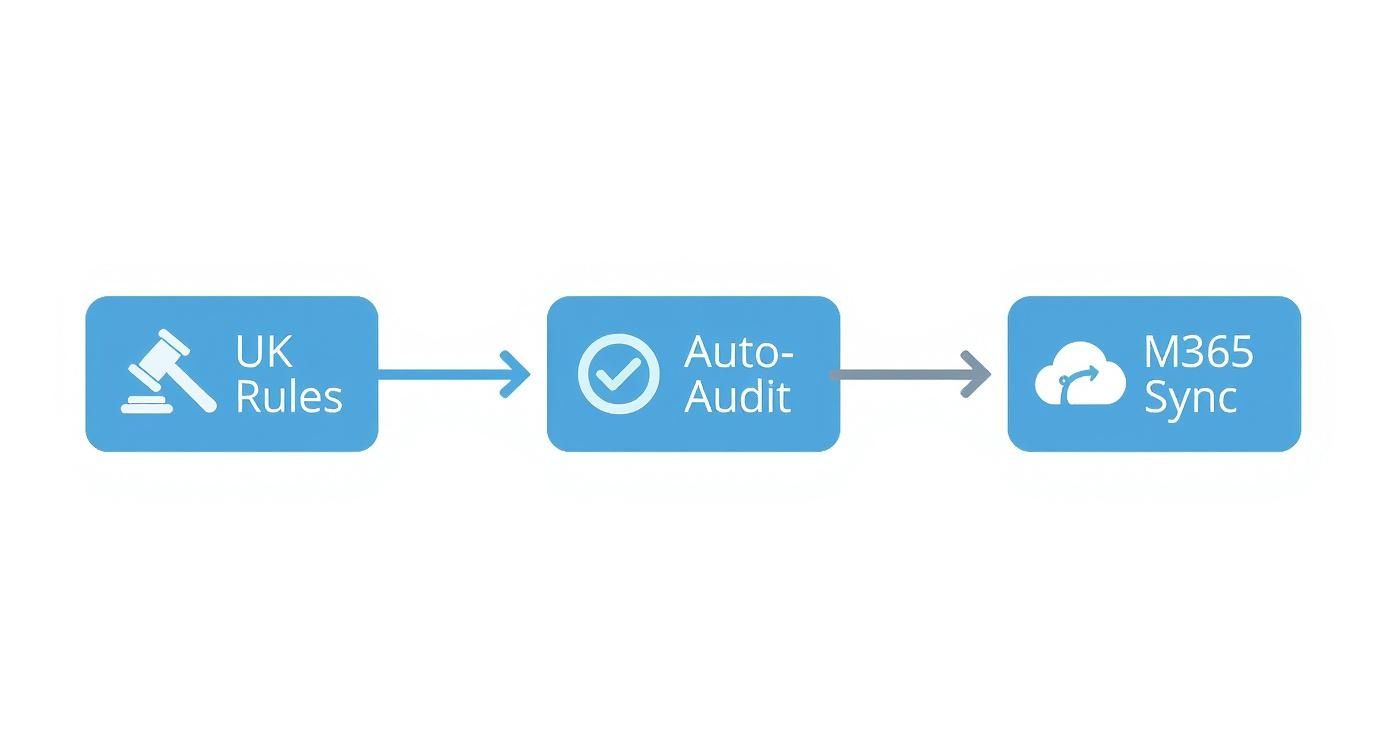
This visual highlights how a native solution connects compliance directly to your core systems, which cuts down on both risk and administrative legwork.
Use a Scoring Matrix for an Objective Choice
To keep things objective and avoid being swayed by a slick presentation, a scoring matrix is your best friend. It’s a simple but powerful tool for comparing your top contenders against the criteria you’ve already defined. This method ensures your final decision is backed by data, not just a gut feeling. Choosing the right platform is also a huge part of building a modern digital workplace, a topic we dive into in our guide to the best HR software in the UK.
Here's a simple template to get you started. Just adapt the criteria to match your own list of must-haves.
Software Evaluation Scorecard
Use this template to score potential software vendors against the criteria that matter most to your business.
| Evaluation Criteria | Vendor A Score (1-5) | Vendor B Score (1-5) | Vendor C Score (1-5) | Notes |
|---|---|---|---|---|
| Microsoft 365 Native Integration | Does it live inside Teams/Outlook? | |||
| Ease of Use (Employee) | How simple is clocking in/out? | |||
| Ease of Use (Manager) | How easy is rota planning/approvals? | |||
| UK Compliance Features | WTR, sick pay, holiday calculations. | |||
| Mobile & Remote Access | App quality, geo-fencing features. | |||
| Reporting & Analytics | Can we get the data we need easily? | |||
| Scalability | Will it grow with us? | |||
| Vendor Support & Training | What's included? What do reviews say? | |||
| Total Cost of Ownership (TCO) | Includes subscription, setup, training. | |||
| Total Score |
By the end, you'll have a clear, numerical comparison that makes the best choice obvious and justifiable to the rest of the business.
By systematically assessing your needs, vetting vendors, and scoring solutions against clear criteria, you turn a complex decision into a straightforward business process. This method ensures you invest in a tool that will deliver real value for years to come.
This structured approach removes the guesswork, giving you the confidence to choose the time and attendance software that’s genuinely right for you.
Ready to find a solution that ticks all your boxes? Phone 01522 508096 today or send us a message to discuss how we can help.
Understanding the True Cost and ROI

Any new software investment has to earn its keep. It’s easy to get fixated on the initial price tag, but the real story is in the long-term value it brings to your business. When you're looking for the best time and attendance software, you need to weigh up both the Total Cost of Ownership (TCO) and the potential Return on Investment (ROI). This isn't just about spending money; it's about making a strategic move that pays for itself, and then some.
The market for this kind of software tells you everything you need to know about its importance. Globally, it’s a $3.7 billion (£2.9 billion) industry in 2024 and is growing by about 12% a year. UK businesses are right at the heart of this, driven by the need to manage complex labour laws and the realities of hybrid working. This isn't just a niche tool anymore; it's becoming fundamental to how modern companies operate. You can get a sense of the bigger picture by exploring these global market trends in time and attendance software.
Breaking Down the Total Cost of Ownership
TCO is all about getting a realistic view of what you’ll actually spend over the life of the software. It’s much more than just the monthly subscription fee; it’s the complete financial picture.
Think of it in these parts:
- Subscription Fees: This is the obvious one, usually a per-user, per-month cost. In the UK, you can expect this to be anywhere from £4 to £12 per user, depending on how sophisticated the features are.
- Implementation and Setup Costs: This is the one-off investment to get things running. It covers the initial setup, moving data from your old systems, and tweaking the software to match your company's specific rules.
- Training and Onboarding: Don't forget the human element. You need to factor in the time and resources it takes to get your managers and employees up to speed and using the new system confidently.
- Ongoing Support: Most subscriptions include support, but it's worth checking the fine print. Is it basic support, or do you get premium help? Are there extra charges for more urgent assistance?
Calculating Your Return on Investment
If TCO is what you put in, ROI is what you get out. This is where a good time and attendance system really proves its worth, delivering tangible financial benefits that can quickly eclipse the initial costs. It’s not just about saving money – it's about unlocking new efficiencies.
The real ROI from time and attendance software comes from transforming a necessary administrative task into a source of valuable business intelligence. It stops financial leaks and provides data to optimise your most valuable asset your people.
So, where do the returns come from? It usually boils down to three key areas:
- Reduced Payroll Errors: Manual timesheets are a recipe for mistakes. A small, repeated error in calculations can snowball into thousands of pounds in overpayments over a year. Automation makes these inaccuracies a thing of the past, delivering direct savings.
- Increased Administrative Efficiency: Just think about the hours your HR and payroll teams burn chasing up timesheets, fixing errors, and manually keying in data. Automating all that frees them up to work on things that actually add value to the business.
- Enhanced Workforce Productivity: With real-time data on who’s working on what and for how long, managers can make smarter decisions. They can optimise schedules, cut down on unnecessary overtime, and make sure the right people are in the right place at the right time.
When you start to put numbers on these savings, you'll quickly see how the best time and attendance software goes from being a cost on a spreadsheet to a powerful tool for growth.
Ready to see how a modern system can deliver a strong ROI for your business? Phone 01522 508096 today or send us a message to discuss your specific needs.
Taking the Next Step in Your Workforce Management Journey
Hopefully, you now have a much clearer picture of what to look for in a time and attendance system for your UK business. Making the leap from evaluation to implementation is a huge step, but it’s one that leads to a far more efficient, compliant, and switched-on workforce. Remember, this isn't just about plugging in new software; it's an investment in a smarter way of working for everyone.
By now, a few key things should stand out. It's absolutely crucial to line up the software’s features with your actual business needs, whether that’s juggling complicated rotas or supporting a mix of office-based and remote staff. And, of course, keeping everything compliant with UK laws like the Working Time Regulations 1998 isn't just a nice-to-have—it’s essential for avoiding some serious financial and legal headaches down the road.
Why a Microsoft-Native Solution Makes All the Difference
If your organisation is already built around Microsoft 365, choosing a native solution is a bit of a no-brainer. A system that’s designed to live and breathe inside your existing setup provides a level of familiarity, security, and connectivity that a bolt-on, third-party tool just can't match.
Think about what that means in practice:
- Unified Security: All your sensitive employee and HR data stays exactly where it should be—within your own secure Microsoft tenant. No third-party servers, no extra risk.
- A Familiar Feel for Users: Staff simply use their existing Microsoft login. That means less friction, fewer forgotten passwords, and a lighter load for your IT team.
- Proper Integration: The software naturally talks to tools you use every day, like Teams and Outlook. Time tracking just becomes part of the daily flow, not another chore to remember.
This approach effectively creates a single, reliable source of truth for all your workforce data. It breaks down those frustrating data silos and gives you a much clearer view of what’s happening across the business.
Choosing a native solution turns your time and attendance system from just another tool into a core part of your digital workplace. It drives real efficiency and empowers your team from the get-go.
Our own solution, for instance, can be enhanced with things like biometric clocking-in terminals. If you're curious about how that works, you can learn more about our FaceClock for Dataverse technology and see how it boosts both accuracy and security.
The time to ditch the spreadsheets and disconnected systems is now. By making a well-informed choice, you’re not just buying a tool to save time and money; you’re gaining the insights you need to make smarter decisions and grow your business.
Here's a look at our contact page – we like to keep things simple.
The layout is designed to be straightforward, so you can easily find the best way to get in touch, whether you prefer to call, email, or fill out the form.
Ready to start your journey towards smoother, more efficient workforce management?
Give us a call on 01522 508096 today or send us a message at https://www.dynamicshub.co.uk/contact/ to chat about what you need.
Frequently Asked Questions
When you start digging into time and attendance software, a few common questions always seem to pop up. Let's tackle some of the things UK businesses like yours often ask, so you can move forward with confidence.
How Does This Software Actually Work for Flexible and Remote Teams?
This is a big one, especially now. The good news is that modern systems are built from the ground up for exactly this kind of flexibility. They offer a few different ways for people to log their time, so it doesn't matter if they're in the office, at home, or on the road.
Here's how they typically handle it:
- Mobile Apps: Perfect for staff who are out visiting clients or working from different sites. They can clock in and out right from their phone.
- Web Portals: For your home-based team, they can simply log in from their laptop or PC to record their hours. It’s quick and easy.
- Optional GPS Data: If you need to confirm someone is physically on-site for their role, this feature can capture their location when they clock in. It adds a layer of accountability where it's needed, without feeling like big brother.
This kind of adaptability means you get accurate records for everyone, no matter what their work setup looks like.
Can I Really Trust a Cloud System with My Company's Data?
Absolutely. It’s a valid concern, but security is the number one priority for any credible provider, particularly those operating within the Microsoft ecosystem. When you choose a solution that’s built natively for Microsoft 365, you're tapping into some of the best security on the planet.
Think of it this way: solutions built on the Microsoft Power Platform are protected by industry-leading security measures, including robust data encryption and full GDPR compliance. Your data is often far safer in that environment than on a server sitting in your office.
Crucially, all your sensitive employee information stays within your own secure Microsoft tenant. You own it, you control it, and you can rest easy.
How Long Does it Take to Get Everything Set Up?
This is often much faster than people imagine. For most small to medium-sized UK businesses, you can be up and running with a cloud-based system in a matter of days, maybe a couple of weeks at most.
The process itself is pretty straightforward:
- Configuration: First, we'll set the system up to mirror your company’s specific rules for working hours, overtime, and leave.
- Data Import: We’ll pull your existing employee data into the new platform.
- Brief Training: Your team and managers get a quick walkthrough to make sure everyone feels comfortable using the new tools.
Any decent provider will give you a clear, simple onboarding plan to make the whole switch feel seamless.
At DynamicsHub, we've built a time and attendance solution that lives inside Microsoft 365, giving UK businesses a secure, familiar, and incredibly easy-to-use system.
Ready to find the right fit for your team? Give us a call on 01522 508096 today, or send us a message to talk through what you need.
Phone 01522 508096 today or send us a message https://www.dynamicshub.co.uk/contact/


