

So, what exactly is the Microsoft Power Platform?
Think of it less as a single piece of software and more like a professional toolkit for your business. It's a collection of powerful, user-friendly tools that lets your team analyse data, build custom apps, and automate workflows, all without needing to be expert coders. It gives the people on the ground—from HR to finance—the power to create the specific solutions they need to make their jobs easier and more effective.
A Clear Guide to Power Platform
Imagine giving your team a box of digital LEGO bricks. With these bricks, they could build almost any business solution they can think of, from a simple holiday request form to a complex onboarding workflow. That's the best way to understand the Microsoft Power Platform. It’s not one programme but a family of interconnected services designed to solve genuine business challenges.
This approach means you don't have to rely on inflexible, off-the-shelf software or wait in a long queue for the IT department to build something for you. Your organisation can become much more responsive. The people who know your processes inside and out can build solutions that fit exactly how you work.
What Are the Core Components?
The platform is built on four main pillars. Each has its own job, but their real power comes from how they work together.
Here's a quick look at the core components and what they do for a business.
Microsoft Power Platform Core Components at a Glance
| Component | Primary Function | Example Business Use |
|---|---|---|
| Power BI | Business analytics & data visualisation | Creating an interactive dashboard to track employee turnover rates by department and region. |
| Power Apps | Low-code custom app development | Building a mobile app for employees to submit expenses with receipt photos from their phones. |
| Power Automate | Process automation & workflows | Setting up an automated workflow that sends a welcome email and schedules induction meetings for new starters. |
| Power Virtual Agents | Intelligent chatbot creation | Developing a 24/7 HR chatbot on your intranet to answer common questions about leave policies. |
These tools all share a common foundation.
At the heart of it all is Dataverse, a secure, smart data service that acts as the central brain. It ensures all your information is consistent and accessible across every app and automation you build. This integrated design is what allows you to connect everything from your HR systems to your sales data into one seamless ecosystem.
At DynamicsHub.co.uk, we provide Transformative HR solutions customised to the unique way you work. Our Human Resource HR Management for Microsoft Dynamics 365 solution, developed by Hubdrive, is the leading hire-to-retire system for the Microsoft Platform, and it uses these powerful tools to their absolute fullest.
Ready to see how this could reshape your HR processes? Phone 01522 508096 today or send us a message to discuss your needs.
Exploring the Four Pillars of the Platform
To really get what the Power Platform can do for your UK business, you need to look at its four core tools. Each one solves a specific type of problem, but their real power is unlocked when they work together, creating a unified system that’s built around your unique processes.
Think of them as a specialist team you’ve hired. You have an app builder, a process expert, a data analyst, and a customer service agent. With this crew, you can tackle almost any operational challenge that comes your way.
Power Apps: The Custom App Builder
At the heart of the platform is Power Apps. It lets your team build custom mobile and web applications with little to no coding knowledge. Instead of wrestling with complex code, users design apps with a simple drag-and-drop interface, much like putting together a PowerPoint presentation. This is brilliant because it puts the power to create solutions directly into the hands of the people who actually understand the business problem.
For instance, your HR department could quickly build an app for employees to request annual leave from their phones. This app could then link to a shared calendar and automatically send the request to the right line manager for approval. No more endless email chains or clunky spreadsheets.
Power Automate: The Process Expert
Next up is Power Automate, the digital glue that connects all your different apps and services. It’s all about creating automated workflows (called 'flows') that take care of those repetitive, manual tasks, freeing up your team to focus on work that actually adds value. If you find yourself doing the same sequence of clicks and actions every day, chances are Power Automate can do it for you.
A classic HR example is automating the new starter onboarding process. When a new employee record is created, Power Automate could kick off a whole series of actions:
- Send a welcome email to the new hire.
- Log a ticket for IT to set up their laptop and accounts.
- Schedule introductory meetings with key team members in their calendar.
- Add them to the right channels in Microsoft Teams.
This makes the onboarding experience smooth and consistent every single time, without anyone having to lift a finger.
Power BI: The Data Analyst
Power BI (Business Intelligence) is the data visualisation part of the family. It’s designed to pull in raw data from all sorts of places—spreadsheets, databases, cloud services—and turn it into clear, interactive dashboards that are easy to understand. Instead of staring at endless rows of numbers, you get a visual story of what’s really going on in your business.
For a mid-market UK business, this could be a live dashboard tracking sales performance against targets, broken down by region. In HR, you could use it to visualise employee retention rates, spot trends in staff turnover, or monitor diversity and inclusion metrics from a single screen.
The image below gives a great overview of how these tools come together to solve common business problems.
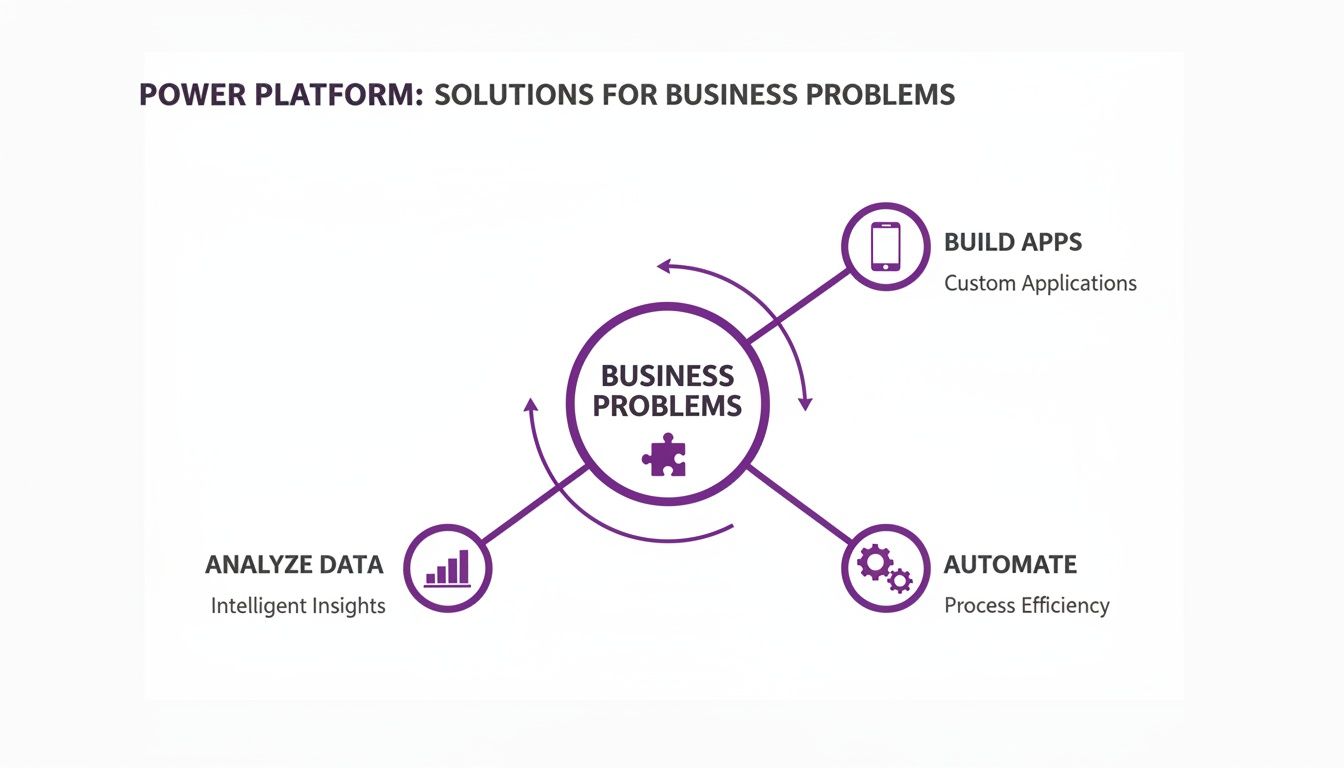
It shows how you can start with a business challenge and use the platform to build an app, automate a process, or analyse data to find the right solution.
Power Virtual Agents: The Conversational Assistant
Last but not least, Power Virtual Agents lets you build intelligent chatbots without needing a team of data scientists or developers. These bots can handle common questions from customers or employees, giving instant answers and freeing up your people to deal with more complex issues. Exploring what's possible with virtual agents shows just how much they can do for a business.
Imagine an HR bot sitting on your company intranet. It could instantly answer frequently asked questions like, "How much holiday do I have left?" or "Where can I find the expenses policy?". This gives your staff 24/7 support and slashes the admin burden on your HR team.
It's also worth knowing that underneath all four pillars is Dataverse, a secure and scalable data service. Think of it as the central, shared brain, ensuring all your apps and automations are working from the same single source of truth.
How Power Platform Enhances Dynamics 365
While each part of the Power Platform is powerful on its own, its true potential is realised when it connects with Microsoft Dynamics 365. This isn’t just a bolt-on feature; the Power Platform is the very fabric that allows you to stretch, mould, and build upon your core business system. It elevates Dynamics 365 from a fantastic off-the-shelf product into a solution that truly reflects how your business operates.
Think of Dynamics 365 as the solid chassis and engine of a car. The Power Platform is your personal customisation workshop. You can build a bespoke navigation system for your specific delivery routes (Power Apps), install a super-smooth automatic gearbox to handle repetitive tasks (Power Automate), and fit a crystal-clear diagnostics dashboard to monitor performance (Power BI). You’re no longer stuck with the factory model; you can build the exact vehicle your business needs to win.
Breaking Free from Software Limitations
This close relationship helps UK businesses move past a common headache: being forced to work around their software's limitations. Instead of twisting your processes to fit the technology, you can shape the technology to support how your teams actually get things done. That's where you find genuine, lasting efficiency.
For instance, a field engineer could use a custom Power App on their tablet to log job details, take photos, and capture a customer's signature. As soon as they hit 'submit', that data feeds directly into the customer’s record in Dynamics 365. This instantly kicks off a Power Automate flow that creates and sends an invoice. The whole manual, error-prone process of data entry is gone, dramatically shortening the service-to-cash cycle. To understand more about this central system, take a look at our guide on what is Microsoft Dynamics 365.
This ability to create custom, integrated solutions is driving significant returns for UK organisations. It empowers teams to solve their own problems without lengthy IT projects, leading to faster innovation and better user adoption.
Realising Tangible Business Value
The results speak for themselves. In the UK, Microsoft Power Platform is unlocking major productivity gains for mid-market organisations. A great example is UK Power Networks, which reported a staggering 480% ROI after rolling out solutions built on the Power Platform. Even more impressive was the 96% adoption rate across all their deployed licences.
These aren't just enterprise-level stats. They show how accessible low-code tools are for rapid customisation, making them a perfect fit for the 50-4,000 employee businesses we work with at DynamicsHub. You can read more about these impressive figures in this report on UK Power Networks' success. This kind of return is entirely achievable because the platform helps you get the absolute most out of the investment you’ve already made in the Microsoft ecosystem.
Driving Real-World HR Transformation
Alright, let's move away from the theory and talk about what this actually looks like in practice. This is where the Power Platform really comes alive, especially when you pair it with a dedicated solution like the Hubdrive HR Management system for Dynamics 365. When you bring them together, you have a complete toolkit to genuinely improve the entire employee lifecycle, from the day someone is hired to the day they retire.
For UK businesses, this combination is about much more than just speeding things up. It’s about automating the soul-destroying administrative tasks and unlocking the critical insights buried in your data. It turns your HR department from a reactive cost centre into a strategic partner that drives the business forward. You’re essentially building an intelligent, connected system that properly supports your people at every stage.

From Manual Paperwork to Automated Workflows
Picture a new employee’s first day. Instead of being handed a huge stack of forms, they open a simple onboarding Power App on their phone. The app walks them through everything they need to do – ticking off checklists, acknowledging policies, and filling in their details. As they complete each step, their record in Dynamics 365 is updated automatically.
But the magic is also happening behind the scenes. A Power Automate flow kicked off the moment the contract was signed. It has already scheduled induction meetings in Teams, sent a request to IT for a laptop, and enrolled the new starter in their mandatory training. This not only gives the new person a brilliant first impression but also saves the HR team hours of chasing and coordinating.
The goal here is simple: let your HR professionals focus on people, not paperwork. When you automate the routine stuff, you slash the risk of human error and free up your team to think strategically about your workforce.
This shift from being buried in admin to proactively shaping the business is fundamental. You can dive deeper into how this is achieved in our guide to Dynamics 365 for HR.
Unlocking Strategic Insights with Data
The benefits don't stop at automation. With Power BI, your HR director can have a live, interactive dashboard showing the most important metrics at a glance.
- Employee Turnover: See exactly where people are leaving – is it a specific department? A certain manager? This helps you spot problems before they become crises.
- Time-to-Hire: Track how long it takes to fill a role, from posting the ad to getting an acceptance, so you can see where the bottlenecks are.
- Diversity & Inclusion: Monitor your D&I metrics in real-time to make sure you’re building the fair and balanced workforce you want.
This data-first approach gets even more powerful when you add AI. Hubdrive’s solution, for example, has features like AI-powered CV parsing that can automatically screen and score applicants, and it can publish job ads to multiple platforms with a single click.
The potential here is huge. Just look at the UK Government's trial of Microsoft 365 Copilot, which is deeply connected to the Power Platform. After the trial, over 80% of users refused to go back to working without it, thanks to the massive productivity gains they saw. This real-world test proves just how much time HR teams can save every single week. Discover more insights from the Microsoft Copilot study.
At DynamicsHub.co.uk, we provide Transformative HR solutions customised to the unique way you work. Human Resource HR Management for Microsoft Dynamics 365 by Hubdrive is the leading hire-to-retire solution built entirely on the Microsoft Platform.
Ready to see how it could work for you? Phone 01522 508096 today or send us a message.
Navigating Security Compliance and UK Licensing
For any UK organisation, and especially for HR teams handling sensitive information, data security isn't just a tick-box exercise. It's the bedrock of everything you do. When people ask about Power Platform security, it’s important to understand that it’s not an add-on; it’s built right into the core of Microsoft’s enterprise-grade, multi-layered security model. The entire architecture is designed from the ground up to protect your most valuable employee and business data.

The security starts with Dataverse, which you can think of as a secure vault for your data. Critically, all your information lives within your organisation's own Microsoft 365 tenant, not on some unfamiliar third-party server. This is a massive plus for meeting UK GDPR obligations because it gives you absolute control over where your data is stored and who can get their hands on it.
On top of that, the seamless link with Microsoft Entra ID (what used to be called Azure Active Directory) lets you get incredibly granular with user permissions. You can set up role-based access controls to ensure an employee in finance only sees the data relevant to their job, while an HR manager can access confidential personnel files. A solid grasp of compliance management is absolutely vital to navigate these regulatory hoops and build a truly robust security posture for your Power Platform solutions.
Demystifying UK Licensing Costs
Of course, understanding the investment is just as crucial as understanding the security. Microsoft has a flexible licensing model so you only pay for what you actually use, with all pricing available in GBP (£).
There are generally three ways to approach it:
- Per-User Plan: This is the way to go for individuals who are building and using multiple apps and flows. For instance, a Power Apps per-user plan sits at around £15.10 per user/month.
- Per-App Plan: A much more cost-effective choice if you just want to run one specific application across your team. This usually comes in at about £3.80 per user/app/month, letting you give broad access to a single solution.
- Pay-As-You-Go: This model really shines for apps with sporadic or unpredictable usage patterns, as you only pay based on the number of monthly active users.
Choosing the right plan is key to maximising your return on investment. At DynamicsHub, we guide UK businesses through these options to create a cost-effective strategy that aligns with their specific operational needs and user base.
It's also worth noting Microsoft's massive £2.5 billion investment in UK AI infrastructure. This is giving a real boost to Power Platform adoption for companies already embedded in the Microsoft 365 ecosystem. This spending on cloud expansion means better performance for Power Apps and Dataverse, which is essential for HR solutions like automated onboarding. This lines up with what we're seeing nationally, where 96% of UK businesses have adopted cloud services and 94% of public cloud users report improved regulatory compliance—a huge factor for things like GDPR and Right to Work checks. You can read more about Microsoft's UK AI investment.
At DynamicsHub.co.uk, we provide Transformative HR solutions customised to the unique way you work. Human Resource HR Management for Microsoft Dynamics 365 by Hubdrive is the leading hire-to-retire solution for the Microsoft Platform.
To discuss your specific security and licensing needs, phone 01522 508096 today or send us a message.
So, What's Your Next Move?
We’ve walked through what the Power Platform is and how it’s helping UK businesses like yours build smarter, more connected solutions—especially within HR. You’ve seen the potential of its different parts working in harmony to solve genuine, everyday challenges. Now, it's about turning that potential into a reality for your own organisation.
That’s where we come in.
At DynamicsHub.co.uk, we provide Transformative HR solutions customised to the unique way you work. Human Resource HR Management for Microsoft Dynamics 365 by Hubdrive is the leading hire-to-retire solution for the Microsoft Platform. It’s all about using these powerful tools to their absolute fullest.
As your dedicated UK partner, we’re here to guide you through every step—from initial setup and customisation to providing continuous, people-first support long after you go live. Our job is to help you move from theory to tangible results, making sure the technology fits your processes, not the other way around.
Ready to see what the Power Platform can really do for your HR department? We can help you build a system that finally gets rid of those administrative headaches and frees your team to focus on what truly matters: your people.
Phone 01522 508096 today, or if you prefer, send us a message to start the conversation.
Your Power Platform Questions Answered
When UK business leaders, HR directors, and IT managers first start looking into the Power Platform, a few common questions always come up. Let's tackle them head-on.
Do I Need to Be a Professional Coder to Use This?
Not at all. This is probably the biggest misconception about the Power Platform. Its real magic lies in its low-code, no-code approach, which is designed for what we call 'citizen developers'.
These are the people in your business—like HR managers or team leaders—who understand your processes inside and out but have zero coding background. They can use simple drag-and-drop tools to build apps and automate workflows, while professional developers can still step in to handle more complex customisations if needed.
How Does the Licensing Work for UK Businesses?
Microsoft keeps the licensing pretty flexible, with all the pricing available in GBP (£) to keep things simple. You've got a few main options to choose from.
There’s a per-user licence, which works well when you have specific people who need to build or use lots of different apps and workflows. Alternatively, the per-app plan is often more cost-effective when you have a large number of people who only need to use one or two specific solutions. There are even pay-as-you-go models for when your usage is a bit unpredictable.
At DynamicsHub, we can help you work through these options to find the most economical licensing strategy for your exact needs. The goal is to make sure you're only paying for what you actually use.
Is Our Company Data Safe on the Power Platform?
Yes, absolutely. Security is baked into the very core of the platform. Your data is kept secure within your own Microsoft 365 tenant and is defended by Microsoft’s world-class security.
You maintain full control over who sees what. Using tools like Dataverse and Microsoft Entra ID, you can set incredibly specific, granular permissions. This is crucial for keeping sensitive HR information private and for complying with UK data protection laws like GDPR.
At DynamicsHub.co.uk, we provide Transformative HR solutions customised to the unique way you work. Human Resource HR Management for Microsoft Dynamics 365 by Hubdrive is the leading hire-to-retire solution for the Microsoft Platform.
Ready to see what's possible for your organisation? Phone 01522 508096 today, or send us a message to get started.


