Think of a template employee handbook template as your starting block. It’s a pre-built guide that lays out all the essential policies, procedures, and expectations for your team. You take this framework and shape it to fit your company, ensuring you’re UK compliant while clearly communicating your unique culture from day one.
Build Your HR Foundation with a Solid Template

Starting an employee handbook from scratch is a huge undertaking. Let’s be honest, staring at a blank page is intimidating for anyone. The real magic of a good template isn’t just about filling in the blanks; it’s a strategic move that helps you build a fair, compliant, and organised workplace much faster. For any mid-market UK business looking to scale, getting this right is non-negotiable.
A well-thought-out template gives you a solid structure, making sure you don’t miss any critical policies required by UK law. It forces you to consider the essential areas that protect both your business and your people. Getting this clear and consistent from the outset is the best way to minimise confusion and head off potential disputes before they even start.
Why Bother with a Handbook Template?
Using a template brings some serious advantages that go way beyond just saving a bit of time. It frees you up to focus on the important part: tailoring the content to reflect your company’s actual culture, rather than getting bogged down building the entire structure from the ground up.
The main wins here are:
- Faster UK Compliance: Most good templates are built with the legal basics in mind. This gives you a massive head start on including mandatory policies like Right to Work checks and GDPR.
- A Consistent Approach: It ensures everyone is on the same page. All the fundamental policies are there and applied uniformly across the business, which is vital for fairness and reducing legal headaches.
- Clarity from Day One: A solid handbook gives new starters instant clarity. They’ll know what’s expected, what the benefits are, and what the company stands for, setting them up to succeed from the get-go.
It’s a similar logic to how you might use a Standard Operating Procedure Template to create consistency in your operations. Both are about building a reliable framework so your business can run smoothly.
An effective employee handbook is more than just a list of rules. It is the first tangible expression of your company’s culture and its commitment to creating a supportive and transparent environment for every team member.
Making It Your Own
A template gives you the skeleton, but you need to add the muscle. The real work is in tailoring the language to match your company’s voice and adding policies that reflect how you actually operate. As your company grows, understanding the wider context of human resources for small business becomes essential for shaping policies that are both compliant and genuinely practical.
At the end of the day, a quality template takes the guesswork out of it. It gives you the confidence and the structure you need to build a robust HR foundation, creating a workplace that isn’t just compliant, but a genuinely great place to be.
Getting Your Essential UK Compliance Policies Right

Let’s be honest, navigating UK employment law can feel like a minefield. Your employee handbook is far more than just a welcome document; it’s your first line of defence and a powerful statement about your commitment to doing things by the book. It’s where you translate complex legislation into clear, practical guidance for your entire team.
For growing mid-market businesses, this isn’t just a box-ticking exercise. Getting these core policies wrong can lead to serious financial penalties and lasting damage to your reputation. A good template gives you the skeleton, but the real work is in fleshing it out to reflect how your business actually operates.
The Two Big Ones: Right to Work and Data Protection
There are a couple of areas where you absolutely cannot afford to slip up: verifying an employee’s right to work and handling their personal data. These aren’t just best practices; they are strict legal duties with severe consequences if you get them wrong.
Your Right to Work policy needs to be crystal clear and applied to everyone, without exception. It should lay out the step-by-step process you follow for checking and copying documents before someone’s first day. This is an ongoing responsibility, requiring you to know which documents are valid, how to spot potential fakes, and when you need to re-check for employees on time-limited visas. For an in-depth look at the latest government guidance, make sure you understand the rules for compliant Right to Work checks in the UK.
In the same vein, your GDPR and Data Protection policy must be completely transparent about how you manage employee information. You need to spell out:
- Exactly what personal data you collect and the legitimate reason for doing so.
- How and where you store this information securely.
- Who in the business has access to it, and why.
- Your data retention schedule for when an employee leaves.
Being upfront about this not only ensures you meet your legal obligations as a data controller but also builds crucial trust with your staff.
To help you get started, here’s a quick checklist distinguishing between what the law demands and what’s considered good practice.
Mandatory vs Recommended UK Policy Checklist
| Policy Area | Legal Requirement Status | Key Considerations for Mid-Market Businesses |
|---|---|---|
| Disciplinary & Grievance | Mandatory | Must be in writing and follow the Acas Code of Practice to avoid tribunal claims. |
| Health & Safety | Mandatory (for 5+ employees) | Needs to be a written policy covering risk assessments, responsibilities, and procedures. |
| Right to Work Checks | Mandatory | A consistent process is vital to avoid discrimination claims and fines from the Home Office. |
| Data Protection (GDPR) | Mandatory | Must detail how you process, store, and protect employee personal data. |
| Equal Opportunities | Mandatory | A written policy is essential to demonstrate your commitment to preventing discrimination. |
| Statutory Leave | Mandatory | Must cover maternity, paternity, adoption, shared parental leave, and flexible working requests. |
| Mental Health & Wellbeing | Recommended | Demonstrates a commitment to employee welfare and can improve productivity and retention. |
| IT & Communications | Recommended | Sets clear boundaries on the acceptable use of company systems, email, and social media. |
| Hybrid/Remote Working | Recommended | Crucial for clarity on expectations, equipment provision, and security for off-site work. |
This table shows that while the law sets a clear minimum standard, a truly effective handbook goes further to address the realities of the modern workplace.
Procedures for Disciplinary Action and Grievances
By law, every UK employer must have written disciplinary and grievance procedures. These policies are the bedrock of fair treatment and give everyone a clear roadmap for what happens when issues arise. A process that feels vague or is applied inconsistently is a fast track to an employment tribunal.
Your disciplinary procedure needs to clearly define what you consider misconduct versus gross misconduct. More importantly, it must detail the formal steps you will take, from an initial chat to a full investigation and hearing, all while following the Acas Code of Practice.
The grievance procedure is the other side of that coin, giving employees a formal route to raise concerns. It should explain how to start the process, who to approach, and what they can expect in terms of a timeline. Having a robust process shows you listen and are serious about resolving problems internally first.
A well-defined disciplinary and grievance process isn’t about looking for reasons to punish people. It’s about providing a fair, transparent, and consistent structure that protects both the employee and the business when things go wrong.
Health, Safety, and Wellbeing Obligations
If you have five or more employees, you are legally required to have a written health and safety policy. This is non-negotiable. The policy should state your commitment to a safe working environment and clearly outline who is responsible for what—from the managing director down to the newest starter.
At a minimum, your policy should cover:
- How you handle risk assessments and hazard reporting.
- Protocols for emergencies, including fire safety and first aid contacts.
- Rules on providing and using personal protective equipment (PPE).
- Guidance for Display Screen Equipment (DSE) for everyone, whether they’re in the office or at home.
Beyond the legal minimums, many forward-thinking handbooks now include dedicated policies on mental health and wellbeing, showing a holistic and modern approach to employee welfare.
Equal Opportunities and Family-Friendly Policies
Promoting equality and preventing discrimination is another legal cornerstone for UK businesses. Your Equal Opportunities policy is your public commitment to fair treatment for all, explicitly covering protected characteristics such as age, disability, race, religion, gender, and sexual orientation. This can’t be a document that just gathers dust; it has to be evident in your hiring, training, and promotion decisions.
Family-friendly policies are just as important. You are legally required to have policies that explain the statutory rights for:
- Maternity, Paternity, Adoption, and Shared Parental Leave.
- The right for an employee to request flexible working.
- Emergency time off for dependants.
Clarity on these entitlements helps your team plan their lives and ensures your managers handle requests fairly and consistently every time.
Putting these policies down on paper is the crucial first step. The real challenge—and where we can help—is making sure they are understood, easily accessible, and applied consistently across your entire organisation.
Making Your Handbook Live: SharePoint and Teams
So, you’ve put in the hard work and crafted the core policies for your employee handbook. Great. But now comes the real test: making sure it actually gets used. A handbook that’s just an old email attachment is a liability, not an asset. It creates confusion, breeds inconsistency, and ultimately, puts the business at risk.
For your handbook to be worth the paper it’s written on (or the pixels it occupies), it needs a single, trusted home. Everyone in the company should know exactly where to find the one, true version.
This is where the tools you’re probably already paying for and using every day come into their own. By bringing your handbook into Microsoft SharePoint and Teams, you can transform it from a static, forgotten file into a living, breathing resource that genuinely supports your people and protects the business. It’s all about getting the right information into the right hands, every single time.
Creating Your Central Hub in SharePoint
First things first, we need to give the handbook a proper home, and a SharePoint document library is the perfect spot. Don’t just think of it as another folder on the server. Think of it as a controlled environment for one of your most critical HR documents. Taking this step immediately solves the age-old problem of multiple, conflicting versions of the handbook causing chaos.
Getting this set up is pretty straightforward, but a little planning goes a long way:
- A Dedicated Home: You could spin up a new SharePoint site just for HR, or simply create a new, clearly-named document library within your main company intranet. The important thing is that its purpose is obvious – this is the official place for the employee handbook.
- Smart Naming: Get into the habit of a consistent file name, something like
CompanyName-Employee-Handbook-v1.0.docx. This kind of simple discipline makes life so much easier when you’re trying to find or reference it. - Switch on Version History: This one is non-negotiable. SharePoint’s version history is a brilliant feature that automatically saves a copy every time a change is made and saved. You get a complete audit trail showing who changed what and when. If someone makes a mistake, you can roll back to a previous version in a couple of clicks.
With this foundation in place, you’ve established one master document. You can now see its entire lifecycle, which is absolutely vital for compliance and good governance.
Who Can Do What? Getting Permissions Right
Let’s be clear: not everyone should be able to edit the master employee handbook. Getting the permissions right is crucial for protecting the integrity of your policies, while still making sure everyone can read them. SharePoint is great for this, allowing you to get really specific about who can do what.
For a typical mid-market business, a permissions structure like this works really well:
| Group | Permission Level | Why It Works |
|---|---|---|
| HR Team / Document Owners | Full Control | This is your small, trusted group. They need to be able to edit, approve, and publish new versions. |
| Senior Leadership / Reviewers | Contribute | This lets directors and managers add comments or suggest edits during a review, but stops them from publishing the final document themselves. |
| All Staff | Read Only | The entire company can view the latest approved version, but they can’t change a thing. This prevents any accidental edits or unauthorised changes. |
Setting up your permissions this way creates a natural, controlled workflow. The HR team owns and manages the document, leadership can give their input, and every other employee has reliable, view-only access. It’s the perfect balance of control and accessibility.
Your employee handbook is a controlled document. You need to treat it with the same discipline as any other critical business asset. Proper versioning and access controls aren’t just IT nice-to-haves; they are fundamental for staying compliant and ensuring clarity across the business.
Getting the Word Out with Microsoft Teams
Now that your handbook is securely managed in SharePoint, Microsoft Teams is the perfect way to share it and communicate any changes. Let’s face it, Teams is where your people are working all day long. Bringing the handbook to them, right inside the app, makes it impossible to miss.
The goal here is simple: eliminate the excuse, “I didn’t know where to find it.”
A couple of quick wins in Teams can make all the difference. Start by pinning the handbook as a tab in a relevant channel. The company-wide “General” channel is a great option, or perhaps a dedicated “HR Announcements” channel. When anyone clicks that tab, the latest version of the handbook opens right there inside Teams—no hunting, no downloading, no confusion.
Then, use Teams to announce updates. When you publish a significant change—a new policy on flexible working, for example—don’t just send an email that will get buried. Post a clear announcement in your main Teams channel. You can use the @general tag to make sure everyone sees it, briefly explain what’s changed, and include a direct link to the updated document. This creates a public, searchable log that you can always refer back to.
This approach brings some huge advantages:
- Massive Visibility: Sticking the handbook in a Teams tab keeps it front and centre.
- Instant Updates: Announcements mean people are actively told when something important changes.
- Zero Friction: Opening the handbook directly in Teams makes it effortless for staff to check a policy.
By marrying the powerful document control of SharePoint with the communication reach of Teams, you build a truly seamless system. You have one official template employee handbook, you know it’s always the latest version, and everyone knows exactly where to find it. You’ve created a secure, efficient, and easy-to-use single source of truth for your company policies.
Automate Onboarding with Dynamics 365 and Power Platform
Having your employee handbook living centrally in SharePoint and Teams is a fantastic start. But why stop there? It’s time to evolve that handbook from a simple reference document into a dynamic part of your business operations. Let’s get rid of the endless chasing for signed forms and the headache of manually updating a dozen different systems.
By hooking your handbook into your core HR processes with Dynamics 365 and the Microsoft Power Platform, you can automate those crucial first steps of the onboarding journey. This isn’t just about saving your HR team a mountain of paperwork; it’s about creating a perfect, auditable trail of policy acceptance for every single employee.
The diagram below shows the basic journey from creating the handbook to getting it in front of your team—this is the foundation we’ll build our automation on.
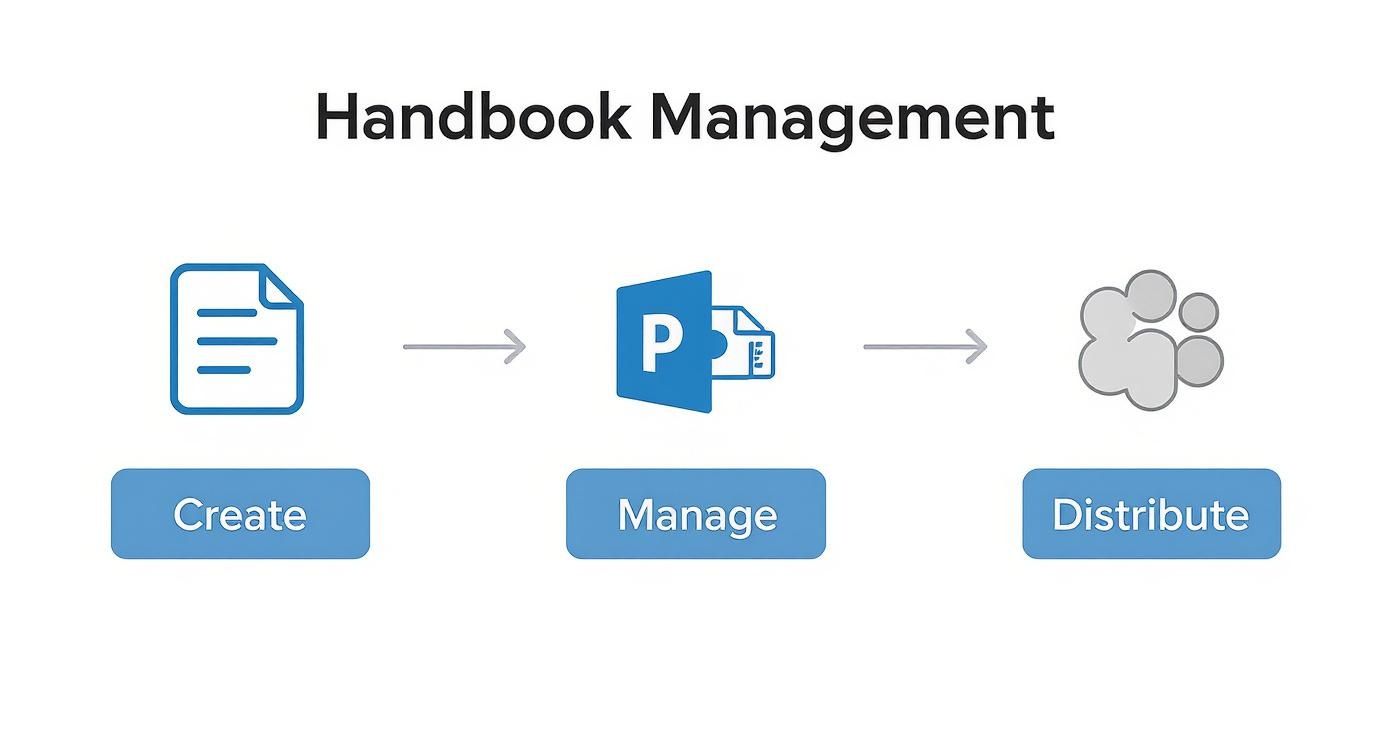
This workflow lays out the progression: document creation, secure management in SharePoint, and distribution via Teams. Once this is in place, the real magic can begin.
A Real-World Automation Scenario
Picture this: it’s Sarah’s first day. Instead of being handed a heavy binder or getting another PDF lost in her inbox, she opens a simple, branded app on her phone. This Power App pulls the latest version of your employee handbook directly from SharePoint.
She reads through the policies, ticks a box to say she’s read and understood everything, and hits “Submit”.
That single click kicks off a whole cascade of actions in the background. And the best part? No one in HR had to do a thing. That’s the power of connecting your systems.
The Technology Behind the Scenes
This kind of slick automation is possible because of how tightly Microsoft’s business applications work together. Here are the key players making it happen:
- Power Apps: This is what we use to build that clean, user-friendly interface for Sarah. It’s surprisingly quick to create, even with minimal coding experience.
- Power Automate: Think of this as the engine driving the whole process. It connects different apps and services using automated workflows, which Microsoft calls “flows”.
- Dataverse: This is the secure, scalable data hub sitting behind Dynamics 365 and the Power Platform. Sarah’s employee record lives here, making it the single source of truth for all your HR data.
- Dynamics 365 HR: Your main HR management system, where you manage everything from personal details to performance reviews. You can dive deeper into what a dedicated system offers in our guide to https://www.dynamicshub.co.uk/2025/11/04/dynamics-365-for-hr/.
So when Sarah clicks “Submit,” she’s actually triggering a Power Automate flow.
This isn’t about replacing the human side of HR. It’s about freeing your team from the repetitive, low-value admin so they can focus on what really matters—creating a brilliant onboarding experience and supporting your people.
Mapping the Automated Workflow
The flow that Sarah’s submission kicks off could automatically perform a series of steps like these:
- Update the HR Record: The flow immediately talks to Dataverse and updates Sarah’s employee file. A field like “Handbook Acknowledged” flips from “No” to “Yes,” and it logs the exact date and time. Just like that, you have a permanent, tamper-proof compliance record.
- Assign Mandatory Training: Next, the flow could check for any training linked to the policies. For instance, it could automatically enrol Sarah in the “Health & Safety Essentials” and “Data Protection Basics” courses in your learning platform.
- Notify Key Stakeholders: An automated message pings Sarah’s line manager in Teams, letting them know she’s completed this key onboarding task. At the same time, another notification could go to IT to provision access to more systems.
This entire sequence, from acknowledgement to system updates and notifications, happens in seconds. It guarantees every new starter follows the exact same compliant process, every single time. No exceptions.
Why This Is a Game-Changer
For a growing mid-market business, moving your handbook acknowledgement into an automated workflow delivers some serious advantages.
| Benefit | Traditional PDF Method | Automated Power Platform Method |
|---|---|---|
| Record Keeping | Manual spreadsheet tracking; prone to human error and a nightmare to audit. | Automatic, timestamped record created in Dataverse; instantly auditable. |
| Consistency | Relies on busy managers remembering to chase new starters. | The process is identical for every employee, ensuring 100% consistency. |
| Efficiency | Huge amount of admin time spent sending, tracking, and filing forms. | Zero administrative overhead once the flow is built. |
| Onboarding Speed | Delays in getting sign-offs can hold up system access or training. | Triggers the next steps immediately, keeping the momentum going. |
By building this simple Power App and flow, you’ve done far more than just digitise a form. You’ve woven a core compliance task directly into your business operations, cutting down on admin headaches and strengthening your governance from day one. To take this even further, you could explore how AI for Employee Onboarding can introduce even more sophisticated techniques.
This approach shows how a humble template employee handbook, when powered by the right tools, becomes an active and intelligent part of your entire employee lifecycle.
Keeping Your Handbook Relevant and Compliant
Think of your employee handbook as a living document, not a dusty file you create once and then forget about. The world of employment law moves fast, and treating your handbook as a ‘set it and forget it’ project is a recipe for trouble. The second it becomes outdated, it’s not just useless—it can become a serious liability.
This is about more than just ticking legal boxes. It’s about creating a workplace built on clarity and trust. Imagine the confusion an old, irrelevant policy on remote working or statutory pay could cause. A proactive, structured review process ensures your handbook grows with your business and stays on the right side of the law.
Finding Your Review Rhythm
So, how often should you be looking at this? I always advise clients to schedule a full, top-to-bottom review of the entire handbook at least once a year. This dedicated annual check-in is your chance to scrutinise every policy against the latest UK legislation and your current business reality.
However, some things just can’t wait for the annual review. Certain events should trigger an immediate update.
You’ll want to get straight to work when you see:
- New Laws: Big legislative shifts, like changes to flexible working requests or new family leave rules, demand immediate attention.
- Major Business Changes: If you’re going through a restructure, an acquisition, or making a permanent move to a hybrid model, your policies will need to reflect that.
- Landmark Court Cases: A significant employment tribunal ruling can completely change how existing laws are interpreted, meaning your policies might need a tweak to stay compliant.
A living handbook is a compliant handbook. The trick is to establish a rhythm of regular, scheduled reviews, punctuated by rapid, targeted updates whenever something critical changes. This two-pronged approach is what keeps your policies consistently relevant and effective.
Who Needs to Be in the Room?
Getting this right isn’t a one-person job. While HR often leads the charge, creating a truly robust review process means bringing a few other key people into the loop. A collaborative approach is the only way to ensure your policies are not just legally sound but also practical for the people who have to live with them day-to-day.
Your A-team for a handbook review should include:
- HR Professionals: They’ll steer the ship, ensuring everything aligns with best practices and your company culture.
- Legal Counsel: Their sign-off is non-negotiable for guaranteeing compliance with the latest UK employment law.
- Senior Leadership: You need their high-level view to make sure your policies are pulling in the same direction as your overall business goals.
- Department Heads: These are your people on the ground. Their input is invaluable for understanding how a policy will actually play out in a real-world team setting.
Once you’ve gathered all the feedback, document every single change with care. The final, critical piece of the puzzle is communicating these updates clearly across the entire organisation. Using a tool like SharePoint for version control and making announcements via Microsoft Teams is a great way to ensure everyone knows what’s changed and can always find the latest version. This is how your handbook remains the single source of truth it’s meant to be.
Your Employee Handbook Questions Answered
When it comes to putting together an employee handbook, a lot of the same questions tend to crop up. Let’s walk through some of the most common queries we hear from UK businesses, giving you clear, practical answers to help you get it right.
Is an Employee Handbook a Legal Contract?
This is probably the number one question, and it’s a bit of a “yes and no” answer. On its own, the handbook isn’t an employment contract. In fact, most handbooks will have a clause saying exactly that.
However—and this is the crucial part—specific policies within the handbook can become contractually binding. This happens if you directly reference them in an employee’s contract. For instance, if a contract says, “Sick pay arrangements are as detailed in the company handbook,” then that sick pay policy is locked in as a contractual term. You need to be really careful about which policies you link to like this, as it reduces your flexibility to make changes later.
How Often Should We Be Updating Our Handbook?
Think of your handbook as a living document, not a one-and-done task. A good rule of thumb is to give it a thorough review at least once a year. This keeps it in line with UK employment law and makes sure it still reflects how your business actually works.
But you can’t just wait for the annual review. You need to act immediately when big things change, such as:
- New Laws: When the government updates rules on things like flexible working requests, parental leave, or minimum pay rates.
- Business Changes: If you’ve shifted to a permanent hybrid model or restructured the company.
- Policy Updates: When you roll out a new employee benefit or change your disciplinary procedures.
How Do We Actually Get Our Team to Read It?
Let’s be honest: nobody is excited to read a 100-page document that lands in their inbox. If you want people to actually engage with the handbook, you have to make it easy and accessible.
Putting it on SharePoint and pinning it in a Teams channel is a fantastic start. But don’t stop there. Instead of a big “launch,” drip-feed the important stuff. Talk through a key policy in your next team meeting or send a quick comms update about a specific section. We’ve seen clients have great success creating short videos or one-page guides for the most critical policies—it makes a huge difference.
The real aim isn’t just getting a signature on an acknowledgement form. It’s making sure your team understands the handful of policies that genuinely affect their work life. Breaking it down makes it less intimidating and far more likely to stick.
Ultimately, a well-managed template employee handbook is more than a compliance tick-box; it brings clarity and consistency to your whole organisation.
At DynamicsHub, we’re experts in helping UK businesses connect their HR processes, boosting efficiency and ensuring compliance. If you want to improve how you manage your people—from their first day to their last—we can help.
Phone 01522 508096 today or send us a message to see how our solutions, built on Dynamics 365 and the Power Platform, can support your business goals.