
If you're trying to manage teams out in the field, you'll know the feeling. It's a constant struggle. For so many UK businesses, the old ways of doing things—spreadsheets, endless phone calls, scribbled notes—just don't cut it anymore. The result is predictable: scheduling chaos, jobs being dispatched inefficiently, and a worrying lack of oversight on compliance.
This is where a modern mobile workforce management solution comes in. Think of it as the central nervous system for your entire field operation, connecting everyone and everything to create a team that’s agile, productive, and always in sync.
Why UK Businesses Can't Afford to Ignore Mobile Workforce Management
In the fast-moving world of service delivery, the disconnect between the office and the people on the ground can quickly become your biggest weakness. Sticking with manual processes creates friction, slows everything down, and leaves both your staff and your customers frustrated. For any UK business that relies on a mobile team—whether in field service, logistics, or healthcare—these aren't just minor headaches. They hit your bottom line, hard.
Your mobile workforce is the face of your brand. Their ability to get the job done right, first time, defines what your customers think of you. When they're cut off from the office, working with out-of-date information, the whole operation starts to creak.
Solving the Day-to-Day Headaches of Field Operations
This is precisely what modern mobile workforce management solutions are built for. They’re designed to tackle those specific, frustrating problems by bringing your entire operation onto a single, connected platform. From the moment a job is booked to the final signature, everything is handled digitally.
This approach directly addresses the most common pain points:
- Scheduling Chaos: Forget about reactive, manual rotas. The system can automatically build intelligent schedules, matching the right person with the right job based on their skills, location, and availability.
- Inefficient Job Dispatch: No more frantic phone calls and messy text message chains. Job details, customer history, required documents, and even the best route are sent straight to a technician's mobile device in real-time.
- Compliance and Safety Risks: Critical checks, like verifying an employee's Right to Work status or making sure safety protocols are followed, are digitised. This creates a clear, auditable trail and dramatically reduces your legal and financial risk.
A great mobile workforce solution doesn't just track your team—it empowers them. It gives your people the tools and information they need to do their jobs well, building a culture of accountability and pride in their work.
Think about the real-world impact. A logistics company can suddenly optimise delivery routes on the fly, saving a fortune in fuel and hitting more delivery windows. A community nursing team can securely access patient records and update care plans from a patient's home, ensuring nothing gets missed. Or a facilities management firm can make sure an engineer always arrives on-site with the right parts and a full job history, massively improving first-time fix rates and keeping clients happy.
These tools have stopped being a 'nice-to-have'. For any UK business that wants to stay competitive, compliant, and efficient, they are now a fundamental part of the toolkit.
Ready to see how this could work for you? Give our experts a call on 01522 508096, or send us a message to start the conversation.
Exploring the Core Capabilities of Mobile Workforce Solutions
What separates a simple tracking app from a genuine mobile workforce management solution? The answer lies in its core capabilities. These are the tools that go beyond just knowing where your team is and start actively boosting efficiency, accountability, and your bottom line.
Think of it as the difference between giving someone a map and handing them a fully-equipped digital toolkit. A proper solution doesn't just point your field staff in the right direction; it gives them the context, information, and support they need to do their best work when they get there.
To help clarify what these essential features look like in practice, here’s a breakdown of the core functionalities and the real-world benefits they bring to mobile teams.
Essential Features of Modern Mobile Workforce Management Solutions
| Core Capability | Description | Key Business Benefit |
|---|---|---|
| Advanced Scheduling & Rota Management | Uses automation to assign the right person based on skills, location, and availability, optimising routes and workloads. | Slashes travel time and fuel costs, boosts first-time fix rates, and dramatically improves customer satisfaction. |
| Real-Time Attendance & Mobile Clocking | Allows staff to clock in and out from their device with GPS verification, creating an accurate, live record of work hours. | Guarantees payroll accuracy, ensures compliance with UK working time regulations, and eliminates manual timesheet errors. |
| Intelligent Job Dispatch & Management | Pushes complete job packs to mobile devices, including customer history, asset details, digital forms, and parts lists. | Empowers technicians with all the info they need, reducing calls back to the office and improving job efficiency. |
| Offline Mobile Access | Enables the mobile app to function fully without an internet connection, syncing data automatically once a signal is restored. | Ensures productivity never stops due to poor connectivity, providing a reliable tool for staff in any location. |
These features work together to create a seamless operational flow, connecting your office with your team in the field in a way that just wasn't possible before. Let's dig a little deeper into what makes each one so important.
Advanced Scheduling and Rota Management
Manually creating schedules is like a never-ending game of Tetris, trying to fit skills, availability, and locations together. Modern systems swap that headache for smart automation. This isn't just about filling a calendar; it’s about making strategic decisions with every job.
The software can automatically find the best technician for a task based on their qualifications, their current location, and even their track record on similar jobs. This simple shift ensures the right person turns up every time, a key factor in getting the job done on the first visit and keeping customers happy. It directly cuts down on wasted travel, reduces fuel expenses, and closes those frustrating, unproductive gaps between appointments.
Real-Time Attendance and Mobile Clocking
The days of chasing paper timesheets and dealing with vague, self-reported hours are over. With mobile clocking, employees can log their start, break, and finish times straight from their phones, often with a GPS stamp to confirm they’re on-site. The result is a precise, undeniable record of hours worked.
For businesses in the UK, this isn't just a nice-to-have; it's essential for compliance. It provides a crystal-clear audit trail for working time regulations and makes sure every payslip is spot on, heading off costly disputes before they start.
This feature fosters a culture of trust and transparency. Managers get a live overview of who is active and where, helping them make smarter decisions on the fly. It also makes life easier for employees, giving them a straightforward, fair method for recording their time.
This diagram shows how a central hub can connect all these core functions—from scheduling and dispatch to compliance—into a single, unified system.
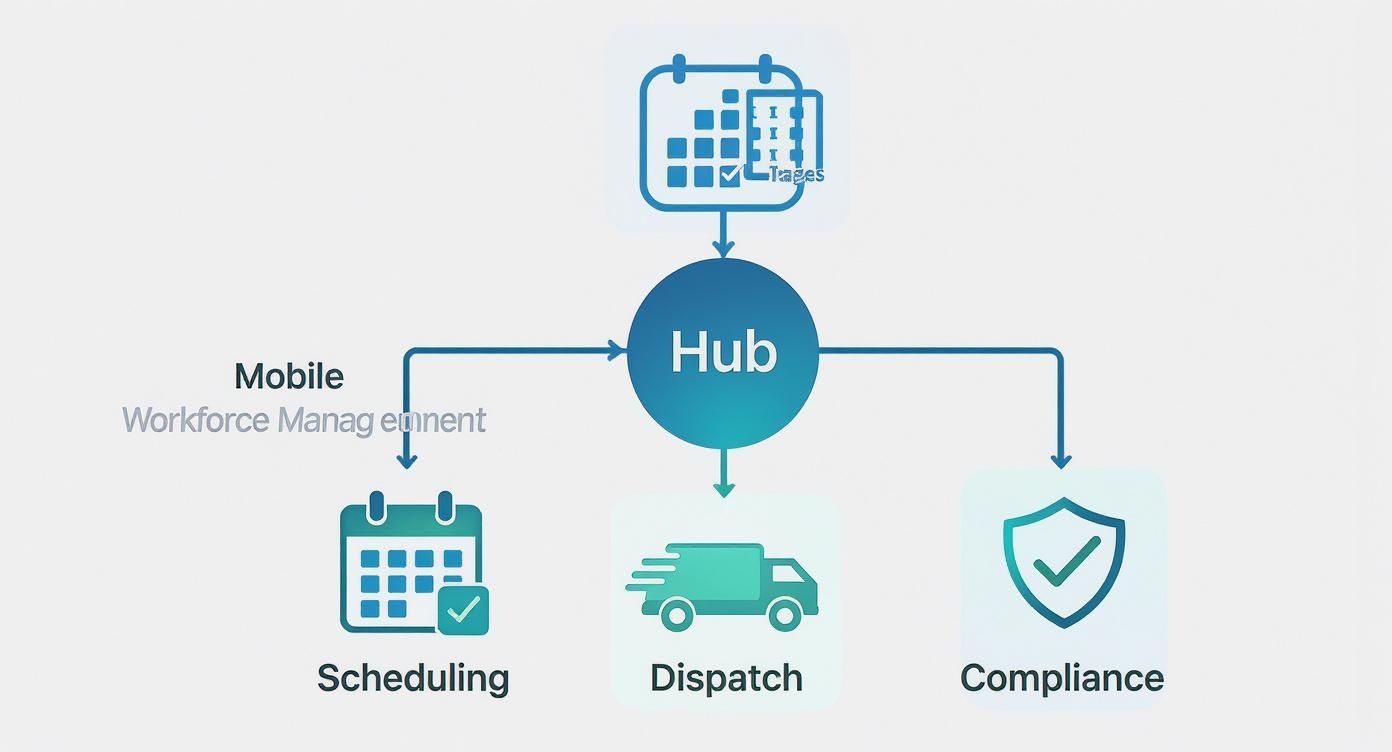
As you can see, a modern solution brings everything together, giving you far greater control and visibility over your entire operation.
Intelligent Job Dispatch and Management
Great dispatching is so much more than just sending an address. An intelligent system delivers a complete information packet for every single job, right to the technician's device. This typically includes:
- Customer History: Notes from previous visits, service records, and key contacts.
- Asset Information: Equipment manuals, schematics, and the full service history.
- Required Parts and Tools: A simple checklist to make sure they have everything they need before setting off.
- Digital Forms: For capturing customer signatures, completing safety checks, or creating service reports on the spot.
Having this level of detail at their fingertips means your technicians spend less time on the phone with the office and more time getting the job done right. For a closer look at this topic, our guide on field service management software in the UK has some excellent insights.
Offline Mobile Access
Let’s be honest, mobile signal in the UK can be patchy, especially in rural spots or deep inside large buildings. That’s why a critical feature for any serious mobile solution is the ability to work completely offline.
This means a technician can keep accessing job information, read manuals, and fill out reports even when there's no internet. As soon as they're back online, the app automatically syncs everything back to the main system. This guarantees that a poor signal never brings productivity to a halt. It’s also worth exploring the wider benefits of modern fleet management software, as this often goes hand-in-hand with managing a mobile workforce.
Integrating with Dynamics 365 and the Power Platform
A mobile workforce management solution should never be a lonely island. Its real power is unleashed when it plugs straight into the systems that already drive your business, creating one cohesive source of information. For most UK companies, that means getting it to talk fluently with Microsoft Dynamics 365 and the Power Platform.
This isn't just a technical box-ticking exercise; it fundamentally changes how you operate. When your mobile platform and Dynamics 365 are properly connected, data silos just crumble away. Customer details, job specs, asset histories, and employee records flow between them without a hitch, killing off the mistakes and wasted time that come with manual data entry.
Picture this: a customer logs a service request in Dynamics 365 Field Service. That instantly creates and dispatches a job in your mobile workforce app. The engineer on the ground finishes the work, gets a signature on their tablet, and the job status updates in Dynamics 365 in real-time, ready for the finance team to invoice from Business Central. That’s the kind of seamless efficiency we’re talking about.
Creating a Single Source of Truth
The biggest win from this kind of integration is establishing a single source of truth. It means everyone—from sales and service to finance and HR—is working from the same live, accurate information.
Just think about the practical impact:
- Sales teams can see a client's full service history while on a call, giving them the perfect context for an upsell or a contract renewal.
- Customer service agents get a complete picture of every interaction, including recently finished jobs, which means they can provide genuinely helpful support.
- Field technicians arrive at a job with the entire history of the equipment right there on their device, pulled directly from Dynamics 365. That alone drastically improves first-time fix rates.
This connected approach is what’s fuelling major growth in the market. The UK workforce management sector is expected to grow at a compound annual rate of around 9-10.5% from 2025, and that’s largely down to businesses adopting these integrated, cloud-based solutions. You'll see this trend reflected across recent industry reports.
Unlocking Customisation with the Power Platform
But connecting to Dynamics 365 is only half the story. The real magic happens when you bring the Microsoft Power Platform into the mix—that’s Power Apps, Power Automate, and Power BI. This toolkit is what lets you mould your mobile workforce solution to fit your specific ways of working, rather than the other way around.
Think of the Power Platform as a set of digital LEGO bricks. It allows you to build custom apps, automate fiddly processes, and create insightful reports without needing a team of developers.
With the Power Platform, you can start getting really creative:
- Build Custom Apps: Use Power Apps to quickly build simple, focused apps for your team. Maybe it’s a site safety checklist, a tool for logging expenses on the go, or an app for capturing competitor information in the field.
- Automate Unique Workflows: With Power Automate, you can create triggers that link different systems. For example, you could set up a flow that automatically sends a customer a satisfaction survey the second a job is marked 'complete' in the mobile app.
- Generate Powerful Insights: Hook your mobile workforce data up to Power BI to build visual dashboards. You can track metrics like travel time versus job time, see how teams are performing against their KPIs, or spot trends in parts usage to make smarter decisions.
By combining a mobile workforce management solution with Dynamics 365 and the Power Platform, you’re not just buying software. You’re building an intelligent, connected, and incredibly flexible system that turns your field operations into a serious competitive advantage. To get a better handle on the core of this ecosystem, take a look at our guide on what is Microsoft Dynamics 365.
Navigating UK-Specific Compliance and Security
For any UK business with teams out in the field, compliance isn't just about ticking boxes—it's the very bedrock of a sound, sustainable operation. When you roll out a mobile workforce management solution, you're not just aiming for better efficiency. You’re taking on a serious responsibility to protect data, verify your team's legal status, and make sure every action is above board.
Managing a mobile workforce brings its own unique set of compliance hurdles. Suddenly, sensitive customer and company data is being accessed on devices far from the safety of your office walls, which naturally cranks up the risk. This is why having iron-clad security and a real grip on UK-specific regulations is non-negotiable if you want to dodge crippling financial penalties and reputational damage.
Upholding GDPR Principles in the Field
The General Data Protection Regulation (GDPR) doesn't care if data is on an office server or a technician's tablet—the rules are just as strict. Every scrap of personal data, from customer job details to employee contact info, has to be handled with the utmost care.
A well-designed mobile workforce solution helps bake these principles right into your daily workflow. It ensures data is encrypted whether it's being sent or just sitting on a device, and it gives you fine-grained control over who sees what. This means a field engineer only gets the specific customer information needed for the job at hand, nothing more. It’s a practical way to live up to the core GDPR principle of data minimisation.
Digitally Verifying Right to Work
Confirming an employee's legal right to work in the UK is a high-stakes, mandatory process. A misstep here can result in fines of up to £60,000 per illegal worker. Relying on old-school paper-based checks is not only slow but also ripe for human error, especially when you're onboarding people remotely.
Modern mobile platforms can completely digitise and simplify this process. An integrated UK Right to Work module allows you to:
- Securely capture and store digital copies of passports, visas, and other essential documents.
- Set up automatic reminders for follow-up checks when documents are nearing their expiry date.
- Build a clear, time-stamped audit trail that proves you’ve done your due diligence.
This digital approach turns a major compliance headache into a straightforward, auditable workflow, shielding your business from huge legal risks.
Securing your mobile operations is a two-front battle. You must protect your business from external cyber threats while also ensuring your internal processes meet strict UK legal standards. One cannot be prioritised over the other.
Ensuring Driver and Fleet Compliance
If your business runs a vehicle fleet, your compliance duties extend to the road. You have a fundamental duty of care to ensure every driver has a valid licence and is legally fit to drive. Manually trawling through DVLA records is a slog and, frankly, it’s an easy one to let slide.
An integrated system can automate DVLA licence checks for you, flagging issues like expired licences or penalty points right away. This proactive approach helps you maintain a safe and legally sound fleet, cutting down on liability and making sure your insurance policies stay valid. Staying on top of UK compliance also means being vigilant against new cyber threats, like understanding the rising threat of infostealer malware.
The Role of Microsoft Entra ID for Security
Locking down the devices themselves is the final, crucial piece of the puzzle. With your team using company or personal devices all over the country, you absolutely must have strong identity management. This is where Microsoft Entra ID (what used to be called Azure Active Directory) plays a vital role.
By using Entra ID, you can apply tough security policies across every mobile device that connects to your systems. We’re talking about things like mandatory multi-factor authentication (MFA), enforcing strong password rules, and even having the power to remotely wipe a device if it gets lost or stolen. It’s all about making sure only the right people, on secure devices, can get to your sensitive company data, creating a powerful shield for your entire mobile operation.
If you have questions about ensuring your mobile operations are secure and compliant, phone 01522 508096 today or send us a message.
Your Successful Implementation Checklist
Switching to a new mobile workforce management solution is a big move, but it doesn't have to be a painful one. The secret isn't just in the software you choose, but in how you roll it out. A clear, step-by-step plan can transform a daunting project into a smooth, manageable process that gets everyone on board.
Let's be honest, the planning stage is where many projects fall flat. Rushing in without a proper roadmap leads to headaches, resistance, and a much slower return on your investment. It’s not about just flipping a switch; it's about laying the groundwork for a real shift in how you operate.
Phase 1: Define Your Goals and Engage Stakeholders
First things first: what does success actually look like for you? Before you even think about the tech, you need to be crystal clear on your objectives. Are you trying to slash fuel costs by 15%? Or maybe you want to boost your first-time fix rate and cut down on costly repeat visits.
Pin down specific, measurable Key Performance Indicators (KPIs) right from the start. These aren't just buzzwords; they're your yardstick for success.
With your goals defined, it’s time to rally the troops. Identify the key players across the business—think HR, operations, finance, and critically, the field engineers who will use the system every day. Getting their input and buy-in early is non-negotiable. They'll become your champions and help smooth over any bumps in the road.
Phase 2: Plan Your Data and Design the Rollout
Think of your existing data as the fuel for your new system. Customer records, job histories, employee details—it all needs to be moved over, and this is your golden opportunity for a spring clean. Sifting through your data now to remove duplicates and fix errors will prevent polluting your shiny new system with old problems.
Next, map out your deployment strategy. Going for a "big bang" launch where everyone switches over at once can be a high-wire act. A phased rollout is nearly always the safer, smarter bet:
- Pilot Group: Kick things off with a small, tech-friendly team. They can test the system in the real world, helping you find and fix any glitches before they affect the whole company.
- Regional Rollout: Once the pilot is a success, start expanding. You could go region by region, or perhaps department by department.
- Full Deployment: With a proven process and a few success stories under your belt, you’re ready to roll it out to everyone.
A phased rollout keeps disruption to a minimum. It gives you space to learn and adapt as you go, building confidence and momentum that makes the final switch much easier for the rest of the team.
Phase 3: Focus on Training and Change Management
This is the part people often underestimate. Great software is useless if your team doesn't know—or want to—use it properly. Training needs to go beyond just showing people which buttons to press. They need to understand why you’re making this change and what's in it for them. Tailor your training sessions to be role-specific, so everyone learns the features most relevant to their day-to-day job.
This is more important than ever as the UK workforce continues to go mobile. Projections show that by 2025, mobile workers in the UK could number 93.5 million, making up nearly 60% of the entire workforce. This massive shift means equipping people with tools they can use effectively from anywhere is essential. You can explore more insights into effective mobile workforce management to get ahead of this trend. Strong change management is the bridge that ensures your growing mobile workforce actually embraces the new solution.
To talk through your own implementation plan, give us a call on 01522 508096 today or send us a message.
How to Measure Your Return on Investment
Signing off on a new mobile workforce management solution is a big move. But sooner or later, senior leaders will ask the one question that really matters: what's the return? To answer that, you need to move beyond gut feelings and focus on the cold, hard numbers. A solid framework for measuring your Return on Investment (ROI) is crucial for proving the system's real-world impact.
This all starts with picking the right Key Performance Indicators (KPIs). These are the specific, trackable metrics that will pinpoint exactly where improvements are happening. Don't try to measure everything under the sun; just concentrate on the handful of KPIs that tie directly back to your original goals for the project.
Identifying Your Key Performance Indicators
To build a watertight business case, your KPIs should hit on both operational efficiency and financial savings. Here are some of the most powerful metrics we see our clients track:
- First-Time Fix Rate (FTFR): This is the gold standard for field service. A rising FTFR is a clear sign that your technicians are turning up better prepared, which means happier customers and far fewer expensive follow-up visits.
- Travel Time Reduction: Clever scheduling and route optimisation should slash the time your team spends stuck in traffic. Keep an eye on the average travel time per job to see this saving add up.
- Jobs Completed Per Day: An uptick here is a direct measure of productivity. More jobs getting ticked off the list, without a jump in overtime, is a massive win for your bottom line.
- Customer Satisfaction Scores (CSAT/NPS): When response times get shorter and service quality improves, your customers notice. Monitoring these scores will show you the direct impact on loyalty and reputation.
Calculating Your Tangible ROI
With your KPIs in hand, you can start putting a real number on the financial returns. This means looking at both direct cost savings and the new revenue you're generating.
For UK businesses especially, using real-time data and analytics to make smarter decisions is no longer a 'nice-to-have'. Companies are increasingly relying on live workforce dashboards to track metrics like travel time and task progress, which sharpens forecasting and drives productivity.
Don’t forget the "softer" benefits. While things like employee morale and reduced staff turnover are harder to put a number on, they have a very real, positive financial impact over the long term.
Let's look at a simple example. Imagine your new solution cuts overtime payments by £5,000 a month and shaves £2,000 off your monthly fuel bill. That’s an immediate, tangible saving of £84,000 a year. Now, add the revenue from each technician completing just one extra job per week, and the financial case becomes impossible to ignore. For more tips on choosing the right platform, have a look at our guide to the best workforce management software.
By weaving together hard cost savings with clear operational gains, you can tell a powerful story that proves just how valuable your mobile workforce solution really is.
Ready to Empower Your Mobile Workforce?
We’ve walked through what it takes to build a truly effective mobile workforce management solution. The core takeaway? It’s all about choosing a partner who gets the whole picture, from the boots on the ground to the data in your back-office systems. A piecemeal approach just leads to headaches, but getting it right with a unified platform is what really fuels growth.
DynamicsHub, working with Hubdrive, offers a complete solution that lives and breathes inside Microsoft Dynamics 365. This isn't a bolt-on; it's a native system designed to solve the challenges we've discussed, ensuring smooth integration, solid UK compliance, and a system that grows with you. Don’t let disjointed software hold your teams back.
If you're ready to build a connected, compliant, and genuinely productive mobile operation, our experts are here to help you get started.
Let's talk about optimising your field operations. Phone 01522 508096 today or send us a message to book your free consultation.