Think of your job description as the first handshake with a potential new hire. It’s more than just a list of tasks; it’s your first and best chance to sell the role, the team, and the company to the right person. Getting it right means crafting a document that’s clear, compelling, and sets the stage for a great hire, especially in the competitive UK talent market.
Building a Job Description That Works
Before you can find your ideal candidate, you need to build a solid foundation. Let’s be honest, a job description is a marketing document. A vague or poorly written one will turn off great people before they even think about applying. In the UK, this is more critical than ever.
The quality of your job description has a massive impact on your hiring success. In fact, over 50% of UK job seekers say it’s a key factor in their decision to apply for a role. With a tight labour market, you can’t afford to let confusing jargon or a wall of text scare away the very people you want to attract.

Before we dive into the nitty-gritty, let’s look at the core components that make a job description truly effective. Each part has a specific job to do, from grabbing attention to providing clarity and encouraging the right people to apply.
The Anatomy of a Compelling Job Description
| Component | Purpose | Key Action |
|---|---|---|
| Clear Job Title | To be easily found and understood by candidates and search engines. | Use standard, searchable industry terms. Avoid internal jargon. |
| Engaging Summary | To hook the reader and sell the opportunity. | Paint a picture of the role’s impact and the company culture. |
| Impact-Focused Responsibilities | To show candidates why their work matters, not just what they’ll do. | Use action verbs and focus on outcomes and achievements. |
| Skills & Qualifications | To set clear expectations and attract a diverse pool of talent. | Clearly separate “must-haves” from “nice-to-haves”. |
By focusing on these elements, you move from a simple list of requirements to a powerful piece of recruitment marketing that speaks directly to your ideal candidate.
Crafting a Compelling Job Title
The job title is your headline. It has to be clear, direct, and, most importantly, searchable. Put yourself in the candidate’s shoes: what would they type into a search bar? Avoid quirky, internal titles that mean nothing to the outside world.
- Stick to the standards: Use titles people actually search for, like “Marketing Manager” or “Senior Software Engineer.”
- Get specific: If the role has a focus, add it. “Digital Marketing Manager (SEO/PPC)” is much better than a generic title.
- Ditch the jargon: Titles like “Growth Ninja” or “Innovation Guru” might sound creative, but they confuse Applicant Tracking Systems (ATS) and candidates alike.
Writing an Engaging Summary
This is your elevator pitch. The summary is a short paragraph right at the top that needs to answer one question for the candidate: “Why should I want this job?”
Don’t just give a dry overview of the company. Talk about the team they’ll join, the exciting projects they’ll get to work on, and what makes your company a brilliant place to be. This is your first real chance to show off your employer brand. For more great tips, check out this detailed guide on writing good job descriptions.
Detailing Responsibilities and Impact
When you get to the responsibilities section, shift your mindset from tasks to impact. A simple to-do list is boring and doesn’t inspire anyone. Instead, frame each point around the outcome and what the person will achieve. Always start with a strong action verb.
A great job description frames responsibilities not as a list of chores, but as a series of opportunities to make a tangible impact. It shifts the focus from “what you will do” to “what you will achieve.”
For example, instead of writing “Manage social media accounts,” try something like, “Develop and execute a social media strategy to grow our online community and drive engagement.” See the difference? The second version gives the work purpose.
Distinguishing Between Essential and Desirable Skills
This is such a simple change, but it makes a huge difference. Clearly separating your “must-haves” from your “nice-to-haves” is crucial. Why? Because a huge, intimidating list of “essential” skills can discourage great candidates—especially women and people from underrepresented groups—who might not apply unless they feel they tick every single box.
- Essential Skills: These are the absolute non-negotiables. What does someone need to be able to do from day one to succeed in this role? Keep this list focused.
- Desirable Skills: These are the bonus points—the skills that would make a great candidate even better. Think of specific software experience, a second language, or niche industry knowledge.
Making this small distinction widens your talent pool and sends a clear message that you’re looking for talented people with diverse experience, not just a unicorn who meets an impossible checklist.
Choosing Language That Engages and Includes
Once you’ve got a solid structure sorted, the words you choose are your most powerful tool. The right language can turn a dry list of duties into a compelling opportunity, showcasing your company culture and attracting people who will genuinely thrive. It’s all about moving beyond sterile corporate jargon and writing with real impact.
Think of your job description as the start of a conversation. It needs to be clear, energetic, and welcoming. Using active, dynamic language makes the role feel tangible and important, helping candidates actually picture themselves succeeding on your team.

This means swapping passive phrases for active verbs. Instead of something like, “The successful candidate will be responsible for managing campaigns,” try this: “You’ll take ownership of our marketing campaigns from start to finish, driving brand awareness.” See the difference? The second version is direct and puts the candidate right in the driver’s seat.
Avoiding Jargon and Corporate Speak
Every industry has its own shorthand, but a job description isn’t the place for obscure acronyms or internal buzzwords. Terms that are common knowledge inside your office can be completely baffling, or even off-putting, to people on the outside. Your goal is clarity, not a pop quiz on their industry knowledge.
For example, a phrase like “synergise with cross-functional teams to leverage core competencies” is vague and drowning in jargon. A much clearer and more engaging alternative would be, “You’ll work closely with our sales and product teams to share insights and build successful strategies.”
Here are a few common offenders to keep an eye out for:
- “Rockstar,” “Ninja,” or “Guru”: Let’s be honest, these titles feel dated. They often deter more candidates than they attract.
- “Hit the ground running”: This can be a red flag for some applicants, implying a lack of training or support.
- “Self-starter”: While independence is great, this can sometimes suggest the person will be left to fend for themselves in isolation.
The best job descriptions use simple, universal language. If an intelligent person from outside your industry can’t understand what the role involves, you’ve made it too complicated. Your aim should be to invite people in, not exclude them with confusing terminology.
Embracing Inclusive and Gender-Neutral Phrasing
Beyond cutting the jargon, using inclusive language is non-negotiable for attracting a diverse talent pool and complying with UK equality standards. Unconscious bias can easily creep into our writing, subtly discouraging entire groups of people from even considering applying. It’s well-documented that certain words are perceived as masculine or feminine, and this can have a real impact on who clicks ‘apply’.
For instance, words like “aggressive,” “dominant,” and “assertive” often read as masculine-coded. In contrast, words like “collaborate,” “support,” and “nurture” are often seen as feminine-coded. Overusing either type can unintentionally skew your applicant pool before you’ve even reviewed a single CV.
The solution is to aim for neutral, skills-focused language that appeals to everyone.
Practical Tips for Inclusive Language
- Use Gender-Neutral Pronouns: Simply opt for “you” or “they/them” instead of “he/she.” It’s a small change that makes a huge difference in making your post feel inclusive from the outset.
- Check for Coded Words: Steer clear of overly competitive or aggressive language. Instead of “We need a competitive sales executive to crush targets,” try “We’re looking for a driven sales executive to achieve ambitious goals.”
- Focus on Skills, Not Stereotypes: Describe what the job requires, not the personality you imagine doing it. So, instead of asking for an “energetic” person, describe the fast-paced environment they’ll be working in.
- Review Age-Related Phrasing: Avoid terms like “digital native” or “seasoned professional,” which can hint at a preferred age bracket. Be specific about the experience needed, such as “experience with social media marketing tools” or “a proven track record in senior leadership.”
By being mindful of your wording, you send a clear signal that you value diversity and are committed to creating a welcoming environment. This doesn’t just widen your talent pool—it strengthens your employer brand, making your organisation a more attractive place to work for the very best candidates out there.
Optimising Your Post for Modern Search
So you’ve crafted a brilliant job description. That’s a massive achievement, but it’s only half the job done. If the right candidates can’t find it, all that effort goes to waste. To get your role in front of the right people, you need to think a little like a search engine.
This isn’t just about Google. It’s also about the internal Applicant Tracking Systems (ATS) that sift through applications. Getting the keywords and formatting right isn’t just a ‘nice-to-have’ anymore; it’s a fundamental part of connecting with a bigger, better pool of talent in a fiercely competitive market.
Nail this, and your role won’t get buried in the digital noise or filtered out by a machine before a human ever lays eyes on it. It’s all about making your post visible to the very people you’re trying to hire.
Finding the Right Keywords
Keywords are simply the words and phrases candidates are typing into search bars. The first step is to figure out exactly what those terms are for your specific role here in the UK. A bit of research now will save you a lot of headaches later.
Start by thinking about the most common, industry-standard titles for the position. While “Brand Evangelist” might sound innovative in a meeting room, I can guarantee more people are searching for “Marketing Manager” or “Brand Manager.”
Here are a few practical ways to find your keywords:
- Check Out the Competition: See how similar companies are advertising the same role. Take note of the common job titles, skills, and specific software they mention.
- Use Job Board Data: Big job boards often share insights on popular search terms. This data is pure gold for understanding what your ideal candidates are actually looking for.
- Think in Synonyms: A “Software Developer” might just as easily search for “Software Engineer” or “Backend Developer.” It’s smart to include these variations where they fit naturally.
Once you have your list, weave these terms into your job title, the initial summary, and your list of responsibilities. The trick is to keep it sounding human, not like you’re just stuffing it with keywords.
Making Your Post ATS-Friendly
Most organisations now rely on an Applicant Tracking System (ATS) to manage the sheer volume of applications. These platforms scan CVs and job descriptions, looking for specific keywords and formatting to sort candidates. If your post isn’t structured correctly, the ATS can misread it or, even worse, reject perfectly suitable applicants.
An ATS is an incredible tool for efficiency, but you have to play by its rules. To get a better handle on these systems, it’s worth understanding what an Applicant Tracking System is and the role it plays in modern recruitment.
To make sure your job description sails through the ATS screening, stick to these simple rules:
- Ditch Complex Tables and Columns: Many systems get confused by tables. Stick to simple bullet points or numbered lists.
- Use Standard, Web-Safe Fonts: Classics like Arial, Helvetica, or Times New Roman are your friends. A fancy font might look great, but it can be unreadable to the software.
- Stick to Standard Headings: Use clear, conventional headings like “Responsibilities” and “Required Skills” instead of trying to get too creative.
- Send It in the Right Format: If the system asks for a .docx or .pdf, that’s what you should provide. Converting formats on your own can mess up the layout.
Getting your job description seen by the right people requires a dual focus. You need to appeal to human psychology with engaging language while also satisfying the technical requirements of algorithms and search engines.
To really make your job description stand out in today’s hiring landscape, it helps to grasp the basics of AI Search Engine Optimization. The same principles that help a website rank on Google can help your job post get more views from qualified people. By treating optimisation as a core part of the writing process from the start, you dramatically increase your chances of making that perfect hire.
Navigating UK Legal and Compliance Rules
When you’re writing a job description in the UK, it’s about more than just finding the right person for the job. You’re also navigating a landscape of legal responsibilities that you simply can’t afford to ignore. Getting this right from the start protects your business, builds trust with potential hires, and shows you’re a fair and responsible employer.
At the heart of this is UK employment law, and specifically, the Equality Act 2010. This isn’t just bureaucratic red tape; it’s a fundamental piece of legislation designed to prevent discrimination. Every word you write needs to be considered through its lens, because even an accidental slip-up could land you in legal hot water.

Upholding the Equality Act 2010
The Equality Act 2010 identifies nine “protected characteristics.” Your job description must be completely neutral and not discriminate, directly or indirectly, against anyone based on these.
It’s crucial to keep these in mind:
- Age
- Disability
- Gender reassignment
- Marriage and civil partnership
- Pregnancy and maternity
- Race
- Religion or belief
- Sex
- Sexual orientation
What does this look like in practice? Asking for a “recent graduate” could be viewed as age discrimination. Requiring someone to be “physically fit” might inadvertently discriminate against candidates with disabilities, unless you can prove that a specific physical capability is an absolute, justifiable necessity for the role.
The golden rule is this: focus only on the skills, qualifications, and experience genuinely needed to do the job. Every single requirement you list must be an objective, essential criterion for success in the role—not a personal preference that could unfairly exclude great candidates.
The Importance of Salary Transparency
While it’s not yet a legal requirement across the board in the UK, being transparent about pay is quickly becoming the expected standard. Including a clear salary range isn’t just a “nice-to-have” anymore; it’s a smart, strategic move.
Think about it—posting a salary range respects a candidate’s time and sets clear expectations right away. It also dramatically improves the quality of your applicants. In fact, job adverts with a salary range attract 30% more candidates than those without. It sends a powerful message about fairness and transparency, two things that top talent really values.
For example, advertising a marketing role in Manchester for “£35,000 to £40,000” immediately qualifies your applicant pool. This simple act helps you attract people who are genuinely interested and aligned with what you can offer, saving everyone a lot of time down the line.
Defining Work Arrangements and Location
To attract the best people, you need to be crystal clear about the working arrangements. With hybrid models now the norm for 28% of Great Britain’s workforce, specifying whether a role is remote, hybrid, or fully office-based is essential. You can learn more from this recent report on job description statistics.
Clarity here doesn’t just help you find the right fit; it also helps you stay compliant by setting non-discriminatory conditions for all applicants.
Of course, compliance doesn’t end with the job description. Your entire hiring process, including essential background checks, needs to be watertight. To ensure you’re on the right track, take a look at our guide on completing compliant Right to Work checks in the UK. Staying on top of these legal guidelines isn’t just about managing risk—it’s about building a respectful and trustworthy hiring process from the ground up.
Bring Your Recruitment Process Into a Single, Smart System with Dynamics 365
Let’s be honest, the hire-to-retire lifecycle is complex. Juggling job descriptions, publishing vacancies, and then tracking applicants can quickly spiral into a mess of spreadsheets and manual admin. It pulls you away from the strategic side of HR – the part where you actually connect with people. This is exactly where the right technology makes a world of difference.
We are DynamicsHub.co.uk we provide Transformative HR solutions customised to your unique workflows, Human Resource (HR) Management for Dynamics 365 is the leading hire to retire solution for the Microsoft Platform.
By bringing your HR functions directly into your Microsoft environment, you stop the process fragmentation. Suddenly, everything is in one place, creating a single source of truth for recruitment and giving you insights that were impossible to see when your data was siloed.
Create Consistency with Centralised Job Descriptions
Your employer brand relies on consistency. A candidate’s first impression is often the job description, and if every role has a different format or tone, it sends a confusing message. A centralised system puts an end to that.
With Dynamics 365, you can build a library of pre-approved job description templates. Imagine your hiring managers having a solid, on-brand starting point for every new role.
Every job advert that leaves your company will be:
- On-brand: It’ll consistently reflect your company’s voice and culture.
- Compliant: All the necessary legal and compliance wording is already baked in.
- Efficient: Managers can adapt a proven template in minutes, not hours. They get their roles advertised faster, and you get peace of mind.
Standardising your job descriptions isn’t just an efficiency hack. It’s about building a professional, cohesive employer brand that candidates recognise and trust from the very beginning.
Publish Once, Track Everywhere
Once the job description is polished, you need to get it out there. Manually posting to one job board after another is tedious and a recipe for mistakes. An integrated system turns this into a simple, one-off task. You can push a vacancy out to all your chosen platforms with just a few clicks.
The real magic, though, is in the tracking. As applications start flooding in from LinkedIn, Indeed, and your careers page, they all land in one central hub. You get an immediate, unified view of who has applied, where they came from, and where they are in your pipeline.
No more switching between different job board logins or trying to make sense of a sprawling spreadsheet. Everything is organised, giving you the clarity to manage your candidates effectively and ensuring no great applicant ever gets lost in the shuffle. Find out more about improving your workflows in our guide to Dynamics 365 for HR.
Make Smarter Decisions with Real Data
Perhaps the biggest win from an integrated system is the data it gives you. When you can track the entire process from the initial post to the final offer, you unlock powerful insights that can genuinely improve how you hire.
You can start asking, and answering, critical questions with real numbers:
- Which job boards are actually sending us the best candidates?
- How long does it really take to fill a role in the marketing team versus the engineering team?
- Where are the bottlenecks in our hiring funnel?
This isn’t guesswork anymore. It’s evidence. You can use this data to refine your recruitment strategy, spend your advertising budget more wisely, and measurably improve the quality of your hires over time.
At DynamicsHub, we specialise in implementing these kinds of powerful, integrated systems. Our Human Resource Management for Dynamics 365 solution offers a complete platform that covers the entire employee journey.
To see how we can help you get a grip on your recruitment process, phone us on 01522 508096 today or send a message through our contact page.
Putting It All Together Before You Post
Right, you’ve drafted what you think is a killer job description. Before you rush to hit ‘publish’, let’s take a moment for a final, crucial review. This last once-over is your quality control, the final check that ensures everything you send out is polished, professional, and genuinely appealing to the people you want to hire. It’s amazing how often small details at this stage can make or break your hiring success.
Start with the absolute basics: spelling and grammar. It sounds obvious, but you’d be surprised how many job ads are riddled with typos. These little mistakes can make your company look careless, which is a major turn-off for detail-oriented candidates. Run a spellchecker, of course, but don’t stop there. Read the whole thing out loud. It’s a simple trick, but it’s fantastic for catching clunky phrasing or sentences that just don’t sound right.
The Final Pre-Publish Checklist
With the fundamentals sorted, it’s time to look at the description more strategically. This is less about correctness and more about impact. Ask yourself these questions before it goes anywhere near a job board.
- Does it sound like us? Read it again. Does the tone match your company’s personality? If you’re a vibrant, innovative startup, your job description shouldn’t sound like it was written by a 19th-century law firm.
- Is it crystal clear? Imagine you know nothing about your company or this role. Does it all make sense? Hunt down and eliminate any internal acronyms, corporate jargon, or vague buzzwords.
- How does it look on a phone? This is a big one. The majority of your potential candidates will see this on a mobile screen. Use short paragraphs, bullet points, and plenty of white space. If it looks like a wall of text on a small screen, people will simply swipe away.
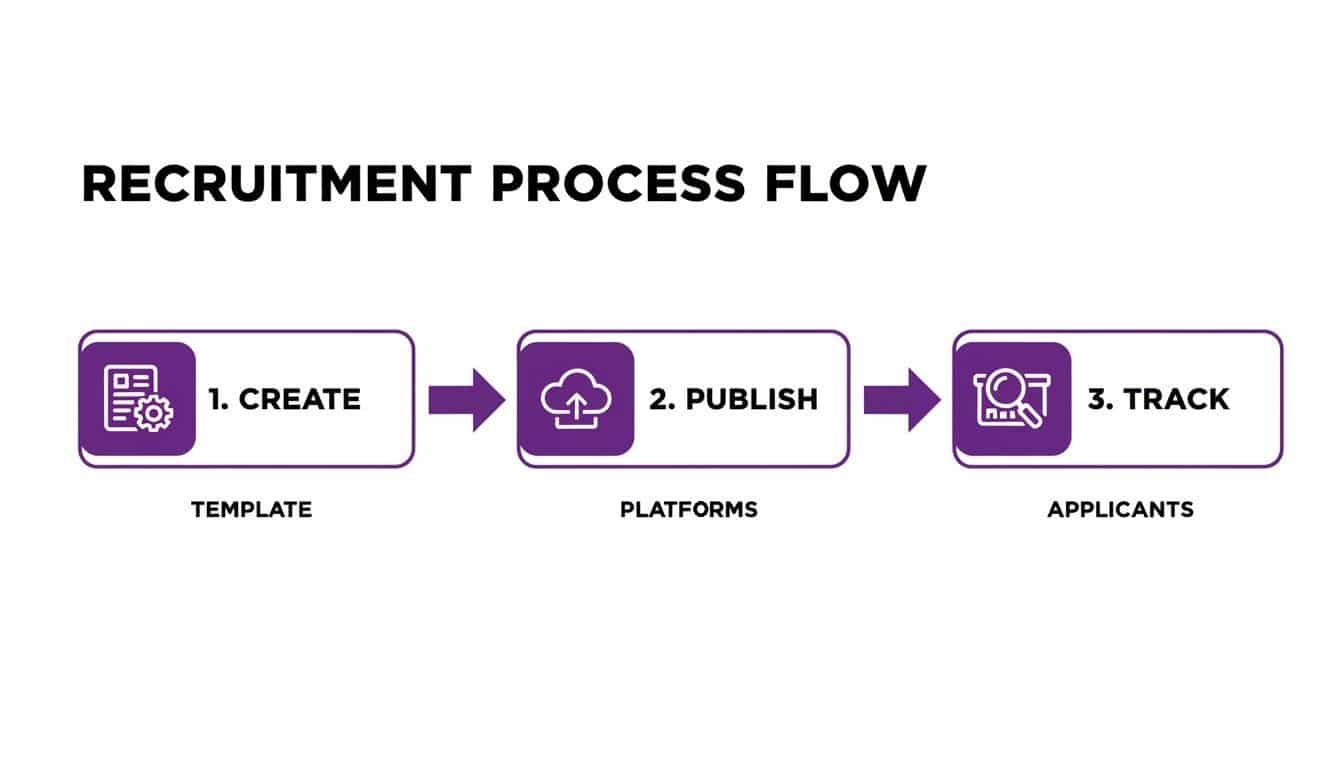
This simple workflow shows that writing the ad is just step one. Real success comes from a joined-up process where you create a solid template, get it out there, and then actually track what happens next.
Measuring What Matters
Once the job is live, how do you know if it’s actually any good? You need to define what success looks like before you start, so you can learn from every hiring round and make smarter decisions next time.
Your job description is a tool, and like any tool, its effectiveness should be measured. Tracking key metrics transforms recruitment from a guessing game into a strategic function.
Don’t overcomplicate it. To begin with, just focus on tracking a few core metrics:
- Number of Qualified Applicants: Are the right people applying? Or are you just getting a flood of CVs that don’t meet the basic criteria?
- Time-to-Hire: How many days pass between posting the job and filling the position? A great description should help speed this up.
- Source Effectiveness: Where are your best candidates coming from? Knowing this helps you focus your time and budget where it will have the most impact.
At DynamicsHub.co.uk, we build HR solutions that fit your specific workflows. Our Human Resource (HR) Management for Dynamics 365 is the leading hire-to-retire solution on the Microsoft Platform, and it makes tracking these crucial metrics almost effortless.
Ready to improve your hiring process? Give us a call on 01522 508096 today or send us a message to see how we can help.
Your Questions Answered
When it comes to writing job descriptions, a few questions pop up time and time again. We’ve compiled answers to the most common queries we hear from HR directors and hiring managers, covering everything from word count to making your post truly shine.
What’s the Sweet Spot for Job Description Length?
Keep it concise. We’ve found that job descriptions between 300 and 700 words consistently perform best. Why? Because candidates are often scrolling on their phones and need to grasp the essentials quickly.
The key is scannability. Use short paragraphs and bullet points for the day-to-day responsibilities and must-have qualifications. You’ve only got a few seconds to grab their attention, so make every word count.
Should I Put the Salary on a Job Description in the UK?
Yes, you absolutely should. Not including a salary range is one of the biggest missed opportunities in UK recruitment. It’s all about transparency and managing expectations right from the start.
Think of it this way: a clear range like “£40,000 – £45,000 per annum” acts as an instant filter. You’ll get more relevant, qualified applicants because you’re showing respect for their time—and yours. It immediately tells a professional if the role aligns with their financial goals.
A job description without a salary range is like a shop with no prices. You’ll get plenty of people browsing, but very few serious buyers. Transparency attracts high-quality candidates who know their worth.
What Are the Most Common Pitfalls to Avoid?
We see the same mistakes over and over. The biggest ones are filling the description with internal jargon that no one outside your company understands, creating a laundry list of unrealistic “must-haves,” and, of course, simple typos and grammatical errors that make you look unprofessional.
From a legal standpoint, you must avoid any language that could be considered discriminatory under the Equality Act 2010. And on a technical note, forgetting about search engine optimisation (SEO) and Applicant Tracking Systems (ATS) is a huge pitfall. Without the right keywords and formatting, your perfect role could be invisible to the very people you want to attract.
How Can I Make My Job Description Genuinely Stand Out?
Let your company culture shine through. Ditch the corporate-speak and write in a voice that reflects what it’s actually like to work on your team. Instead of just a dry list of duties, paint a picture of the impact this person will have.
Go beyond the salary and highlight what makes you different.
- What are your best perks and benefits?
- Do you offer clear professional development paths?
- Are there flexible or hybrid working policies?
Tell the story of the role and the team. That’s what gets top talent excited.
At DynamicsHub.co.uk, we build HR solutions that fit your real-world workflows. Our Human Resource (HR) Management for Dynamics 365 is the leading hire-to-retire solution on the Microsoft Platform.
Ready to take control of your recruitment process? Phone 01522 508096 today or send us a message.