A solid return to work interview template is one of the most effective tools in a manager’s kit. It’s about handling employee absence with fairness and consistency every single time. By providing a clear script and form, you ensure the conversation is supportive, legally sound, and properly documented, which protects everyone involved.
Why a Return to Work Interview Is Business-Critical
The days of a quick, informal “welcome back” chat in the corridor are long gone. Today’s workplace is a different beast altogether, shaped by hybrid working, a much-needed focus on mental health, and a noticeable rise in long-term sickness. This new reality demands a structured and empathetic approach.
A standardised return to work interview template isn’t just a ‘nice-to-have’ anymore; it’s a fundamental part of good people management. This isn’t about ticking boxes. It’s a crucial tool for managing risk, genuinely supporting wellbeing, and keeping the business running smoothly.
Creating a Fair and Supportive Framework
Having a formal process guarantees that every single employee gets the same level of care and attention when they return. That consistency is key. It helps you demonstrate fairness across the board and shuts down any perception of favouritism or discrimination—a vital consideration under UK law.
A template also gives managers, who aren’t always HR experts, the confidence to handle what can be sensitive conversations. It prompts them to cover all the important bases, from asking how the employee is feeling to discussing whether any adjustments are needed at work. This structured approach helps build trust and sends a clear message that the organisation genuinely cares.
Meeting Legal and Compliance Duties
Here in the UK, employers have a legal duty of care for their staff. This isn’t optional. It includes specific obligations under the Equality Act 2010 to make ‘reasonable adjustments’ for employees with disabilities. The return to work interview is your first and best opportunity to find out if such adjustments are necessary.
You absolutely have to document these conversations. A completed template acts as a clear, auditable record of what was discussed, what was agreed, and the steps the company took to support the employee. That piece of paper can be invaluable if a dispute or tribunal claim ever arises.
The nature of employee absence has also changed. Recent figures from the Office for National Statistics (ONS) show the UK’s economic inactivity rate is at 21.0%. That means roughly one in five working-age adults isn’t in the workforce, often due to long-term health problems. This reality underlines why UK employers need robust, auditable return to work processes. You can dig into the full employment figures on the ONS website for more context.
Your Ready-to-Use Return to Work Interview Template

A solid template is the backbone of any effective return to work process. It elevates the meeting from a quick, informal chat into a meaningful, supportive, and legally sound conversation. The point isn’t to create a rigid script for an interrogation; it’s about establishing a consistent framework that guides managers, puts employees at ease, and captures all the necessary information.
The real goal here is to cover all the essential ground—from confirming the reason for absence to exploring potential workplace adjustments—without ever feeling intrusive. A well-designed template ensures every manager asks the right questions in the right way, creating a fair and uniform experience across the board.
From a compliance standpoint, this approach is non-negotiable. Having a completed form creates a clear, documented record of the conversation. In the UK, this is absolutely crucial for demonstrating you’ve fulfilled your duty of care.
To get you started, we’ve broken down a comprehensive return to work interview template into two parts: a conversational script for managers and a structured form ready for immediate use.
A Conversational Script for Managers
Remember, the tone you set is just as critical as the questions you ask. This script is designed to be supportive and open, fostering an honest, two-way dialogue.
Starting the Conversation
- “Welcome back, [Employee Name]. We’ve really missed having you here, and it’s great to see you. How are you feeling about being back?”
- Why this works: It immediately frames the conversation on a positive and welcoming note, reinforcing that the employee is a valued part of the team.
Discussing the Absence
- “Before we properly get you settled back into work, I just need to record the details of your absence for our records. Could you confirm the first and last day you were off?”
- “You mentioned the reason was [briefly state reason, e.g., ‘a bout of flu’ or ‘a minor injury’]. Is that still correct? Is there anything else you feel comfortable sharing that we should be aware of?”
- Why this works: This approach focuses on the facts needed for HR records while gently giving the employee an opportunity to add more context if they wish, without any pressure. It avoids prying.
Assessing Fitness to Return
- “Are you feeling fully recovered and ready to jump back into your normal duties? Did your GP or any other medical professional give you any advice about returning that would be helpful for us to know?”
- Why this works: This is a direct but essential question. It confirms the employee feels fit for work, which is a key part of your health and safety obligations as an employer.
Exploring Adjustments and Support
- “Is there anything at work that might have contributed to you being off? And as we look ahead, is there any support or any adjustments we could make to help you settle back in and stay well?”
- “This could be anything from a phased return, slightly different working hours for a short while, or even just some changes to your workstation. We’re here to help, so please don’t hesitate to be open.”
- Why this works: This is a vital step for meeting your legal duty to consider reasonable adjustments under the Equality Act 2010. It shows you’re proactively looking for ways to support your team members.
Agreeing on Actions and Closing
- “Thanks so much for sharing that. Based on our chat, let’s agree on the following actions: [list agreed points, e.g., ‘I’ll arrange an ergonomic assessment for you’ or ‘We’ll map out a phased return plan for the next two weeks’]. Does that sound right to you?”
- “Let’s pencil in a quick, informal catch-up on [date] just to see how you’re getting on. It’s great to have you back.”
- Why this works: It ensures both you and the employee leave the meeting with a crystal-clear understanding of the next steps. Scheduling a follow-up also reinforces your ongoing support.
Structuring Your Digital Return to Work Form
While the script helps guide the human side of the conversation, a digital form is your best friend for consistent and secure record-keeping.
The structure below is designed for easy integration into a modern HR system, like the Human Resource HR Management for Microsoft Dynamics 365 by Hubdrive solution we implement and support for organisations in the UK. By capturing this data within a platform like Microsoft Dataverse, you ensure the information is secure, easy to report on, and linked directly to the employee’s central record.
Here’s a breakdown of the essential fields your form should include to capture all the critical information consistently.
Return to Work Interview Form Fields
| Field Name | Purpose | Example Data |
|---|---|---|
| Employee Name | To identify the employee and link the record. | John Smith |
| Absence Start Date | Records the first day of the sickness period. | 15/10/2024 |
| Absence End Date | Records the last day of the sickness period. | 21/10/2024 |
| Reason for Absence | A brief, non-intrusive summary. | Flu-like symptoms |
| Doctor’s Note Provided | A simple yes/no for compliance checks. | Yes |
| Fitness to Return Confirmed | Confirms the employee states they are fit for work. | Yes |
| Workplace Adjustments Discussed | Records whether the topic was covered. | Yes |
| Agreed Actions and Next Steps | Details specific actions, owners, and deadlines. | Ergonomic chair to be ordered by Jane Doe by 25/10/24. |
| Follow-up Review Date | Sets a date for a check-in. | 04/11/2024 |
| Employee Signature (Digital) | Confirms the employee agrees with the record. | [Digital Signature] |
| Manager Signature (Digital) | Confirms the manager has completed the interview. | [Digital Signature] |
Having a structured return to work interview template like this ensures you’re not just going through the motions of managing absence. You’re actively supporting your people and, in doing so, protecting your organisation.
How to Conduct the Interview Legally and Sensitively
Navigating a return-to-work interview is a real balancing act. On one side, you need to show genuine care and support for your employee. On the other, you have to stay compliant with UK employment law. Getting this right isn’t just about ticking boxes; it protects your team member’s wellbeing and shields the organisation from potential legal trouble.
The whole conversation should feel supportive, never like an interrogation. You’re not trying to catch someone out. Think of it as a crucial moment to fulfil your duty of care and pave the way for a smooth, safe return to work.
Understanding Your Legal Duties
In the UK, two major pieces of legislation really shape these conversations: the Equality Act 2010 and GDPR. The Equality Act is especially critical because it puts a legal duty on employers to make ‘reasonable adjustments’ for employees with a disability.
What counts as a disability? Under the Act, it’s a physical or mental impairment that has a ‘substantial’ and ‘long-term’ negative effect on someone’s ability to do normal daily activities.
A return-to-work chat is often the first time you might realise an adjustment is needed. This is why documenting the conversation properly is absolutely vital.
- Focus on Fitness for the Role: Keep your questions centred on the employee’s ability to do their job. You don’t need a specific medical diagnosis. Instead of asking, “What exactly did the doctor say was wrong?”, try something like, “Is there anything we can do to support you as you settle back into your role?”
- Proactively Discuss Adjustments: Be the one to bring it up. Openly ask if any changes to their duties, hours, or equipment could help them. This shows you’re taking your legal responsibilities seriously and genuinely want to help.
- Document Everything: Always make a clear, concise record of what was discussed and any adjustments that were agreed upon. This document is your proof that you’ve acted reasonably and can be invaluable if a dispute ever comes up down the line.
Handling Sensitive Health Data and GDPR
Employee health information is what’s known as ‘special category data’ under GDPR. This is the serious stuff, and it demands the highest level of protection. You must have a clear lawful basis for even collecting this data—in this case, it’s usually to fulfil your obligations as an employer for health and safety.
This means you have to handle any information from a return-to-work interview with extreme care.
A classic mistake is when a manager saves a completed interview form on their own laptop or in a general shared folder. This is a massive data breach risk waiting to happen. This kind of sensitive information needs to be locked down with restricted access.
If your organisation uses Microsoft 365, the best way to handle this is to store these records within the employee’s secure profile in a system like Microsoft Dataverse. This is a core part of the Human Resource HR Management for Microsoft Dynamics 365 solution by Hubdrive. It keeps the data encrypted, controls who can see it, and gives you a clear, compliant audit trail.
Navigating Difficult Scenarios
Of course, real-world conversations rarely stick to a script. It’s important to be prepared for the human element and know how to respond professionally and with sensitivity.
- If an employee becomes emotional: Stop the formal questions immediately. Offer to take a break, get them a glass of water, or just listen with empathy. The human connection is far more important than getting through a form. Acknowledge how they’re feeling and gently reassure them that the whole point of the meeting is to support them.
- If they reveal they aren’t ready to return: Whatever you do, don’t pressure them. Talk through their concerns and explore the options together. This might mean extending their sick leave, suggesting they get more advice from their GP, or arranging a referral to Occupational Health for an expert opinion.
By approaching the interview with a solid grasp of your legal duties and a genuinely supportive mindset, you can transform what feels like a procedural chore into a powerful moment for building trust and loyalty.
Adapting Your Approach for Different Absence Scenarios
A one-size-fits-all return to work interview script just doesn’t work in the real world. The reason behind an employee’s absence completely changes the conversation’s focus and tone. You need a flexible approach—one that lets you offer genuine support while still ticking all the necessary compliance boxes.
This has never been more important. With long-term health issues and career breaks on the rise in the UK, these conversations are a vital tool for keeping your team productive and managing business risk. Considering the average time-to-hire in the UK is now a lengthy eight weeks, simply replacing staff is no longer a quick or cheap option. This reality builds a powerful case for having a robust, well-managed return to work process. You can dig deeper into these UK hiring and workforce trends on cvgenius.com.
So, let’s look at how you can pivot your approach for four common situations.
Handling Short-Term Sickness
For those brief, one-off absences like a common cold or a stomach bug, the interview should be quick and reassuring. The main point is to formally log the absence, check they feel genuinely well enough to be back, and gently probe for any underlying problems. Simple.
But what about repeated short-term absences? This is often a red flag for a bigger issue. The trick is to spot the pattern without sounding accusatory. A great way to do this is to simply look at their absence record together.
- A good way to phrase it: “Welcome back. I was just looking at our records and noticed you’ve had a few separate days off over the last couple of months. Just wanted to check in—is there anything going on we should know about, or any support we could offer?”
- The focus: This framing keeps the focus squarely on support, not suspicion. It creates an opening for a more honest dialogue. For a more data-driven way to monitor absence, take a look at our guide on how to use the Bradford Factor for managing sickness.
Returning from Long-Term Absence or Injury
When an employee comes back after a long illness or an injury, the conversation needs to be much more thorough. Your number one priority here is ensuring their return to work is both safe and sustainable for the long run.
This is where you’ll most likely need to discuss formal adjustments. A phased return, where someone gradually builds their hours back up over a few weeks, is a popular and effective approach. You might also need to think about temporarily changing some of their duties to ease them back in.
Getting Occupational Health (OH) involved is often a very smart move in these cases. An OH assessment gives you an expert, impartial view on an employee’s fitness for work and can suggest specific, practical adjustments. It adds a crucial layer of professional guidance to your own judgement.
Addressing Mental Health-Related Absence
Talking about mental health demands the highest level of sensitivity and care. The most important thing you can do as a manager is to create a safe, non-judgemental space where your team member feels they can speak openly, but only if they want to.
Never, ever pressure someone to share the details of their condition. Instead, steer the conversation towards practical support you can offer in the workplace.
- Practical adjustment ideas: Could you offer flexible start and finish times to help them avoid a stressful commute? Maybe they’d benefit from more frequent, informal check-ins? Or perhaps a quieter desk space would make a difference.
- Signposting is key: Be prepared to point them towards helpful resources. This could be your company’s Employee Assistance Programme (EAP), if you have one, or external charities like Mind.
Re-integrating After a Sabbatical or Career Break
Welcoming someone back from a non-sickness-related break, like a sabbatical or parental leave, comes with its own unique set of challenges. The employee is perfectly healthy, but they’ve been disconnected from the day-to-day life of the business.
Your interview should be all about re-integration and getting them back in the loop.
- What to cover: Walk them through any significant changes to the team, company strategy, or key projects that happened while they were away.
- Create a plan: Work with them to map out their first couple of weeks. This should include who they need to catch up with and any training they might need on new systems or processes.
This conversation isn’t about their health; it’s about making their return to the professional world as smooth and successful as possible.
At DynamicsHub.co.uk, we provide Transformative HR solutions customised to the unique way you work. Human Resource HR Management for Microsoft Dynamics 365 by Hubdrive is the leading hire-to-retire solution for the Microsoft Platform, helping you manage all these varied scenarios with ease.
Phone 01522 508096 today or send us a message.
Bringing Your Process into Microsoft 365
Let’s be honest, paper forms and standalone spreadsheets are more than just old-fashioned; they’re a risk. For a process as sensitive as a return-to-work interview, embedding it directly into your Microsoft ecosystem is a game-changer for efficiency, security, and compliance. It stops sensitive employee data from being left on unsecured local drives and turns a clunky, manual task into a slick, connected workflow.
The real magic happens when you connect these systems. Imagine a manager using a simple Power App on their tablet to complete the return-to-work form. The moment they hit ‘submit’, that record is instantly and securely linked to the employee’s central profile in Dynamics 365. Just like that, you’ve created a single source of truth—no double-keying data, no lost paperwork. If you’re new to this, you can learn more about what is Power Platform and see how its tools knit your business processes together.
From Form to Follow-Up
Once the interview is logged, the real work of automation can begin. Using Power Automate, you can build smart workflows that trigger the next steps without anyone needing to lift a finger.
- Actioning Adjustments: Need an ergonomic chair? An automated task can be created in Microsoft Planner for the office manager. Does the employee need specific software? A ticket can be logged for IT.
- Booking Check-ins: The system can automatically find a free slot and schedule a follow-up review in both the manager’s and employee’s Outlook calendars for two weeks’ time.
- Notifying HR: If the conversation flags a need for an Occupational Health referral or a formal policy update, an alert can be sent directly to the HR channel in Microsoft Teams.
These aren’t just fancy tricks; this kind of automation ensures the promises made during the interview actually happen. It builds trust and shows you’re serious about your duty of care.
Secure Storage and a Clear Audit Trail
Let’s not forget, these forms contain sensitive personal health data. An automated workflow can save the completed interview as a PDF and file it away in a secure SharePoint library with tightly restricted access. This gives you a fully auditable trail, easy to access for compliance checks but completely locked down from unauthorised staff. This is where a dedicated solution like Human Resource HR Management for Microsoft Dynamics 365 by Hubdrive really proves its worth, elevating a simple form into an intelligent, compliant business process. For those looking to take things a step further, exploring AI-powered business process optimization techniques can uncover even more ways to refine these workflows.
A digital system also helps managers navigate the nuances of different absences. The focus of the conversation changes depending on the reason someone was away, as the infographic below shows.
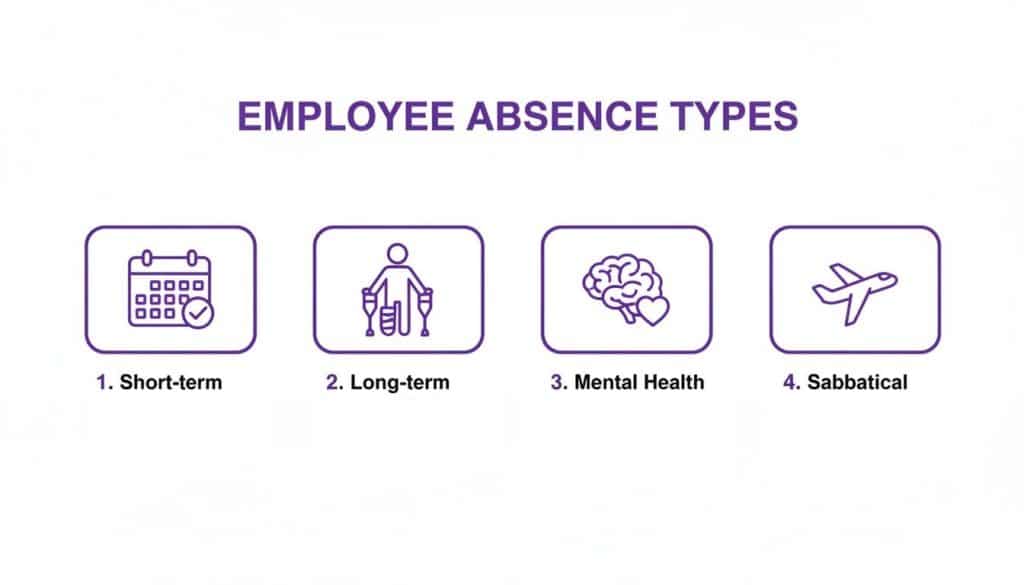
Having a digital template can guide a manager through the right questions for each specific scenario, ensuring consistency and thoroughness.
The rise of hybrid working adds another layer of complexity. With the UK’s day-one right to request flexible working, properly documenting these discussions is no longer optional. A 2025 CIPD study found that a staggering 1.1 million workers had quit a job because of a lack of flexibility. By building structured fields for flexible work requests directly into your Power App or Dynamics 365 form, you create an official record of who requested what and when it will be reviewed. This simple step is invaluable for demonstrating fairness and protecting your business against potential tribunal claims.
Your Questions Answered
Even with a solid return to work interview template in hand, real-life situations can throw managers a curveball. Let’s walk through a couple of common dilemmas that often pop up during these important chats.
What If an Employee Refuses the Interview?
It happens. An employee might occasionally push back against having a return to work interview. When it does, the first step is to approach them with empathy, not authority.
Gently explain that the meeting isn’t about getting them into trouble. It’s purely about checking in, supporting their wellbeing, and making sure their return to work is as smooth and safe as possible. Reassure them that it’s a standard, confidential part of the company’s absence policy that applies to everyone.
If they still say no, you’ll need to document their refusal. It’s also wise to calmly explain that without this conversation, it’s much harder for the company to meet its duty of care obligations towards them.
What If They Are Not Fit to Return?
You might start the interview and quickly realise the employee isn’t actually ready to be back, even though they’ve shown up. If they admit they’re struggling with their health or can’t cope with the workload, listen carefully and don’t pressure them.
Instead, you need to shift gears and talk through the available options. This could look like:
- Extending their sick leave: It might be best to suggest they visit their GP again to get another fit note.
- Getting a second opinion: This is a perfect time to consider an urgent referral to Occupational Health for a professional, independent assessment.
- Finding a temporary fix: If they feel they can do something, you could explore a drastically reduced workload or different tasks for a day or two while you get further advice.
The absolute priority here is to prevent someone from working when it’s unsafe for them or their colleagues.
A supportive and flexible response is crucial in this moment. Pushing an unfit employee to keep working is not only a breach of your duty of care but can also worsen their health and open the door to legal issues. When in doubt, always put their wellbeing first and get professional medical guidance.
Let DynamicsHub Reshape Your HR Approach
At DynamicsHub.co.uk, we provide Transformative HR solutions customised to the unique way you work.
The Human Resource HR Management for Microsoft Dynamics 365 by Hubdrive is the leading hire-to-retire solution for the Microsoft Platform, giving you the tools to manage processes like the return to work interview template with genuine confidence and efficiency.
If you’re looking to really get ahead, it’s worth seeing how innovations like AI Agents for HR can automate routine tasks, freeing your team for more strategic work. Our experts specialise in integrating these powerful tools into a single, seamless system that just works.
To get a better sense of what this looks like in practice, take a look at our deep dive into Dynamics 365 for HR.
Ready to see how an integrated HR system could genuinely support your team? Phone 01522 508096 today or send us a message to start the conversation.