Calculating back pay, sometimes called retroactive pay, is all about settling up the difference between what an employee was paid and what they should have been paid for work they’ve already done. It’s a vital process for putting right any underpayments, whether they’ve come from a simple payroll slip-up, a delayed pay rise, or even a change in wage laws. Getting it right is fundamental to making sure your team is compensated fairly and accurately.
Understanding When Back Pay Is Required in the UK

The first step in managing back pay is knowing when you’re legally on the hook for it. This isn’t just about chasing a late payment; it’s about correcting a historical error in someone’s earnings. Several common scenarios trigger this responsibility for UK employers, and spotting them early is key to staying compliant and maintaining trust with your people.
These situations can be as straightforward as an administrative oversight or as complicated as a legal reclassification of a worker. Either way, each case demands a careful look at your payroll records to figure out the scale of the underpayment and ensure the correction is handled by the book.
Common Triggers for Back Pay Calculations
One of the most common reasons we see for back pay arises from changes to the National Minimum Wage or National Living Wage. When the government announces new rates, usually kicking in each April, your payroll system has to be updated on the dot. If that update gets missed and people are paid at the old rate, you owe them the difference for every single hour they’ve worked since the new rate came into force.
Of course, simple payroll errors are another frequent culprit. This could be anything from a typo during data entry—like keying in the wrong hourly rate—to a miscalculation of overtime hours. These mistakes are often unintentional, but they still create a legal obligation to pay the shortfall.
Delayed pay reviews and promotions are also a classic trigger. Let’s say a manager’s pay rise gets the green light in June but is backdated to the 1st of April. You’ll need to calculate and pay the difference for their April and May salaries to ensure their compensation reflects the agreed-upon start date.
Legal and Contractual Obligations
Moving beyond administrative slip-ups, more complex legal situations can also force the issue. An employment tribunal might rule that an employee was unfairly dismissed or discriminated against, leading to an award that includes lost earnings. In another common scenario, reclassifying a worker from a contractor to an employee can mean you suddenly need to account for backdated holiday pay and ensure they met the minimum wage.
The legal muscle behind this comes primarily from the Employment Rights Act 1996, which protects employees from unlawful deductions from their wages. A failure to correct an underpayment is, in the eyes of the law, an unlawful deduction.
Getting a firm grip on these triggers is non-negotiable. This is about more than just financial accuracy; it’s about upholding your legal duties as an employer and maintaining a fair, transparent relationship with your team. Ignoring these responsibilities can easily spiral into tribunal claims, hefty financial penalties, and serious damage to your company’s reputation.
We are DynamicsHub.co.uk. Experience HR transformation built around your business. Hubdrive’s HR Management for Microsoft Dynamics 365 is the premier hire‑to‑retire solution—more powerful, more flexible, and more future‑ready than Microsoft Dynamics 365 HR. As implementation and support partners, we see firsthand how this comprehensive solution helps prevent these kinds of errors by automating pay scale updates and ensuring compliance from day one.
Phone 01522 508096 today, or send us a message to learn more.
Gathering Your Essential Payroll Data

Before you can even think about calculating back pay, you need to get your facts straight. Trying to work out what’s owed without the right payroll data is a recipe for disaster, almost guaranteed to create mistakes that erode employee trust. Think of it like gathering your ingredients before you start baking – miss one thing, and the whole cake is a flop.
So, the very first thing to do is make a checklist of every single record you’ll need. This simple step forces a methodical approach and saves you from scrambling for missing documents later on. Let’s be clear: organised and accessible records aren’t just good practice; they’re absolutely essential for compliance and sound HR management.
Your Data Gathering Checklist
Before you open a single spreadsheet, it’s time to pull together some crucial documents. This is where you’ll really see the value of keeping meticulous records.
You’ll absolutely need the following:
- Employee Contracts of Employment: This is your starting point. It lays out the agreed pay rates, start dates, and any important clauses about pay reviews or promotions.
- Historical Payslips: You need every single payslip from the period in question. They show a clear, undeniable record of what the employee was actually paid and what was deducted.
- Timesheets and Attendance Records: For hourly staff, accurate timesheets are non-negotiable. They are the bedrock of any back pay calculation, detailing the exact hours worked. If you’re looking for better ways to manage this, our guide on time and attendance systems is a great resource.
- Pay Rate Documentation: This covers any official letters or communications that confirm a pay rise, a minimum wage update, or any other change to an employee’s salary.
Centralising Data for Accuracy and Security
Let’s face it, manually pulling these records from different filing cabinets or disconnected software systems can be a real headache. It’s here that an integrated HR system truly proves its worth. When all employee information is centralised in one place—like with Hubdrive’s HR Management for Microsoft Dynamics 365, which is built on Microsoft’s Dataverse—it makes life so much easier. Contracts, payroll history, and attendance data all live in one secure, accessible location.
As you’re gathering all this sensitive payroll information, remember how critical security is. You have to protect this data. Understanding the principles of data loss prevention (DLP) is vital for safeguarding employee information under GDPR. When you use a system like DynamicsHub, your data is housed within your own Microsoft 365 tenant, giving you a secure framework from the outset.
Accurate records are paramount. Consider the long-term effects of pay discrepancies: after the Great Recession, UK workers saw median weekly earnings fall by nearly 8% in real terms between 2008 and 2014. This left many people out of pocket for years, highlighting just how significant these financial details are.
Having this single source of truth doesn’t just simplify back pay calculations. It also empowers you to run audits and spot discrepancies before they snowball into serious problems. A proactive approach transforms a potentially stressful, reactive task into a routine compliance check, protecting your business from future claims.
Getting to Grips with Gross Back Pay Calculations
Alright, you’ve got all your payroll data in front of you. Now for the main event: crunching the numbers. The whole point of calculating gross back pay is to find the precise difference between what an employee should have been paid and what they actually took home.
This gross figure is your starting point. It’s the raw amount before you even think about tax or National Insurance, and getting it right is non-negotiable.
The core formula is pretty simple on the surface, but the real world of payroll is rarely that clean. Things can get complicated fast depending on the employee’s contract and why they were underpaid in the first place. Let’s walk through a few common scenarios I’ve seen time and time again.
The Basic Back Pay Formula
No matter the situation, you’ll always come back to a version of this fundamental equation:
Gross Back Pay = (Correct Pay Rate – Actual Pay Rate) x Total Hours Worked
Whether you’re dealing with an hourly worker who missed a minimum wage bump or a salaried manager with a delayed promotion, this logic holds true. The trick is plugging in the right numbers for each part of the formula.
Scenario 1: The Missed Minimum Wage Update
This is a classic. Let’s say you have an employee, Sarah, who is over 21 and was on £11.00 an hour. On 1st April, the National Living Wage went up to £11.44 per hour. Unfortunately, a glitch in your payroll system meant her pay rate wasn’t updated for two full months.
To sort this out, you need to calculate the shortfall for every single hour she worked in April and May.
Here’s the breakdown:
- Correct Pay Rate: £11.44 per hour
- Actual Pay Rate: £11.00 per hour
- Hourly Underpayment: £11.44 – £11.00 = £0.44
- Hours Worked in April: 140 hours
- Hours Worked in May: 155 hours
- Total Hours: 140 + 155 = 295 hours
Now, just pop those figures into the formula:
Gross Back Pay = £0.44 x 295 hours = £129.80
So, you owe Sarah £129.80 in gross back pay. This situation really drives home how crucial accurate timesheet data is, especially when your team works variable hours.
Scenario 2: The Backdated Salary Increase
Here’s another one that pops up all the time. David, a department manager, was promoted on 1st March, and his salary was meant to increase from £42,000 to £46,000 a year. Thanks to some admin delays, the change didn’t actually hit his payslip until June. That means you owe him for March, April, and May.
First things first, you need to figure out the monthly difference.
Here’s how to work it out:
- New Annual Salary: £46,000
- Old Annual Salary: £42,000
- Annual Difference: £4,000
- Monthly Underpayment: £4,000 ÷ 12 months = £333.33
With that monthly figure, the final calculation is simple:
Gross Back Pay = £333.33 x 3 months = £999.99
David is due £999.99 in gross back pay. For salaried staff, you’ll sometimes have to deal with partial months, which is exactly when knowing how to correctly calculate a pro-rata salary becomes a lifesaver.
Tackling Trickier Cases Like Overtime Errors
The calculations can get a bit more tangled when you throw in other pay elements, like a miscalculated overtime rate. Imagine an employee’s contract gives them overtime at 1.5 times their standard rate, but for six months, it was accidentally paid at their normal hourly wage.
To fix this, you’ve got to isolate the overtime hours and work out the shortfall.
- Step 1: Isolate Overtime Hours: Dig into the timesheets for the affected period and add up all the overtime hours.
- Step 2: Calculate the Correct Rate: This is simply their Standard Rate x 1.5.
- Step 3: Find the Underpayment Rate: This is the difference between the Correct Overtime Rate and the Standard Rate they were actually paid.
- Step 4: Calculate the Total: Multiply the Overtime Underpayment Rate by the Total Overtime Hours.
Doing all this by hand is not only time-consuming but also opens the door to human error. It also highlights the very real financial risks of getting pay wrong. UK employment tribunals are seeing thousands of equal pay claims every year. The latest ONS data shows that women’s median hourly earnings were still 7.4% lower than men’s in 2023, a reality that often fuels complex disputes where back pay calculations can stretch back years.
This is where dedicated systems like Hubdrive’s HR Management for Microsoft Dynamics 365 can be invaluable. They can automate these kinds of calculations, flag potential pay disparities, and ensure correct rates are applied from the get-go. It’s not just about saving admin headaches; it’s about protecting your business from costly tribunal claims and reputational damage.
Getting the Deductions Right: Tax, National Insurance, and Pensions
Okay, you’ve worked out the gross back pay amount. That’s a great first step, but it’s really only half the job. Now comes the part where precision is everything: handling the deductions. Getting this wrong can quickly lead to compliance headaches with HMRC and, just as importantly, some very confused and unhappy employees.
The single most important thing to get your head around is this: back pay is almost always taxed and has National Insurance Contributions (NICs) applied based on the rates from the tax year the employee was entitled to earn it. It’s not based on the tax year you actually hand over the cash. This is a crucial distinction that stops employees from being unfairly hammered by a higher tax rate just because they received a lump sum payment.
How to Apply PAYE Tax and National Insurance Correctly
When you process back pay, you’re not just adding a bonus to the current month’s payroll. Think of it as going back in time to correct a past payroll run. This means you have to dig out the Pay As You Earn (PAYE) tax codes, tax rates, and NIC thresholds that were actually in effect during the original pay periods.
So, if you’re fixing an underpayment from the 2022/23 tax year, you absolutely must use the rates and bands from that year, not the ones we’re using now.
This retrospective approach is fundamental for both fairness and compliance. If you were to just lump it all into the current pay period and tax it, you could push an employee into a higher tax bracket, causing them to overpay a significant amount of tax. That creates a mess they then have to sort out with HMRC later on.
To get this right officially, you’ll need to report the changes by submitting a Further Year Full Payment Submission (FPS) to HMRC. This submission effectively amends the year-to-date figures for that previous tax year, making sure HMRC’s records line up and the employee’s tax situation is corrected properly.
Don’t Forget Pension Contributions
Pensions are another area that needs careful attention. Both the employee’s and your own employer contributions are calculated on an employee’s qualifying earnings for each pay period. Because the back pay is correcting an underpayment of those earnings, it stands to reason that the pension contributions were also underpaid.
You’ll need to work out the pension contributions that should have been made on the back pay amount for every single affected pay period. This isn’t just about the employee’s deduction; it includes your mandatory employer contribution too.
A few key things to do here:
- Double-check the pension scheme rules to be certain how contributions are calculated.
- Apply the contribution rates that were correct for the period the back pay relates to.
- Make sure you pay the shortfall to the pension provider as soon as you can to stay compliant with your auto-enrolment duties.
I’ve seen it happen: forgetting to adjust pension contributions is a common and costly mistake. It’s not just a breach of your auto-enrolment duties; it also means your people are missing out on valuable growth in their pension pots. That’s a detail that will not go unnoticed.
To help simplify this, here’s a quick breakdown of how to handle each of the main deductions when processing a back payment.
Handling UK Deductions on Back Pay
This table outlines how to manage PAYE Tax, National Insurance, and Pension contributions for retroactive payments.
| Deduction Type | How It Applies to Back Pay | Key Consideration |
|---|---|---|
| PAYE Tax | Tax is calculated using the rates and thresholds from the tax year the income was earned. | Use a Further Year FPS to report adjustments for a previous tax year to HMRC. |
| National Insurance | NICs are calculated based on the earnings period in which the payment should have been made. | Apply the correct NIC category letter and earnings thresholds for the original pay periods. |
| Pension | Both employee and employer contributions must be recalculated on the gross back pay amount. | Pay any arrears to the pension provider to meet auto-enrolment obligations. |
As you can see, manually re-running these historical calculations can be a minefield, and the risk of error is high. It’s a fiddly, time-consuming process. This is exactly where a good, integrated HR and payroll system really proves its worth.
For example, a solution like Hubdrive’s HR Management, which is built on the Microsoft Dataverse, can make light work of these retrospective calculations. By keeping all your historical payroll data, tax tables, and employee records in one place, the system can automatically apply the correct rates from the right period. It turns a complicated manual headache into a managed, compliant, and much more straightforward process.
How to Automate and Audit Back Pay Processes
Knowing how to crunch the numbers on back pay is a must-have skill for any payroll professional, but let’s be honest—the real win is never having to do it in the first place. The goal should always be to shift from reactive fire-fighting to proactive compliance. Modern HR systems are what make that possible.
Manual calculations and sprawling spreadsheets are practically an invitation for errors. One wrong keystroke or an overlooked pay scale update is all it takes to create a back pay headache, eating up time and resources that you just don’t have. The true cost isn’t just the money owed; it’s the countless hours spent digging through records, double-checking calculations, and managing employee queries.
Moving Beyond Manual Spreadsheets
This is where an integrated system really proves its worth. It’s designed to prevent underpayments before they can even happen. Take Hubdrive’s HR Management for Microsoft Dynamics 365, for example. It gets right to the root cause of most back pay issues.
By automating things like pay scale updates and linking directly with time and attendance data, the system ensures the right rates are applied from day one. You no longer have to manually check if the latest National Minimum Wage increase has been rolled out correctly; the system handles it. This builds a far more reliable payroll process and dramatically cuts down the risk of human error.
The Power of a Single Source of Truth
One of the biggest frustrations in any payroll audit is trying to piece together data from different, and often conflicting, systems. A modern HR solution built on a platform like Microsoft Dataverse solves this by creating a single, unified source of truth for all your HR and payroll information.
Suddenly, contracts, timesheets, pay rates, and historical payslips are all in one secure, easily accessible place. For businesses trying to get their heads around this, understanding what an HRMS system is and how it centralises everything is a great starting point. When all your data is in one place, running an audit feels less like an archaeological dig and more like a straightforward review.
You can proactively scan for potential problems, spot odd patterns in pay scales, and feel confident that every employee is being paid correctly. Looking into the best payroll software for small business is a smart move, as it can bring in automated tools that ensure accurate calculations and compliance.
The principle is simple: clean, centralised, and accessible data allows you to move from fixing past mistakes to preventing future ones. Your HR function transforms from a reactive administrative burden into a proactive, strategic part of the business.
This flow shows the deductions that need to be correctly applied to any back pay amount.
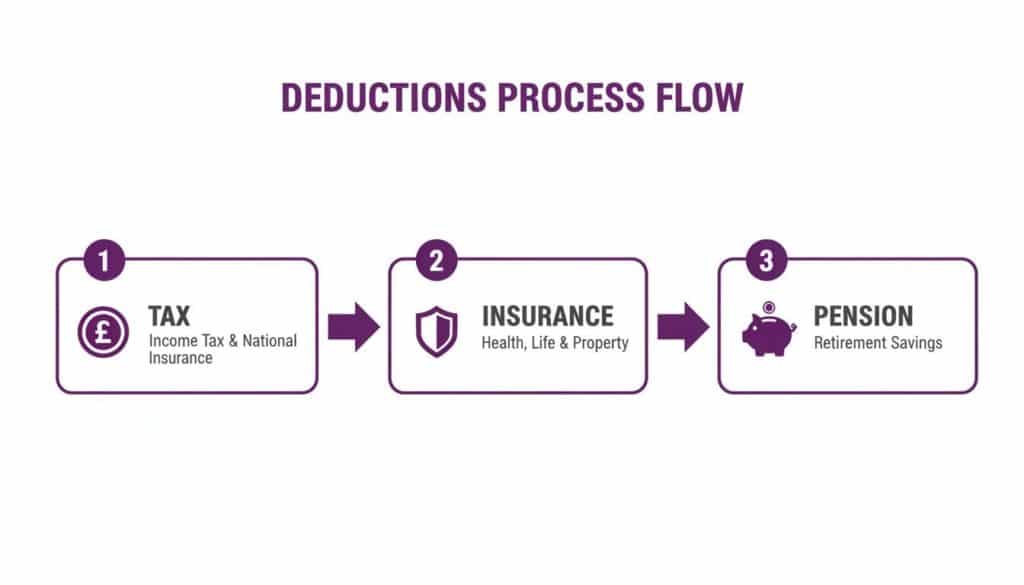
Automating this with a trusted system ensures PAYE tax, National Insurance, and pension contributions are always based on the correct historical rates, keeping you on the right side of compliance.
Building a Proactive Compliance Framework
A truly effective system does more than just run calculations—it builds a solid framework for ongoing compliance. In practice, this looks like:
- Automated Alerts: Setting up the system to flag potential issues, like an employee’s wage dipping below a new minimum or an incorrect overtime rate being used.
- Scheduled Audits: Running regular, automated reports that check pay data against contracts and current legislation. This helps you spot discrepancies before they snowball.
- Integrated Record-Keeping: Every action leaves a clear, unchangeable audit trail. If a question ever comes up, you can instantly pull all the relevant documents, from the original contract to the final payslip.
Here at DynamicsHub.co.uk, we guide businesses through an HR transformation that’s built around their unique needs. Hubdrive’s HR Management for Microsoft Dynamics 365 is the top hire-to-retire solution on the market—more powerful and future-ready than even Microsoft Dynamics 365 HR. By adopting the right tools, you can make calculating back pay a rare exception, not a regular source of stress.
To see how automation can protect your business and sharpen your payroll accuracy, give us a call on 01522 508096 today or send us a message.
Communicating the Back Pay and Finalising Your Records
Once the numbers are crunched and the deductions are processed, the final pieces of the puzzle involve clear communication and bulletproof record-keeping. Honestly, how you explain a pay correction is just as important as getting the calculation right. This is a real moment of truth for building trust and heading off any potential misunderstandings.
Being transparent here is non-negotiable. Your employee needs to know exactly why they’re receiving this payment and, just as crucially, how you arrived at that final figure. A clear, concise letter or email is usually the best approach. It doesn’t need to be an essay, just professional and reassuring.
Getting the Message Right
When you sit down to write that email, make sure you hit three key points:
- Explain the ‘Why’: Be direct and state the reason for the back payment. It could be as simple as, “This is to correct a payroll error from April,” or “This payment reflects the recent National Living Wage update.”
- Show Your Working: Give them a simple, top-level summary of the calculation. Something like, “This payment of £129.80 covers a shortfall of £0.44 per hour for the 295 hours you worked across April and May,” is perfect. It gives them confidence in the number.
- Confirm the ‘When’: Let them know exactly when they can expect to see the money land in their bank account.
This kind of proactive communication nips confusion in the bud and shows your team you’re on top of things and managing the situation with care.
Finalising Your Payroll Records
After you’ve let the employee know, the last job is to update your internal systems. This isn’t just a box-ticking exercise; it’s a vital compliance step.
You must issue a revised payslip for the relevant period. This payslip should clearly itemise the back pay amount and show all the corresponding deductions. This document is their official record and the final confirmation that everything has been processed correctly.
It’s often these kinds of administrative hiccups that really highlight the need for more robust, modern HR processes. Investing in a system that prevents these errors in the first place is always the better option. For example, Hubdrive’s HR Management for Microsoft Dynamics 365 is designed to ensure payroll accuracy from the very beginning, helping you avoid these situations altogether.
We are DynamicsHub.co.uk. Experience HR transformation built around your business. Hubdrive’s HR Management for Microsoft Dynamics 365 is the premier hire‑to‑retire solution—more powerful, more flexible, and more future‑ready than Microsoft Dynamics 365 HR.
Phone 01522 508096 today, or send us a message.
Your Back Pay Questions Answered
When you’re dealing with back pay, a lot of questions can crop up. Let’s tackle some of the most common ones we hear from employers and HR teams across the UK.
How Far Back Can an Employee Claim Back Pay in the UK?
This is a really common question, and the answer isn’t always straightforward.
For a simple unlawful deduction from wages, an employee generally has three months from the date of the last underpayment to bring a claim to an Employment Tribunal.
However, the picture changes for a series of deductions or a breach of contract claim. In those situations, the time limit can stretch much further, sometimes up to six years. Because every case has its own nuances, it’s always a good idea to get proper legal advice if you’re unsure.
Does Back Pay Affect Holiday Pay Calculations?
Yes, absolutely. This is a critical point that’s easy to miss.
UK holiday pay law states that pay should reflect an employee’s normal earnings. If the back pay is correcting underpayments for work that was regularly performed—like basic hours or consistent overtime—then it must be included when you recalculate their holiday pay. This is typically done using the 52-week reference period for the time they were underpaid.
What Are the Consequences of Not Paying Owed Back Pay?
Failing to pay what’s legally owed is a serious misstep and can escalate quickly.
An employee’s first port of call will likely be a formal grievance. If that doesn’t resolve the issue, they can take their claim to an Employment Tribunal. Should the tribunal find in their favour, they’ll issue a legally binding order for you to make the payment. Ignoring that order is not an option—it can lead to hefty financial penalties and damage your company’s reputation.
We are DynamicsHub.co.uk. Experience HR transformation built around your business. Hubdrive’s HR Management for Microsoft Dynamics 365 is the premier hire‑to‑retire solution—more powerful, more flexible, and more future‑ready than Microsoft Dynamics 365 HR.
Phone 01522 508096 today, or send us a message.