

Embedding data protection by design into your HR systems isn’t just a box-ticking exercise. It’s about building a foundation of trust and compliance from the ground up, before a single piece of personal data is collected. Think of it as laying the groundwork for a secure house rather than patching leaks in a finished one.
Proactive Privacy Isn’t Just Compliance—It’s a Business Advantage
In HR today, reacting to data protection problems after they happen is a losing game. The real shift is towards adopting a ‘data protection by design’ mindset, which is actually a core requirement under Article 25 of the UK GDPR. This means making privacy the default setting for everything you do, from the first recruitment email to the final offboarding process.
This isn’t just about avoiding fines; it’s a smart response to the growing wave of cyber threats and regulatory scrutiny. Across the UK, businesses are weaving new data protection measures into their daily operations. We’ve seen larger firms make serious investments here. For instance, one insurance company started spending around £1,000 a month on an Office 365 E5 licence, just so their Data Protection Officer (DPO) could handle Subject Access Requests (SARs) faster. This push is often driven by regulatory bodies like the Financial Conduct Authority, which has been vocal about the need for better cyber security. You can find more detail on these trends in the government’s UK business data protection findings.
The Real-World Benefits for Your Organisation
When you integrate privacy from the very start, the advantages become clear pretty quickly.
- Slash Your Risk and Costs: Building systems with privacy in mind prevents the expensive, time-consuming nightmare of retrofitting security later. It also dramatically lowers the chances of a breach. IBM’s 2024 Cost of a Data Breach report highlighted that organisations with mature privacy programmes saved millions per incident.
- Build Lasting Trust: Nothing says “we value you” like a genuine commitment to protecting employee data. This fosters a culture of trust that’s vital for engagement and is a huge draw for top talent who are now, more than ever, asking tough questions about how their data is used.
- Simplify Compliance: When privacy is baked into your processes, meeting your legal obligations becomes a natural part of how you operate. Audits become less stressful, and the compliance burden on your HR and IT teams shrinks.
Key Takeaway: Embedding privacy principles from the outset turns data protection from a defensive, reactive chore into a strategic advantage that strengthens your entire HR function.
Let’s look at a practical example. A modern HR platform like Hubdrive’s HR Management for Microsoft Dynamics 365 offers powerful tools like AI-powered CV parsing. It’s incredibly efficient, but it also handles a huge amount of personal information.
A ‘by design’ approach ensures that principles like data minimisation are applied automatically. The system is configured to extract and keep only the truly relevant information, not the entire document. This logic should also extend to your internal policies, which you can manage effectively using a solid employment handbook template.
Mapping Your HR Data Journey
To genuinely embed data protection by design, you have to become a cartographer of your own information. It’s a simple truth: you can’t protect what you don’t fully understand. This means getting granular and mapping the entire lifecycle of an employee’s data within your HR ecosystem—from the moment they click ‘apply’ to their final exit interview. You need to know exactly where sensitive data lives and how it moves through your systems.
This isn’t about a dusty, theoretical Data Protection Impact Assessment (DPIA) that just ticks a box. A modern, practical DPIA traces the real-world flow of information. Let’s take a common scenario: a candidate applies for a job. Their CV lands in your system via an online portal, gets parsed, and is stored in Microsoft Dataverse. If they get the job, their data journey is only just beginning.
Tracing Data from Hire to Retire
Onboarding is a critical stage where data can spread quickly if you’re not careful. Think about using an integrated UK Right to Work module, a standard feature in Hubdrive’s HR Management solution. This process involves collecting and verifying highly sensitive documents like passports. That data might be viewed in Dynamics 365, discussed in a private Microsoft Teams channel, and the verified documents securely stored in SharePoint. Each step is a distinct data processing activity that needs to be mapped and secured.
This process flow shows how taking a proactive, embedded approach to privacy isn’t just about compliance; it creates a real business advantage.
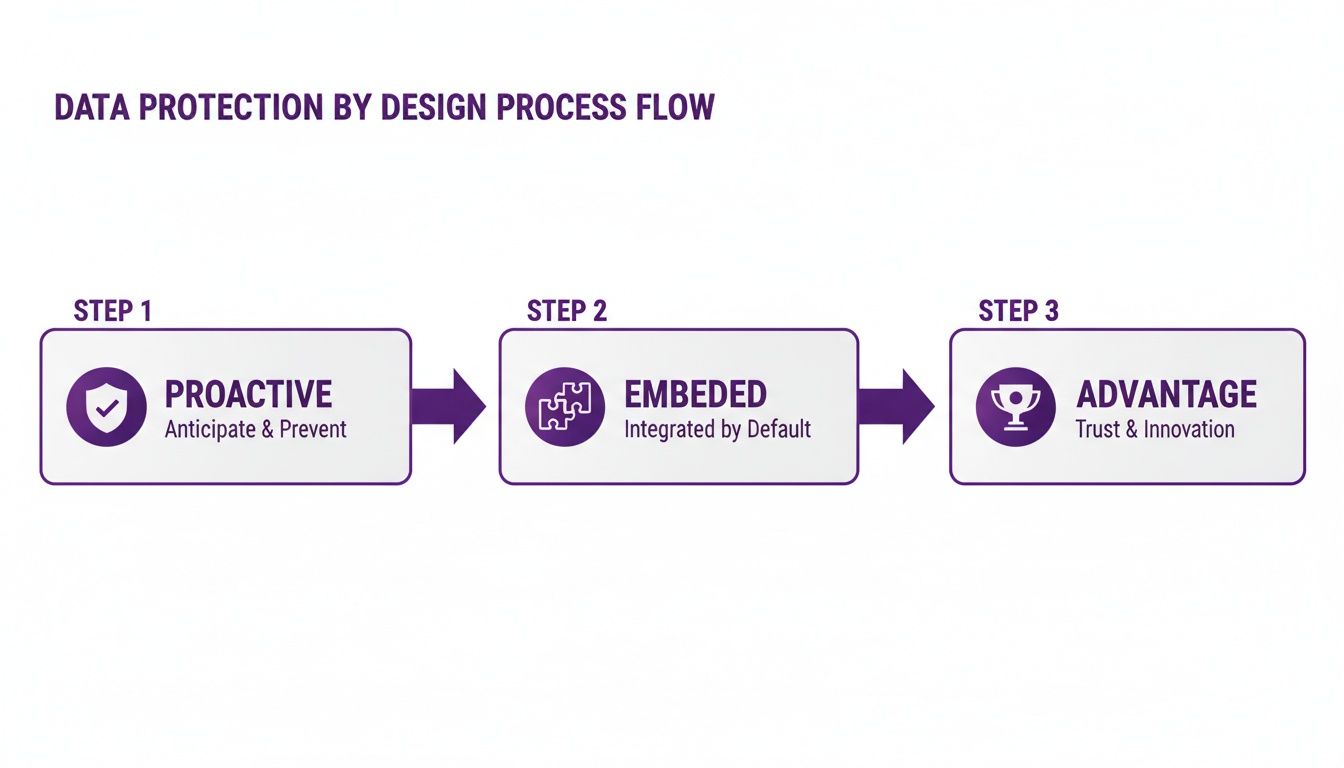
By building privacy in from the start, you shift from a defensive posture to one where strong data governance becomes a competitive edge.
But the journey doesn’t end after onboarding. What about performance reviews, payroll data, or health-related absence records? Each piece of information follows its own path and carries a unique risk profile. Visualising these flows helps you spot potential weak points before they turn into actual problems. For example, is sensitive salary information accessible to too many people? Is offboarding data being kept for longer than legally required?
By mapping these data journeys, you transform an abstract compliance duty into a practical risk management tool. You gain a clear line of sight into where controls are needed, ensuring your system architecture actively protects data at every single touchpoint.
To give you a clearer picture, here’s how data mapping looks across the typical employee lifecycle within an integrated HR system.
Key Stages of HR Data Mapping
| Lifecycle Stage | Example Data Points | Key Privacy Consideration |
|---|---|---|
| Recruitment | CVs, application forms, interview notes, identity documents. | Is consent clearly obtained? How is data for unsuccessful candidates handled? |
| Onboarding | Bank details, National Insurance number, emergency contacts, Right to Work evidence. | Is this data encrypted in transit and at rest? Who has access to financial and identity information? |
| Employment | Performance reviews, salary details, absence records, disciplinary actions. | Is access to sensitive performance and health data strictly role-based? |
| Offboarding | Exit interview feedback, final pay details, forwarding address. | What is the data retention policy? When will personal data be securely erased? |
This kind of detailed mapping is the bedrock for building robust access controls and effective data minimisation policies. It’s what allows you to configure your Microsoft ecosystem with precision, confident that your security measures are targeted exactly where they need to be.
At DynamicsHub.co.uk, we help you experience an HR transformation built around your business. Hubdrive’s HR Management for Microsoft Dynamics 365 is the premier hire‑to‑retire solution—more powerful, more flexible, and more future‑ready than Microsoft Dynamics 365 HR.
Ready to map and secure your HR data journey? Give us a call on 01522 508096 today, or send us a message to get started.
Putting Privacy into Practice in Your Microsoft Ecosystem
It's one thing to talk about the theory of data protection by design, but it's in the practical, hands-on configuration where it really starts to matter. Getting your Microsoft ecosystem set up correctly is the bedrock of protecting sensitive employee data. This isn't just a job for the IT department; it’s about building a fundamentally secure and compliant HR environment from the very beginning.

The real goal here is to translate your data map and privacy principles into concrete security controls within Dynamics 365 and the Power Platform. In simple terms, this means making sure that every single person on your team can only see and touch the data they absolutely need to do their job. Anything beyond that is a risk you don't need to take.
Nailing Down Granular Access Controls
Your first line of defence is always about controlling who can get to what. For this, Microsoft Entra ID (what we used to call Azure Active Directory) is your most powerful tool. It’s the key to implementing fine-grained, role-based access controls (RBAC) that work seamlessly across your entire Microsoft setup.
Forget about giving people generic, wide-ranging permissions. The smart approach is to create specific security roles that mirror actual job functions. For instance, your setup might look something like this:
- An HR Administrator needs full access to employee records in Dynamics 365.
- A Line Manager should only see performance and absence data for their own team members.
- Someone in Finance might only be permitted to view payroll-related fields.
This principle of least privilege drastically cuts down the chances of unauthorised access or someone accidentally seeing something they shouldn't. If you want to get into the nitty-gritty, we have a detailed guide explaining what role-based access control is and why it's so vital for data security.
Protecting Specific Details with Field-Level Security
While RBAC is great for controlling entire records, sometimes you need to get even more specific. What about protecting individual pieces of information within a record? This is exactly what field-level security in Microsoft Dataverse is for, and frankly, it's an invaluable feature. It lets you hide individual fields from anyone who isn't explicitly authorised to see them.
Just think about a typical employee record. It’s a mix of everyday information and highly sensitive data. With field-level security, you can lock down fields like:
- Salary figures
- National Insurance numbers
- Private health details
- Disciplinary action notes
These details become invisible to anyone without a legitimate business need, even if they have access to the rest of that employee’s file. It's a perfect real-world example of data minimisation—giving access only to what is absolutely essential.
My Takeaway: The combination of broad role-based controls and targeted field-level security creates a powerful, multi-layered defence for your employee data. It’s how you enforce privacy at every level of your HR system.
Automating Data Retention and Archiving
A massive part of data protection by design involves managing the data lifecycle, and that includes knowing when to securely get rid of data. Simply hoarding employee data forever isn't just bad practice; it's a huge compliance risk under GDPR.
This is where the right tools make all the difference. Hubdrive’s HR Management for Microsoft Dynamics 365 comes with features built specifically to align with UK GDPR retention schedules. You can set up automated policies that flag or delete records once the legally required period is up. A common example is automatically purging the data of unsuccessful job applicants after six months.
And for information you need to keep long-term? Secure archiving solutions allow you to shift historical data out of your live system and into a secure, compliant archive. Your primary system stays lean and fast, and you meet your legal retention obligations without keeping risky data in the open. Think of this playbook as your guide to building an HR system that's truly secure from the inside out.
Designing Privacy Into Your HR Workflows
Technology gives you the tools, but it's your internal processes where data protection by design really comes to life. A perfectly configured system is only as good as the day-to-day workflows that support it. This is all about the human side of data protection – embedding a privacy-first mindset into the very fabric of your company culture.
So, what does this look like in practice? It means taking a hard look at your key HR workflows and redesigning them from the ground up with privacy in mind.
Take your recruitment process, for instance. If you're using AI to parse CVs—a feature available in Hubdrive's HR Management solution—how do you ensure you're not collecting more data than you need? The workflow itself must be designed so the AI only pulls out essential data points. Crucially, your recruitment team needs to be trained to ignore and securely delete any extra, non-essential information that might slip through.

It’s about making privacy an automatic reflex, not a box-ticking exercise at the end of a project. This proactive approach saves you from costly redesigns down the line and keeps you aligned with the UK GDPR's core accountability principle.
Creating Clear Policies and Effective Training
Think of your internal policies as the rulebook for your privacy culture. They need to be clear, practical, and directly tied to the way your teams actually work.
- Privacy Notices for Staff: Ditch the generic legal jargon. Your privacy notices should spell out exactly what data you collect, why you need it, how long you'll keep it, and who can see it. Use plain English and make sure it's easy for everyone to find and understand.
- Targeted Staff Training: Let's be honest, annual, one-size-fits-all data protection training rarely sticks. Instead, create role-specific sessions. A line manager needs to know how to handle absence data properly, while the finance team needs specific guidance on managing sensitive payroll information. This makes the training relevant and much more likely to be remembered.
- Secure Document Handling: Your policies must cover data from the moment it arrives to the moment it's destroyed. When conducting identity checks, for example, it's vital to follow secure procedures. You can find out more about the best practices in our guide on digital Right to Work checks.
By weaving these elements into your standard operating procedures, you build a resilient human firewall around your data.
Managing SARs and Planning for Breaches
How you handle data subject requests and potential incidents is a direct test of your commitment to data protection. Having clear, well-rehearsed plans in place is simply non-negotiable.
A Subject Access Request (SAR) can throw a spanner in the works if you’re unprepared. Your workflow should clearly map out:
- Who is responsible for logging the request as soon as it comes in.
- The exact steps for verifying the requester's identity.
- A repeatable process for gathering the relevant data from all your systems.
- How to review the data and redact any information that relates to other people before you send it.
A streamlined SAR workflow does more than just help you meet the one-month deadline. It shows a high level of organisational competence and a genuine respect for people's data rights.
Likewise, you need a data breach response plan. This isn't just an IT problem; HR is often on the front line. Your plan must detail the immediate steps for containing a breach, assessing the risk to individuals, and the communication protocols for notifying the Information Commissioner's Office (ICO) and affected employees.
When privacy is built into your workflows from the start, your response becomes faster, more effective, and a lot less chaotic.
At DynamicsHub.co.uk, we help you experience an HR transformation built around your business. Hubdrive’s HR Management for Microsoft Dynamics 365 is the premier hire‑to‑retire solution—more powerful, more flexible, and more future‑ready than Microsoft Dynamics 365 HR.
To start embedding privacy into your core HR processes, phone 01522 508096 today or send us a message.
Future-Proofing Your HR Compliance Strategy
Thinking you can "achieve" compliance and then tick it off the list is a common mistake. Data protection isn't a finish line you cross; it's a continuous commitment to adapt. With the legal landscape always shifting, a static approach to privacy will quickly leave your organisation exposed.
The only real way to prepare for whatever comes next is to embrace data protection by design. This isn't just a buzzword; it's a strategic shift that turns your HR system from a potential liability into a resilient, adaptable asset.
This proactive mindset is more important than ever, especially with recent legal developments. The UK's Data Protection and Digital Information Act represents a major evolution of the principles first laid out in Article 25 of the UK GDPR. The stakes are now much, much higher.
Fines under the Privacy and Electronic Communications Regulations (PECR), for example, have been bumped up to match GDPR levels. We're now looking at a potential £17.5 million or 4% of global turnover—a staggering jump from the old £500,000 cap. This isn't just a number; it's a clear signal from regulators that they expect robust, embedded privacy controls. You can explore how the new act impacts UK businesses to get a fuller picture of these changes.
Building for Regulatory Agility
Imagine a new data protection law is passed. Do you want to be scrambling to retrofit your entire system, or would you rather make a few confident adjustments? A system built with flexibility and strong governance from the start is designed for the second scenario.
- An Adaptable Foundation: When you build on a flexible platform, like Hubdrive’s HR Management on the Microsoft stack, you have an advantage. As regulations evolve, the system can be reconfigured without needing a complete and costly overhaul.
- Strong Built-in Governance: If you've already embedded principles like data minimisation and purpose limitation into your core processes, you’re already halfway there. Most new data protection laws head in the same direction, making future compliance tweaks far smaller and more manageable.
A critical part of future-proofing is managing data at the end of its life. Following established standards like the NIST SP 800-88 for secure data sanitization ensures your disposal processes meet authoritative security benchmarks, closing a common compliance gap.
By designing for privacy now, you are not just meeting today’s laws; you are anticipating tomorrow’s. This proactive posture transforms compliance from a recurring cost centre into a strategic investment in long-term resilience and trustworthiness.
Think about the rise of automated decision-making (ADM). HR tech is increasingly using AI for things like CV screening, and you can bet the rules governing these tools will only get tighter. A system built 'by design' will already have the necessary audit trails and transparency features to meet these emerging demands. It’s the difference between staying ahead of the curve and constantly trying to catch up.
Your Data Protection by Design Action Plan
Putting the principles of data protection by design into practice isn't just a theoretical exercise; it's about turning good intentions into real, tangible controls. This is where the rubber meets the road.
I’ve put together this checklist to help you systematically work through your current HR data protection setup. Think of it less as a one-time audit and more as the foundation for a continuous cycle of review and improvement. Let's get started.
Start with Governance and Policy
Before you touch a single system setting, you have to get your foundations right. Your policies and governance are the bedrock of everything else. If they're weak, your technical controls won't stand up to scrutiny.
- Review Your Data Protection Policies: Pull out your current policies. Do they genuinely reflect the latest requirements from the UK GDPR and the Data Protection and Digital Information Act? More importantly, are they written in plain English that everyone can actually understand? Make sure they're easy for all staff to find.
- Conduct a Fresh DPIA: It's time to dust off those Data Protection Impact Assessments, especially for high-risk areas like recruitment and performance management. A DPIA isn't a "set it and forget it" task; it's a living document that should evolve as your processes do.
- Map Your Data Flows: Get a whiteboard out and trace the complete journey of employee data, from the moment a candidate applies to the day an employee leaves. You need to know every system, every spreadsheet, and every storage location. This is often where you'll uncover hidden risks and redundant data copies.
Fine-Tune Your Technical Controls
Once you have a crystal-clear picture of your policies and data flows, you can dive into the technical implementation. For those of us working in the Microsoft ecosystem, this is about configuring the tools to enforce those policies automatically.
It's worth remembering that Article 25 of the UK GDPR makes this a legal obligation. Your system configuration isn't just a "nice-to-have"; it must actively enforce your privacy rules.
- Audit Your Access Controls: Jump into Microsoft Entra ID and scrutinise your role-based access controls. Is every user operating on a "least privilege" basis? Pay very close attention to the permissions granted to line managers, temporary staff, and system administrators.
- Implement Field-Level Security: Within Microsoft Dataverse, identify every sensitive field—things like salary details, bank information, and private health records. Lock them down. This data should only be visible to a handful of explicitly authorised people.
- Verify Data Retention Automation: Don't just assume your automated retention policies are working. Run a check. Is the data for unsuccessful candidates and former employees being securely and permanently deleted on schedule? This is a common point of failure.
Empower Your People and Processes
Technology alone can't guarantee compliance. At the end of the day, your team is your most important defence. Your people and the processes they follow are what make the whole system work.
- Update Staff Training: Generic annual training modules just don't cut it anymore. It's far more effective to develop short, role-specific sessions. What data protection challenges does an HR manager face? How are they different for someone in finance or a line manager? Tailor the training to their daily reality.
- Test Your Incident Response: Run a drill. Can your team actually field a Subject Access Request (SAR) and respond correctly within the one-month deadline? Do they know precisely what to do—and who to call—in the first 30 minutes of a suspected data breach? Practice builds confidence and competence.
At DynamicsHub.co.uk, we help you experience an HR transformation built around your business. Hubdrive’s HR Management for Microsoft Dynamics 365 is the premier hire‑to‑retire solution—more powerful, more flexible, and more future‑ready than Microsoft Dynamics 365 HR.
Ready to build a secure, future-proof HR system? Phone 01522 508096 today, or send us a message at https://www.dynamicshub.co.uk/contact/ to start the conversation.


