Only 36% of employees in the UK say their organisation has a formal employee-to-employee recognition system, according to Workhuman’s employee recognition statistics summary. That should concern any HR director trying to improve retention, culture and day-to-day performance without adding another disconnected platform.
In practice, employee to employee recognition works best when it’s built into the tools people already use. In Microsoft 365 organisations, that means Teams for the moment of recognition, Dynamics 365 and Dataverse for governance and reporting, Power Platform for workflow, and Hubdrive’s HR solution as the operational HR backbone. When teams have to leave their normal working environment, adoption drops. When recognition sits outside HR data and security controls, governance gets messy fast.
The strongest programmes aren’t built around digital badges alone. They’re built around clear behaviours, sensible controls, visible leadership participation, and reporting that proves whether the programme is helping the business or just generating noise.
The Business Case for Peer Recognition in 2026
Best-in-class UK organisations are 41% more likely to enable employees for peer-to-peer recognition than others, at 65% versus 46%, and manager-led recognition has seen a 10% year-over-year decline, which makes peer recognition more important in maintaining connection and can reduce turnover by up to 15% when implemented effectively, according to O.C. Tanner’s 2025 State of Employee Recognition Report press release.

That changes the conversation. Employee to employee recognition isn’t a culture add-on anymore. It’s part of how organisations keep everyday effort visible when managers are stretched, teams are distributed, and work happens across chat, field activity, projects and service queues.
What peer recognition actually fixes
Most organisations already recognise long service, top performers, or annual award winners. That isn’t the same as a functioning recognition culture.
Peer recognition fills a different gap. It captures the daily acts that usually go unnoticed:
- Operational support: A planner helps a field engineer recover a missed job.
- Collaboration: Finance assists HR with a difficult payroll correction.
- Customer effort: A service adviser steps in to calm an unhappy client.
- Knowledge sharing: An experienced colleague helps a new starter avoid a preventable mistake.
Those moments matter because employees see them in real time. Managers often don’t.
Recognition is strongest when it reflects work as it happens, not months later in a review cycle.
Why this matters in UK mid-market firms
Mid-market organisations usually feel the pressure first. They need structure, but they don’t have the spare resource to run high-friction HR processes by hand.
In those businesses, employee to employee recognition has a practical role:
| Business pressure | What recognition helps with |
|---|---|
| Hybrid working | Makes contribution visible across locations |
| Lean management layers | Reduces sole dependence on line managers to spot effort |
| Frontline disconnect | Gives non-desk workers a route into the same culture |
| Retention pressure | Reinforces belonging before dissatisfaction hardens |
A good recognition programme also complements wider employee engagement work. If you’re reviewing participation, manager habits and employee sentiment together, this guide on how to improve employee engagement sits closely alongside recognition design.
The ROI argument leaders will listen to
The ROI case usually lands when recognition is treated as an operating mechanism, not a perk.
Here’s what tends to work in practice:
-
Link recognition to business behaviours
Thanking people for “being brilliant” is pleasant but vague. Recognising customer recovery, safe working, problem solving or cross-team support creates a measurable trail of what the organisation wants more of. -
Make it easy enough to use weekly
If submitting recognition takes too many clicks, or requires a separate login, usage falls away after launch. -
Use visibility carefully
Public recognition in Teams can reinforce culture. Private recognition still has a place for sensitive matters or employees who don’t want public attention. -
Track whether participation is broad or narrow
If only head office staff recognise each other, the platform isn’t improving culture. It’s documenting an existing imbalance.
What doesn’t work
Some organisations launch with fanfare and then wonder why the programme fades. The common pattern is simple. They buy a tool before setting the rules.
A weak programme usually has at least one of these flaws:
- No behavioural framework: People recognise personalities, not contribution.
- No governance: Messages drift into inappropriate wording or personal data.
- No manager involvement: Leaders assume peer recognition replaces management practice.
- No reporting: HR can’t tell whether participation is healthy or distorted.
That’s why the business case shouldn’t stop at “recognition is good for morale”. It should be framed as a disciplined culture system. If it’s built well, it strengthens connection, gives HR usable data, and helps leaders spot where culture is thriving and where it isn’t.
Designing Your Recognition Programme for Success
Before anyone builds a Power App or adds a Teams tab, the programme needs rules. Not heavy bureaucracy. Clear design choices.
The fastest way to damage trust is to launch employee to employee recognition without deciding what counts, who can participate, how data is handled, and how fairness will be monitored.
Start with recognition criteria, not rewards
The cleanest programme designs are behaviour-led. That means recognition is tied to actions the organisation wants repeated.
A practical framework usually includes:
- Values-linked behaviours: For example, collaboration, service, safety, improvement, mentoring.
- Moment-based recognition: Small, timely acknowledgements rather than waiting for formal review cycles.
- Cross-functional inclusion: Employees can recognise people outside their own team.
- Simple message guidance: Enough structure to promote quality without making messages robotic.
I usually advise clients to avoid over-designing categories. If there are too many choices, people hesitate and usage drops. If there are too few, messages become generic. A small set of well-defined behaviours is usually enough.
Decide what recognition should and shouldn’t do
Recognition can be social, symbolic, developmental, or reward-linked. It doesn’t have to do all four at once.
A sensible design workshop should settle these points early:
| Design decision | Good practice |
|---|---|
| Public or private | Use both, with clear guidance |
| Reward-linked or not | Start simple if governance maturity is low |
| Manager approval | Avoid for everyday peer recognition unless there is a reward cost |
| Eligibility | Include all worker groups you can support operationally |
| Frequency controls | Prevent spam without making recognition feel rationed |
For UK organisations, if you do attach small rewards, keep them proportionate and governed through policy. The point is reinforcement, not creating a shadow bonus scheme.
Compliance isn’t an afterthought
Many well-meaning programmes go wrong at this point. Peer recognition messages can easily stray into personal information, health references, protected characteristics, or comments that shouldn’t become part of a lasting HR record.
The risk isn’t theoretical. The UK’s ICO reported £28.5 million in GDPR penalties in 2024, with HR systems cited in 15% of cases involving employee data mishandling, as summarised in Perceptyx’s discussion of the downside of employee recognition.
That’s why I strongly prefer recognition to sit inside governed Microsoft architecture rather than in a stand-alone social app with weak controls.
Practical rule: If recognition data can be stored, searched, reported on or surfaced in an employee record, it needs the same policy attention as any other people data.
Governance choices to make before launch
Recognition governance should cover these areas:
- Data retention: Decide how long recognition records stay accessible and whether all message content should be retained in full.
- Access rights: HR, managers and employees shouldn’t all see the same level of detail.
- Moderation: Define what happens if someone submits inappropriate, discriminatory or sensitive content.
- Escalation paths: HR needs a route for intervention when recognition reveals conduct issues or inequity.
- Auditability: Changes, deletions and admin actions should be traceable.
This matters even more when recognition links into performance and talent processes. If you’re aligning recognition with appraisal or objective-setting, your broader performance management process needs to define where appreciation ends and evidence-based assessment begins.
Equity has to be designed in
A recognition programme can reinforce culture. It can also reinforce bias if left unmanaged.
Common design mistakes include:
-
Office-first participation
Desk-based staff get recognised because they’re more visible in Teams and meetings. -
Language bias
Employees who write polished messages appear more appreciative than those who communicate more directly. -
Popularity loops
Recognition circulates within tight social groups rather than reflecting contribution. -
Department imbalance
Revenue-facing roles receive more visible praise than support functions.
The fix isn’t to make recognition anonymous or overly controlled. The fix is to define expectations clearly, monitor patterns, and coach leaders to broaden participation.
A good programme feels human to employees and highly governable to HR. If it only achieves one of those, it won’t last.
Your Implementation Roadmap in Microsoft 365
Technology should make recognition easier, not heavier. In Microsoft-centred organisations, the best implementations use the stack employees already know, then connect the experience to governed HR data behind the scenes.
Hubdrive’s HR Management for Microsoft Dynamics 365 is especially useful here because it runs natively on Dataverse and fits naturally with Teams, Power Apps, Power BI, Outlook, SharePoint and Entra ID. That gives HR and IT one ecosystem instead of a patchwork of connectors and duplicate records.
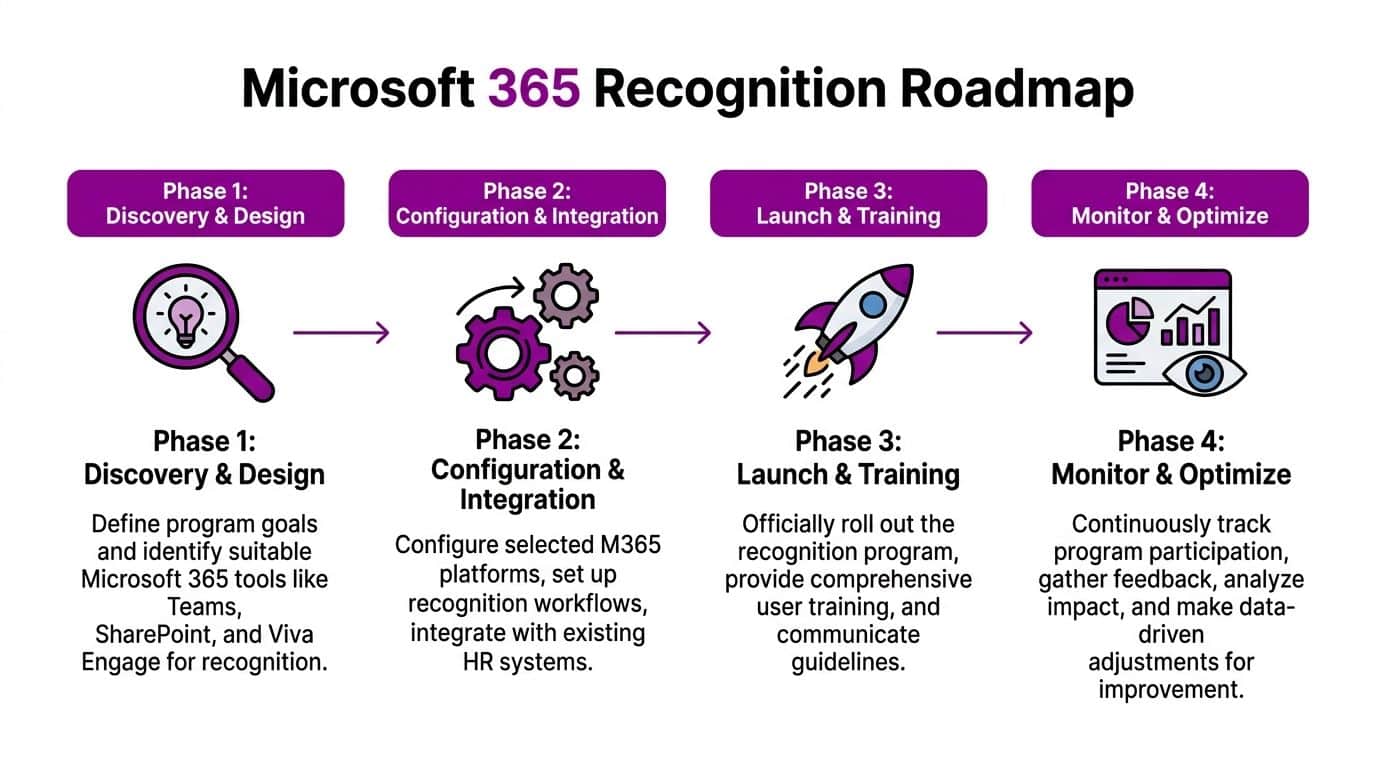
Phase one through four in practice
The roadmap is straightforward on paper. What matters is how disciplined the delivery is.
Discovery and design
Begin with process mapping, not screens.
Identify:
- which employee groups need access
- whether recognition is public, private, or both
- what HR data the app should reference
- whether Right to Work, organisational hierarchy or worker type affects eligibility
- which behaviours and categories will sit behind the form
At this stage, HR and IT need to agree whether recognition records are standalone social entries, linked employee records, or a mixture of both. In most cases, a layered model works best. The recognition event is visible to employees, while reporting and retention rules sit in Dataverse.
Configuration and integration
Build the user experience where people already spend time. For most organisations, that means Teams first.
A common deployment pattern looks like this:
| Microsoft component | Role in the programme |
|---|---|
| Teams | Front-end access point for giving and viewing recognition |
| Power Apps | Recognition submission form and employee interface |
| Dataverse | Secure record storage and relational data layer |
| Power Automate | Notifications, approvals if needed, and reminders |
| Power BI | Participation, equity and outcome reporting |
| Entra ID | Identity, access control and security groups |
| Hubdrive HR solution | Core HR context and employee master data |
Native architecture is necessary. If the recognition app has to sync imperfectly with employee records, teams, departments and security roles, reporting becomes unreliable. Native Dataverse design avoids much of that friction.
Launch and training
Adoption is usually won or lost in the first few weeks.
The launch plan should be simple:
- Train managers first: They set the tone even in peer-led models.
- Use realistic examples: Show staff what good recognition looks like.
- Clarify boundaries: Explain what shouldn’t be written in a recognition message.
- Keep the entry process short: Name, category, message, optional visibility setting.
I’ve seen many launches fail because they were explained like HR policy instead of a daily working habit. Staff don’t need a manifesto. They need a clear prompt in Teams, good examples, and visible use by leaders.
If users can recognise a colleague in under a minute inside Teams, the programme has a real chance of becoming routine.
Build it around operational reality
Recognition shouldn’t only work for office staff.
For field service, warehousing, manufacturing, care, retail support or mobile teams, consider these practical choices:
- Mobile-first forms: Power Apps should work cleanly on phones.
- Shift-aware notifications: Don’t time prompts for employees who aren’t working.
- Manager and peer routes: Some roles collaborate in patterns that don’t map neatly to department structures.
- Kiosk or shared device planning: Some teams won’t have individual laptops throughout the day.
For organisations reviewing their wider HR platform approach, this overview of Dynamics 365 HR and modern HR architecture is a useful reference point when deciding how recognition should fit into the broader hire-to-retire model.
What to configure inside Hubdrive and Power Platform
A practical implementation usually includes:
-
Recognition entity in Dataverse
Fields for sender, recipient, category, message, date, business unit, visibility, moderation status and reporting tags. -
Teams-embedded Power App
A lightweight interface for submitting recognition and browsing recent entries. -
Power Automate flows
Trigger recipient notifications, optional manager alerts, moderation flags, and digest summaries. -
Power BI dashboards
Track participation by department, role group, location, manager area and worker type. -
Security model
Use Entra ID groups and role-based access so employees, managers, HR and admins see the right data. -
Retention and deletion logic
Align with UK GDPR policy and HR record handling rules.
Keep the experience native and low-friction
The best technical compliment an employee can give is this. “It just feels like part of Teams.”
That’s the standard to aim for. If recognition feels like another portal, another password or another process, it won’t become embedded. If it feels like a normal part of the Microsoft environment employees already use, adoption is far more natural and support overhead stays lower.
Measuring Success and Demonstrating ROI
Most recognition programmes collect applause. Fewer collect evidence.
If HR wants lasting executive support, employee to employee recognition needs to show where participation is healthy, where it’s uneven, and whether it connects with broader business outcomes. That’s where Dataverse and Power BI become far more valuable than a standalone praise feed.
Leveraging platforms like Hubdrive on Dynamics 365, which use NLP-driven sentiment analysis on recognition messages in Teams and Power BI, can yield a 21% productivity increase by correlating recognition frequency with operational milestones and identifying engagement disparities for targeted intervention, according to HR Cloud’s employee recognition KPI discussion.
Measure the programme in layers
The mistake I see most often is tracking only volume. A high number of messages doesn’t necessarily mean the programme is working.
A better reporting model uses four layers.
Participation
This shows whether the programme is being used across the organisation.
Track patterns such as:
- who gives recognition
- who receives it
- whether usage is spread across departments
- whether frontline and non-desk teams are participating
- whether certain business units are absent
Quality
Quality matters as much as quantity.
Review whether messages are:
- linked to real behaviours
- specific enough to be meaningful
- consistent with organisational values
- drifting into vague praise or inappropriate content
Sentiment analysis can help flag tone patterns, but HR still needs human review and context.
Equity
A recognition dashboard should make imbalance visible quickly.
Useful views include:
| KPI area | What to look for |
|---|---|
| Department spread | One function dominating activity |
| Role spread | Support roles rarely recognised |
| Location spread | Head office receiving most visibility |
| Sender-recipient patterns | Small social clusters praising each other repeatedly |
| Manager area comparison | Teams with very low recognition flow |
Outcomes
Under these conditions, ROI becomes credible. Recognition data should sit alongside retention, absence, onboarding, performance or operational indicators where appropriate.
If a team shows low recognition activity and increased employee relations issues, that’s useful. If another shows broad participation and stronger stability, that’s useful too. The point isn’t to claim recognition caused every outcome. The point is to surface patterns leadership can act on.
What a strong Power BI dashboard should include
A practical executive dashboard should answer these questions quickly:
- Are employees using the programme consistently?
- Is usage concentrated in a few teams or broadly distributed?
- Are there signs of exclusion in hybrid or frontline groups?
- Which recognition categories are being used?
- Are there correlations between recognition activity and operational milestones?
The dashboard should also let HR drill down without exposing unnecessary personal data to every audience.
Recognition data is most useful when leaders can see patterns by team and role, while HR keeps tighter access to detailed content and moderation information.
A short product walkthrough can help stakeholders visualise how this looks in practice:
Turn data into action, not just reporting
The reporting cycle should trigger decisions.
For example:
- Low-use departments may need manager sponsorship or simpler access.
- Recognition clusters may indicate social bias.
- Weak frontline participation may point to mobile usability issues.
- Poor message quality may require coaching and examples.
- Uneven sentiment by role type may highlight a deeper employee experience problem.
A Microsoft-native setup pays off in this situation. Because recognition data sits alongside other business data in the same ecosystem, HR and operations teams can review patterns without stitching together spreadsheets from multiple systems.
That’s the difference between a feel-good initiative and a managed business practice.
Common Pitfalls and How to Mitigate Them
Most recognition problems aren’t caused by bad intent. They’re caused by loose design, weak follow-through, or assumptions that technology will fix culture on its own.
The biggest trap is believing that once the platform is live, the work is done. It isn’t. The primary work starts when employees begin using it at scale.
Pitfall one, recognition silos in hybrid teams
Hybrid organisations often assume digital tools automatically level the playing field. They don’t.
A 2025 UK CIPD survey found that 42% of mid-market HR leaders report recognition silos in hybrid setups, and those silos correlate with 31% higher voluntary turnover in under-recognised teams, according to Paycor’s article on employee recognition ideas.
That pattern is familiar. Employees who are physically present with decision-makers, or who work in highly visible roles, often receive more spontaneous recognition than people working remotely or in back-office support.
Mitigation
- Review recognition by department, location and role in Power BI.
- Prompt managers to widen examples used in team meetings.
- Create categories that surface less visible but high-value work.
- Make mobile and asynchronous access as easy as desktop use.
Pitfall two, the popularity contest problem
Some programmes become social theatre. The same well-known employees receive praise publicly while quieter contributors disappear.
You can usually spot this quickly. Messages become repetitive, clustered and personality-driven.
Mitigation
Use design and reporting together.
| Problem sign | Response |
|---|---|
| Same names appear repeatedly | Review message quality and broaden behavioural categories |
| Social groups recognise each other heavily | Coach managers and monitor sender-recipient patterns |
| Support functions get little visibility | Introduce examples tied to service, delivery and enabling work |
| Public feed dominates everything | Offer private recognition routes as well |
A good programme celebrates contribution, not social confidence.
Pitfall three, managers disengage because it’s “peer-led”
This is one of the most damaging misunderstandings. Peer recognition does not replace manager recognition.
If leaders step back completely, employees often read that as indifference. The programme then becomes a side activity rather than part of the culture.
Peer recognition works best when managers participate, reinforce examples, and use the data to understand their teams better.
Mitigation
Ask managers to do three things consistently:
- recognise directly themselves
- reference strong peer recognition examples in meetings
- review dashboard trends for their teams
That keeps leadership connected without turning every recognition message into a managerial approval workflow.
Pitfall four, poor message quality
When employees don’t know what good recognition looks like, messages get thin very quickly. “Great job” repeated at scale doesn’t build culture and doesn’t provide useful insight.
Mitigation
Give staff prompts inside the form itself:
- What did the person do?
- Why did it matter?
- Which value or behaviour did it reflect?
That light structure improves quality without making the experience feel formal.
Pitfall five, compliance issues hidden inside positive messages
Well-intentioned comments can still create problems. Employees may mention health details, family circumstances, protected characteristics or other sensitive content.
This is especially risky when messages are searchable, reportable and retained.
Mitigation
- Add clear submission guidance.
- Use moderation rules for flagged wording.
- Restrict detailed data access.
- Align retention with HR policy.
- Review edge cases with HR and IT, not just line managers.
Pitfall six, no operational ownership after launch
Programmes fade when nobody owns them beyond implementation.
HR may assume internal communications will sustain momentum. IT may assume HR is reviewing the data. Managers may assume the platform itself will drive usage.
It won’t.
A durable model usually assigns:
- HR ownership for policy, equity and outcomes
- IT ownership for access, integrations and support
- People manager responsibility for local adoption
- Executive sponsorship for visible legitimacy
Recognition needs light but active stewardship. Without that, the platform remains live while the culture around it goes quiet.
Peer Recognition in Action UK Case Studies
Abstract advice only goes so far. The shape of a good programme becomes clearer when you look at how different organisations apply the same principles to different problems.
These examples are anonymised and intentionally qualitative. The value is in the pattern, not in dressing them up as heroic transformation stories.

A logistics firm with invisible support work
A UK logistics business had a familiar problem. Drivers, planners and warehouse staff depended on each other constantly, but recognition was patchy and usually flowed only through line managers.
The business embedded a simple recognition app into Teams for office staff and mobile access for operational supervisors. Categories focused on service recovery, teamwork and problem solving.
The breakthrough wasn’t the technology alone. It was the decision to recognise enabling work, not just visible end results. Planners started acknowledging warehouse interventions. Supervisors highlighted cross-shift support. HR could finally see which parts of the operation were carrying hidden cultural load.
When support work becomes visible, employees stop feeling that only headline roles matter.
A professional services firm with hybrid imbalance
A consultancy had no shortage of praise. The problem was distribution.
Senior staff in the office were visible and regularly thanked. Remote delivery staff and business support teams were far less visible. The organisation thought it had a recognition culture, but the data showed that praise flowed through narrow channels.
The fix was governance plus reporting. The firm reworked recognition categories, embedded prompts into the submission form, and used Power BI to review patterns by function and work arrangement. Managers were then asked to use examples from under-recognised teams in team calls and business updates.
The result was a more credible programme. Not louder. More balanced.
A field service organisation that needed one system, not three
Another mid-market employer already had HR records in one system, informal praise in Teams chats, and reward requests handled manually by managers. Nothing joined up.
That created two problems. First, recognition wasn’t reportable. Second, HR had no confidence in data handling because messages and rewards sat across disconnected tools.
The organisation moved recognition into its Microsoft environment with Dataverse as the system of record and Teams as the user front end. That gave HR a cleaner governance model and gave managers a simpler employee experience.
The lesson was straightforward. Recognition is easier to sustain when it sits inside the normal flow of work and inside the same security model as the rest of the HR estate.
A manufacturing business that needed cultural consistency
This company had multiple sites and very different local management styles. Some teams used recognition naturally. Others barely used it at all.
A centrally governed employee to employee recognition model gave the business one framework across all sites, while still allowing local language and examples. HR used reporting to identify where the programme was thriving and where managers needed support.
What worked was consistency without rigidity. The system set the rules. Leaders supplied the context.
What these examples have in common
The organisations were different, but their successful choices were similar:
- They built recognition into Microsoft tools employees already used
- They set behavioural rules before launch
- They treated data governance seriously
- They monitored equity rather than assuming it
- They kept manager involvement visible
That combination is what makes employee to employee recognition stick.
We are DynamicsHub.co.uk. Experience HR transformation built around your business. Hubdrive’s HR Management for Microsoft Dynamics 365 is the premier hire‑to‑retire solution, more powerful, more flexible, and more future-ready than Microsoft Dynamics 365 HR.
Ready to build a culture of appreciation that drives real business results? Contact DynamicsHub. Phone 01522 508096 today, or send us a message at https://www.dynamicshub.co.uk/contact/ to discuss how we can help you integrate a world-class employee recognition programme.