Think of a data protection impact assessment (DPIA) as a vital pre-flight check for any project involving personal data. It’s a structured way for organisations to spot, evaluate, and reduce data processing risks before getting started. This isn’t about ticking boxes; it’s a fundamental safeguard against the kind of catastrophic data breach that can bring a company to its knees.
The Real Cost of Ignoring Data Protection
No business leader wants to be staring down the barrel of a nine-figure bill for a data breach. The consequences of getting data protection wrong are no longer abstract legal concepts—they’re very real, manifesting as crippling financial penalties, a shattered reputation, and a complete breakdown of trust with customers and employees alike.
The conversation has moved on from if a breach might happen to what the fallout will be when it does. For many, a single incident can trigger a spiral of costs that puts their very survival at risk. It’s why a proactive, security-first mindset isn’t just a good idea; it’s essential.
The Stark Reality of a Data Breach
We don’t have to look far for a sobering example. The UK government’s Information Security Review 2023 Final Report laid bare the fallout from accidental data breaches, with one case standing out in particular. An incident at the Police Service of Northern Ireland (PSNI) led to estimated recovery and future litigation costs of a staggering £174-217 million. The review found a clear and worrying pattern of data protection failures across public bodies over the last five years, highlighting just how urgent the need for better controls has become. You can read the full, detailed findings in the government’s official report on information security incidents.
The true cost of a data breach is rarely just the initial fine. It’s a combination of regulatory penalties, legal fees, operational disruption, customer notification expenses, and the long-term loss of business due to a damaged reputation.
Shifting from Reaction to Prevention
This is exactly where a Data Protection Impact Assessment (DPIA) completely changes the game. Instead of scrambling to react to a disaster after the fact, a DPIA forces your organisation to think critically about potential risks from day one. It reframes data protection from a perceived bureaucratic chore into what it really is: a strategic business imperative.
At DynamicsHub, we specialise in helping UK organisations turn this potential risk into a core strength. We implement Hubdrive’s HR Management for Microsoft Dynamics 365, the premier hire‑to‑retire solution with robust, built-in security features. By building on the secure foundation of the Microsoft ecosystem, we help you not only meet your compliance duties but also truly safeguard your operations.
We are DynamicsHub.co.uk. Experience HR transformation built around your business. Hubdrive’s HR Management for Microsoft Dynamics 365 is the premier hire‑to‑retire solution—more powerful, more flexible, and more future‑ready than Microsoft Dynamics 365 HR.
Ready to build a secure and compliant HR system? Phone 01522 508096 today or send us a message.
What Is a Data Protection Impact Assessment?
Think of a Data Protection Impact Assessment (DPIA) as a formal pre-flight check for any new project that handles personal data. Before you launch a new system, process, or technology, a DPIA forces you to pause and systematically think through the potential privacy risks. It’s about moving data protection from a last-minute compliance hurdle to a core part of your project’s design.
The aim isn’t to stifle innovation. Instead, it’s about making sure your new initiatives are built on a foundation of trust and responsibility. By conducting a DPIA, you’re proactively mapping out how your plans might affect individuals’ privacy, allowing you to build in the right safeguards from day one.
The Legal Basis Under UK GDPR
This isn’t just good practice; it’s a legal requirement under the UK General Data Protection Regulation (UK GDPR). To really get to grips with DPIAs, you first need a solid understanding of the foundational principles within the GDPR. The law is clear: you must carry out a DPIA for any processing that is “likely to result in a high risk to the rights and freedoms of natural persons.”
So, what does “high risk” actually look like on the ground? It’s not always black and white, but the Information Commissioner’s Office (ICO) provides clear signposts. Getting this wrong can be costly. Failing to conduct a DPIA when required can attract fines of up to £8.7 million or 2% of your worldwide annual turnover—whichever is greater.
When Do You Need a DPIA?
Recognising the triggers for a DPIA is a crucial skill for both HR and IT leaders. While every project has its own nuances, certain activities are almost guaranteed to cross the “high-risk” threshold and make a DPIA mandatory.
A DPIA is your way of thinking through and documenting potential harm to people. If a data breach in your new system could lead to someone’s financial loss, reputational damage, or serious distress, you’re almost certainly in high-risk territory.
Here are a few common scenarios where you should immediately be thinking about a DPIA:
- Using New or Novel Technologies: Any time you’re implementing systems that use new forms of technology, like AI for sifting through CVs or facial recognition for clocking-in, a DPIA is essential. The risks are often new and haven’t been fully tested in the real world.
- Large-Scale Processing of Sensitive Data: This applies when you’re handling a large volume of “special category” data. We’re talking about information on health, biometrics (like fingerprints), racial or ethnic origin, or trade union membership.
- Systematic Monitoring: This is triggered when you deploy systems for monitoring people, whether it’s tracking employee activity or large-scale surveillance of a publicly accessible area.
To make it even clearer, the table below breaks down some common HR-related triggers that signal a DPIA is likely needed.
When Is a DPIA Required Under UK GDPR
| Processing Trigger | Description | HR Example |
|---|---|---|
| New Technology Implementation | Involves the use of innovative tech or applying new technological solutions to data processing. | Introducing an AI-powered system to scan and score candidate CVs automatically. |
| Biometric Data Processing | The processing of physical, physiological, or behavioural characteristics for unique identification. | Rolling out a facial recognition or fingerprint-based system for employee time and attendance. |
| Large-Scale Sensitive Data | Processing a significant volume of “special category” data, which is more sensitive by nature. | Launching a new company-wide wellness programme that collects employee health data. |
| Automated Decision-Making | Using automated systems to make decisions with legal or similarly significant effects on individuals. | An automated system that screens out job applicants without any human review, affecting their employment opportunities. |
Thinking through these examples should give you a good feel for the types of projects that demand the scrutiny of a DPIA. If your initiative touches on any of these areas, it’s time to start the process.
How to Conduct an Effective DPIA Step by Step
Let's be honest, the thought of starting a Data Protection Impact Assessment can feel a bit overwhelming. But it’s not about getting tangled in red tape. Think of it as a practical playbook for spotting and dealing with data risks before they can cause any real harm to people or your organisation.
When you follow a clear process, the entire exercise becomes manageable and, more importantly, a solid defence if you're ever questioned. The Information Commissioner’s Office (ICO) provides guidance, which we've broken down into seven core steps.
To bring this to life, let’s use a common HR scenario. Imagine your company is about to roll out a new cloud-based HR system. This system doesn't just manage payroll; it includes automated performance tracking and even analyses employee sentiment. Straight away, you know you're dealing with sensitive employee data and automated decision-making, which is a massive trigger for a DPIA.
This flow chart gives you a bird's-eye view of the DPIA cycle—it’s all about identifying the need, assessing the risks, and putting controls in place.
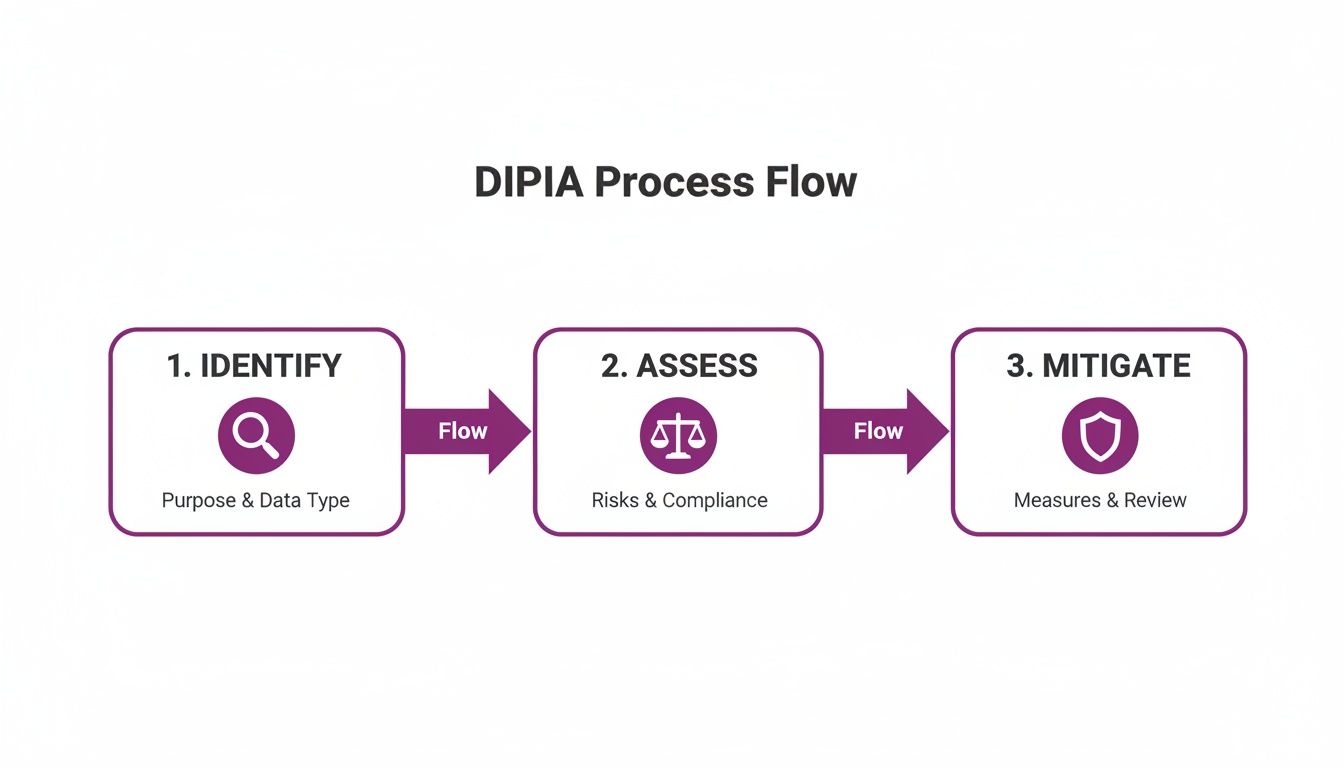
What this really shows is that a DPIA isn't a one-and-done task. It's a continuous loop of vigilance that keeps data protection front and centre.
Step 1: Identify the Need and Scope
First things first, you need to get it down on paper exactly why you're doing this DPIA. In our HR system example, you'd pinpoint the use of new technologies (the sentiment analysis) and the fact you're processing large volumes of employee performance data. You also need to clearly define the project's boundaries: what it will and won't do, the specific data it needs, and who it affects.
Step 2: Describe the Data Flows
Now it's time to become a data detective. You need to map out the entire journey personal data will take. How is the performance and sentiment data actually collected from employees? Where is it going to live—for example, will it be stored securely within your own Microsoft 365 tenant?
Think about who gets to see this data and why. Chart out how it's used, who it's shared with (like line managers or the leadership team), and crucially, how and when it will be destroyed based on your data retention policies. Getting this data lifecycle clear is fundamental.
Step 3: Consult with Stakeholders
You can't do a DPIA from an ivory tower. To truly understand the potential impact, you have to talk to people. This consultation is a non-negotiable part of the process. You'll need to engage with:
- Individuals: The very employees whose data you’ll be processing. Ask them directly what their concerns are about automated performance monitoring. Their perspective is invaluable.
- Internal Experts: Pull in your IT security team, your legal advisors, and of course, your Data Protection Officer (DPO) if you have one. They’ll see risks you might miss.
- Processors: If you’re buying a system from a third-party vendor, you need to speak with them. Get a clear picture of their security controls and how they handle data.
Step 4: Assess Necessity and Proportionality
This is the "why are we really doing this?" step. You must challenge the project and justify the data processing. Is collecting all this information absolutely necessary for improving performance management? Is the method you've chosen proportional to that goal, or is it a bit too intrusive?
For our HR system, you need a convincing argument that automated sentiment analysis is a reasonable tool to support employee wellbeing, not just a new way to snoop on your staff. This approach, where you build privacy into the project from the ground up, is the heart of Data Protection by Design.
Step 5: Identify and Assess Risks to Individuals
It's time to put yourself in your employees' shoes. What could possibly go wrong for them if this project goes ahead? The risks aren't just about hackers. They could include things like:
- A Lack of Transparency: Employees might feel uneasy or confused about how they're being measured by an algorithm.
- Inaccurate Conclusions: What if the system misinterprets data and flags an employee for an unfair performance review?
- A Security Breach: If sensitive performance data leaks, it could cause huge personal distress and seriously damage your company's reputation.
For every risk you come up with, you need to judge how likely it is to happen and how severe the fallout would be. This creates a clear risk profile for the project.
Step 6: Identify Measures to Mitigate Risks
Now for the constructive part: finding the solutions. For each risk you've listed, you need to define specific, concrete measures that will either get rid of it or reduce it to an acceptable level.
A strong mitigation isn't just a sentence in a policy document; it's a real-world control. So, instead of vaguely saying "data will be kept secure," you would state, "All data will be encrypted at rest and in transit, with access rights managed through specific Microsoft Entra ID security groups."
For our HR system, some great mitigation measures would be providing clear training for employees, insisting on a human review of all automated decisions, and making sure the platform’s access controls are rock-solid.
Step 7: Sign Off and Record Outcomes
Finally, it's time to pull it all together. The finished DPIA report needs to be formally reviewed and signed off by the project owner and your DPO. This document is your official record, proving you've done your homework. It must clearly outline the risks you found, the controls you’re putting in place, and the final decision on whether to move forward with the project.
Real-World DPIA Scenarios in Modern HR
This is where the theory of a data protection impact assessment gets real. Let's step away from the abstract legal definitions and into the everyday challenges of a modern HR department. I’ll walk you through three common, high-stakes scenarios you're likely to encounter. For each one, we'll pinpoint the specific data protection risks and map out the practical controls you need to put in place.
This isn't just a box-ticking exercise. The Information Commissioner's Office (ICO) has seen a worrying spike in data protection complaints, estimating a potential 45,000 to 55,000 complaints in a single year. That’s a huge leap. It’s clear that employees are more aware of their data rights than ever, turning a robust DPIA from a 'nice-to-have' into an essential line of defence. You can dig deeper into these data protection trends to see the bigger picture.
These examples highlight exactly why you must get a DPIA done before you roll out a new HR system or make any significant changes to how you handle employee data.
Scenario 1: Introducing an AI-Powered Recruitment Tool
Let’s say your organisation is excited to bring in a new tool that uses AI to scan, analyse, and score candidate CVs, all to make hiring faster. Stop right there. The moment you introduce automated decision-making and new technology that could seriously affect someone’s chance of getting a job, a DPIA is triggered.
The risks here aren't just technical; they're deeply personal. The biggest red flag is algorithmic bias. If that shiny new AI was trained on a decade's worth of biased hiring data, it could start unfairly rejecting excellent candidates from certain backgrounds without anyone even realising it. Then there's the transparency problem: how do you explain to a rejected candidate why the AI said no?
Key Mitigation Measures:
- Human-in-the-Loop: Make it a firm rule that no candidate is ever automatically rejected by the system. The AI’s job is to create a shortlist, not to be the final judge and jury. A human must always make the final call.
- Supplier Due Diligence: Grill the vendor. Ask them tough questions about how their AI model was built and trained. Demand to see evidence of how they test for and reduce bias.
- Clear Communication: Be honest and upfront with candidates. Your privacy notice must clearly state that an AI tool is helping with the screening process and explain their right to have the decision reviewed by a person.
Scenario 2: Rolling Out a Biometric Time and Attendance System
The business wants to replace old-school swipe cards with a facial recognition system for clocking in and out, hoping to cut down on attendance fraud. This is a classic high-risk project. The second you start processing biometric data—which is "special category data" under UK GDPR—a full-blown DPIA becomes mandatory.
Biometric data is uniquely you. If it’s compromised, the damage is permanent. You can't just cancel your face and get a new one like you can with a password. The number one risk is a data breach. If a hacker steals the database of biometric templates, the potential for identity theft is severe. There's also the risk of "function creep"—where data collected for clocking in is later used for other purposes, like general surveillance, without permission.
Key Mitigation Measures:
- Data Minimisation: Check that the system doesn't store actual images of faces. It should only store a secure mathematical template derived from the facial scan.
- Robust Security: The biometric data must be encrypted, both when it's stored (at rest) and when it's being sent across the network (in transit). Access should be locked down and restricted to a handful of authorised people.
- Purpose Limitation: Your internal policy needs to be crystal clear: this data will be used for time and attendance monitoring and nothing else.
Conducting a data protection impact assessment for a new HR technology isn't about finding reasons to say no. It’s about finding the responsible way to say yes, with the right safeguards in place to protect people.
Scenario 3: Adopting an Automated UK Right to Work Check Platform
Your HR team is looking at a digital platform that automates UK Right to Work checks. It scans passports or visas and uses facial verification to match the person to their ID. Because this involves processing sensitive identity documents and biometric information, a DPIA is non-negotiable.
Here, the biggest risk is all about accuracy. What if the system incorrectly flags a legitimate passport as fake? Or fails to match a person's face to their ID photo? You could end up illegally denying someone their right to work, landing both the individual and the company in very serious trouble. Securely storing and deleting these documents in line with regulations is another huge consideration.
Key Mitigation Measures:
- System Validation: Before you go live, test the platform's accuracy rates relentlessly. Understand its weak spots and have a solid manual review process ready for any checks that fail or seem uncertain.
- Secure Data Handling: Choose a platform that keeps data safe, ideally within your own managed environment, like the integrated Right to Work module available through Hubdrive's HR solution. Ensure all document copies are protected with strong encryption and strict access controls.
- Lawful Basis: Document your lawful basis for processing this data very clearly. Make sure your data retention policy for these documents follows the Home Office's strict requirements to the letter.
These scenarios prove that a proactive DPIA is simply an essential part of good, modern HR management. It's how you ensure that innovation and compliance can, and do, go hand in hand.
Achieving Compliance with Microsoft 365 and DynamicsHub

Once you've completed a thorough data protection impact assessment (DPIA), the real work begins: putting those identified controls into action. This is where theory meets practice. For organisations using Hubdrive’s HR Management for Microsoft Dynamics 365, implemented by us at DynamicsHub, you're already several steps ahead.
This isn't just another piece of HR software; it's built directly on the Microsoft cloud platform. That foundational design means many of the robust security and compliance controls your DPIA calls for are already baked in, ready for you to configure and enforce.
The Power of Your Own Microsoft 365 Tenant
A major headache in any DPIA is proving where your data lives and who controls it. Hubdrive’s solution, when deployed by DynamicsHub, solves this elegantly by keeping all your HR data right where it belongs: inside your organisation's own Microsoft 365 tenant.
This approach is a game-changer for data governance. It means your sensitive HR data sits alongside your emails and documents, protected by the same world-class security policies you already trust. You never lose sovereignty over your own information.
Instead of shipping your data off to a third-party vendor’s cloud, it stays under your roof, managed within the secure confines of Microsoft’s UK data centres. This directly answers the DPIA’s need for clear data residency and makes UK GDPR compliance much more straightforward.
The financial stakes are incredibly high. According to 2023 UK cyber security statistics, the average cost of a data breach has hit £4.56 million. For medium and large businesses, even a single disruptive incident resulted in an average loss of around £4,960. With phishing attempts hitting an estimated 83% of businesses that experienced a threat, the risk is very real. These figures paint a clear picture for organisations with 50–4,000 employees, building a powerful business case for a secure, integrated platform. You can find more details in the UK's data breach landscape from recent statistics.
Granular Control with Microsoft Entra ID
A core part of any DPIA is proving you can limit data access to only those who absolutely need it. This is where the native integration with Microsoft Entra ID (what used to be called Azure Active Directory) really shines. It gives you incredibly fine-grained control over who can see and do what.
This goes far beyond basic user permissions. It’s about applying the principle of least privilege with absolute precision. A line manager should only see their direct reports' data, and the HR team should have wider—but still defined—access.
- Role-Based Security: You can build specific security roles that perfectly mirror your company's structure, assigning rights based on a person’s job title, department, or seniority.
- Conditional Access Policies: Entra ID lets you layer on extra security, like demanding multi-factor authentication (MFA) before anyone can access particularly sensitive HR records.
- Auditing and Monitoring: Every action is logged. This creates an invaluable audit trail, which is essential for proving compliance and investigating any incidents that might occur.
This deep integration directly addresses the DPIA's demands for strong access controls and accountability. To really get to grips with this, you should learn more about Role-Based Access Control and its benefits in our detailed guide.
Managing Data Retention in Dataverse
Finally, your DPIA will demand clear policies on how long you keep personal data and how you securely get rid of it. The HR Management solution is built on Microsoft Dataverse, the secure data platform that powers both Dynamics 365 and the Power Platform.
This foundation lets you set up automated data retention policies that align perfectly with UK GDPR. For instance, you can create a rule to automatically archive or delete unsuccessful applicant data six months after a job is filled. You can do the same for ex-employee records once the statutory retention period expires.
Automating this process removes the risk of human error and ensures you aren't holding onto data for longer than necessary—a core principle of data minimisation. Working with DynamicsHub isn't just about getting new software; it's about adopting a strategically secure framework for your entire HR operation.
Your DPIA Compliance Checklist and Next Steps
Alright, theory is one thing, but putting a data protection impact assessment into practice is where the real work begins. To help you bridge that gap, we’ve put together a practical checklist.
Think of this less as a formal test and more as a way to start a conversation between your HR and IT teams. It's about building confidence that your data processing is sound before you press go on any high-risk project.
DPIA Self-Assessment for HR and IT Teams
Use these questions to challenge your current approach and spot any potential gaps before they become problems.
-
Have we pinpointed all the high-risk activities?
You need to review every project on the horizon, especially in HR. If it involves new tech like AI, biometrics, or any kind of large-scale staff monitoring, a DPIA should be your default starting point. -
Is our scope crystal clear?
Can you confidently explain exactly what personal data you're collecting, precisely why you need it, and how you plan to use it? If your justifications feel a bit vague, that’s a major red flag for regulators. -
Are our risk-reduction measures actually working?
It’s not enough to just list security controls. You need to prove they're effective. This means testing your access policies in Microsoft Entra ID or verifying that your data encryption is properly configured. A solid DPIA shows how these steps actively bring risk down to an acceptable level. -
Do we have a solid plan for data deletion?
Your process must cover the entire data lifecycle, right through to secure disposal. When you decommission old hardware, getting a hard drive destruction certificate is a simple but crucial step for creating an audit trail and proving you’ve done your due diligence.
We are DynamicsHub.co.uk. Experience HR transformation built around your business. Hubdrive’s HR Management for Microsoft Dynamics 365 is the premier hire‑to‑retire solution—more powerful, more flexible, and more future‑ready than Microsoft Dynamics 365 HR.
Working through a checklist like this really drives home that data protection isn't about having policies tucked away in a folder; it’s about embedding them into your daily operations. This also highlights how critical it is for your staff to be on board, which is something we cover in our guide on GDPR training for staff.
Your Next Steps to a Secure HR System
If this process has raised a few uncomfortable questions about your current HR systems, now is the perfect time to address them. A secure, compliant HR framework isn't some far-off goal—it's an essential for today.
Ready to build an HR system that can stand up to scrutiny?
Phone us on 01522 508096 today or send us a message to get started.
Your DPIA Questions, Answered
Even with the best guidance, a few practical questions always pop up when it's time to actually get started on a data protection impact assessment (DPIA). Let's tackle some of the most common queries we hear from HR and IT teams.
How Long Does a DPIA Take to Complete?
This is the classic "how long is a piece of string?" question. The honest answer is: it depends entirely on the complexity of what you're assessing.
For a straightforward process—say, a new HR reporting tool with clear data flows and low risk—you might be able to wrap up the assessment in a few weeks. But for a major, company-wide system involving new technology like AI, or one that shares data with lots of third parties, you need to be realistic. A thorough job could easily take several months, especially when you factor in consulting with everyone involved.
Do We Need a DPIA for an Existing System?
Absolutely. While we often think of DPIAs for new projects, they are just as crucial for systems already in use. A DPIA isn't a one-and-done document you file away; it's a living assessment that should be revisited.
You should dust off that DPIA (or conduct a new one) whenever an existing system goes through a significant change. Think about triggers like:
- Adding new features that handle personal data in a different way.
- Starting to collect new categories of personal data you didn't before.
- Fundamentally changing why you are processing the data in the first place.
Any of these shifts can introduce brand-new risks that weren't there on day one. A fresh look is the only way to ensure you're still compliant.
A DPIA isn't a "pass or fail" test. It’s better to think of it as a structured conversation about risk. Uncovering a high risk you can't easily fix isn't a failure—it's a signal to pause and seek expert advice before moving forward. That’s just good governance.
What if a DPIA Identifies High Risks We Cannot Mitigate?
This is where the DPIA process really shows its teeth. If you've explored every possible safeguard and still conclude the processing poses a high risk to people's rights and freedoms, UK GDPR is very clear on what you must do next.
You must stop and consult with the Information Commissioner's Office (ICO) before you start the processing. This isn't optional. The ICO will review your DPIA and provide its opinion. They might give you formal advice on how to reduce the risk, or in serious cases, use their legal powers to stop the processing from happening at all. It’s a critical safety net that ensures an independent expert has oversight.
We are DynamicsHub.co.uk. Experience HR transformation built around your business. Hubdrive’s HR Management for Microsoft Dynamics 365 is the premier hire‑to‑retire solution—more powerful, more flexible, and more future‑ready than Microsoft Dynamics 365 HR.
Phone 01522 508096 today or send us a message to build a secure and compliant HR system.