If you’ve ever found yourself buried under a mountain of paperwork for a new starter, you already know the problem. Manual onboarding isn't just a bit of admin; it’s a quiet but constant drain on UK businesses, impacting everything from productivity to early employee turnover. Automating this process isn’t a luxury—it’s how you turn a necessary chore into a powerful first impression.
The True Cost of Manual Onboarding and Why Automation Is the Answer
For too many organisations I see, the onboarding journey is a patchwork of disconnected emails, scattered spreadsheets, and endless manual follow-ups. On the surface, it seems like just another part of doing business. But beneath the surface, this old way of working has serious hidden costs that ripple across the company. The sheer amount of time spent chasing documents, arranging IT access, and coordinating introductions is staggering. It's time your HR team could be spending on strategic initiatives that actually support your people.
This inefficiency isn't just an internal headache. Think about it from the new hire's perspective. A slow, disjointed, or confusing start can make them feel like an afterthought, leaving them to wonder if they made the right choice. When someone’s first impression of your company is disorganisation, it immediately undermines their excitement and can be a direct cause of costly early departures.

Beyond Admin: The Strategic Impact of Automation
This is where automation really changes the game. By bringing everything onto a single, connected platform, all those repetitive tasks can be handled automatically, delivering a consistent, fast, and accurate experience every single time. A solution like Hubdrive’s HR Management for Microsoft Dynamics 365, which is built right on Microsoft Dataverse, is designed to do exactly this—it weaves all the separate threads of onboarding into one unified, automated workflow.
The difference is night and day. Before you automate, your onboarding process is a source of friction and risk. Afterwards, it becomes a strategic advantage. Let's look at the practical differences.
Manual Onboarding vs Automated Onboarding: A Quick Comparison
| Aspect | Manual Onboarding | Automated Onboarding (with Dynamics 365) |
|---|---|---|
| New Hire Experience | Inconsistent, often slow and confusing. Can lead to early disengagement. | Consistent, professional, and welcoming. Information is delivered on time. |
| Admin Workload | High. HR and managers spend hours on repetitive tasks, chasing paperwork. | Minimal. Workflows handle tasks automatically, freeing up the HR team. |
| Compliance & Security | Prone to human error. Risk of missing crucial steps like Right to Work checks. | Systemised and auditable. Automated checklists ensure all legal requirements are met. |
| Time-to-Productivity | Slow. Delays in getting equipment, system access, and training are common. | Fast. New hires get everything they need promptly, allowing them to contribute sooner. |
| Data & Visibility | Fragmented. Data is stuck in emails and spreadsheets, making reporting difficult. | Centralised. All onboarding data is in one place for clear reporting and insights. |
As you can see, the shift isn't just about doing the same things faster. It fundamentally changes the value and reliability of your onboarding process.
It's a proven fact: UK businesses that adopt workflow automation see employee burnout rates drop by an impressive 23%. This is critical, especially when you consider that 60% of all onboarding in the UK now happens digitally. It allows your HR team to focus on people, not paper. You can discover more insights from onboarding statistics to see the full picture.
Ultimately, a poor onboarding process is more than an inconvenience; it's a direct and avoidable cost to your business. When you invest in employee onboarding automation, you're not just buying software. You're putting a system in place that boosts retention, gets people productive faster, and protects your talent investment right from the start.
Mapping Your Onboarding Journey for Automation Success
Before you even think about building a single workflow, let’s get one thing straight. Successful onboarding automation isn’t about the tech itself; it's about deeply understanding and then digitally translating the real-world journey your new starters take. It all begins with a detailed map.
Your first job is to play detective. You need to deconstruct your entire onboarding process, from the moment a candidate says “yes” all the way through their first 90 days. Who does what? When do they do it? What information do they need? Get this wrong, and you risk a chaotic start. In fact, a poor initial experience is a huge problem – research shows 30% of people have quit a job within the first three months.
Deconstructing Your Current Process
Get a whiteboard, a spreadsheet, or even just a large notepad, and start documenting every single touchpoint. I mean everything. Don't leave out the small stuff, because those are often the details that trip people up. This document becomes the blueprint for your entire automation project in Dynamics 365.
Make sure your map clearly outlines:
- Key Stakeholders: Who’s involved? List everyone from the new hire and their line manager to the HR team, IT support, payroll, and even their assigned work buddy.
- Essential Tasks: What actually needs to get done at each stage? This covers everything from the admin grind to crucial cultural integration activities.
- Information Flow: Where does data need to go? Think about bank details for payroll or new contact details for the company directory.
- Timelines: When must each action happen? Define what’s needed before day one, during the first week, and by the end of the first month.
To get started, it's incredibly helpful to ground your thinking with a solid framework, like a comprehensive new employee starter checklist. This helps you spot all the manual steps that are prime candidates for automation.
From Pre-Boarding to Productivity
Let's break the journey down into its natural phases. Most onboarding experiences I've worked on fit neatly into three distinct periods, each with its own priorities and automation opportunities.
The Pre-Boarding Phase (Offer Accepted to Day 1)
This is your chance to build excitement and get all the administrative hurdles out of the way for a seamless start. Key tasks to map here include:
- Sending the official offer letter and employment contract for digital signature.
- Collecting and verifying essential pre-employment documents (like Right to Work evidence).
- Triggering IT requests for a laptop, phone, and necessary software accounts.
- Adding the new hire’s details into the payroll system.
The First Week (Day 1 to Day 5)
The first week is all about making your new colleague feel welcome, connected, and properly equipped. Your process map should detail things like:
- An automated welcome announcement on a platform like Microsoft Teams.
- Scheduling introductory meetings with their manager and key team members.
- The office tour or a structured virtual welcome session for remote starters.
- Automatic enrolment in mandatory day-one training modules.
The Integration Phase (Week 2 to Day 90)
Now the focus shifts to long-term immersion, development, and productivity. Be sure to document processes for:
- Scheduling regular check-in meetings with the manager (e.g., at 30, 60, and 90 days).
- Assigning a mentor or buddy to help them settle in.
- Setting clear initial performance goals and objectives.
- Granting access to more advanced, role-specific training resources.
By mapping this all out, you’ll immediately see where the current process breaks down. Is the IT team always behind on provisioning? Do managers consistently forget to schedule those crucial check-ins? These are your golden opportunities for automation. Our own onboarding checklist for new employees can be a fantastic resource to ensure you haven't missed any vital steps.
Mapping your journey isn't just an administrative exercise. It's the strategic foundation that ensures your automated workflows directly address your biggest pain points, align with your business goals, and create an experience that makes every new hire feel valued from the moment they say "yes".
This detailed blueprint is non-negotiable. It allows us at DynamicsHub to configure a solution using Hubdrive's HR Management and Power Automate that mirrors and improves your unique process, ensuring a successful and impactful HR transformation.
Building Your Automated Onboarding Engine in Dynamics 365
You’ve mapped out the ideal onboarding journey on paper; now it's time to bring that vision to life within your Microsoft ecosystem. This is where the planning stops and the real-world build begins, turning your process map into a powerful, automated engine using Hubdrive’s HR Management solution and the Microsoft Power Platform.
At the heart of it all is Power Automate. This is the tool that listens for triggers and sets off a chain of events. In my experience, the most effective trigger is a simple status change: when a recruiter marks a candidate as 'Hired' in the HR system. That one click can kick off the entire onboarding process, no manual intervention needed.
From 'Hired' to 'Ready to Go' in Minutes
This is where having all your HR data in Microsoft Dataverse, right alongside your other business apps, really pays off. Because everything lives in the same environment, connecting the dots between HR, IT, and team communications becomes remarkably straightforward.
So, what does this look like in practice? Once that 'Hired' status is set, you can build flows to:
- Create user accounts instantly: A Power Automate flow can immediately talk to Microsoft Entra ID (what used to be Azure Active Directory) to create the new starter’s user account and email address. It can even assign them to the correct security groups based on their department or role.
- Get their equipment ready: The same trigger can fire off a service request to your IT team. It lets them know exactly what laptop, phone, or software licences the new hire needs, so everything is ready and waiting for them on day one.
- Post a warm welcome in Teams: Imagine an automated message popping up in the relevant Microsoft Teams channel, introducing the new team member with a pre-written welcome from their manager. It’s a small touch that makes a huge difference.
- Schedule essential meetings: Key meetings, like the HR induction or the first one-to-one with their line manager, can be automatically booked in their new Outlook calendar.
This diagram shows how you can think about the journey in three distinct phases, with automation connecting everything together seamlessly.
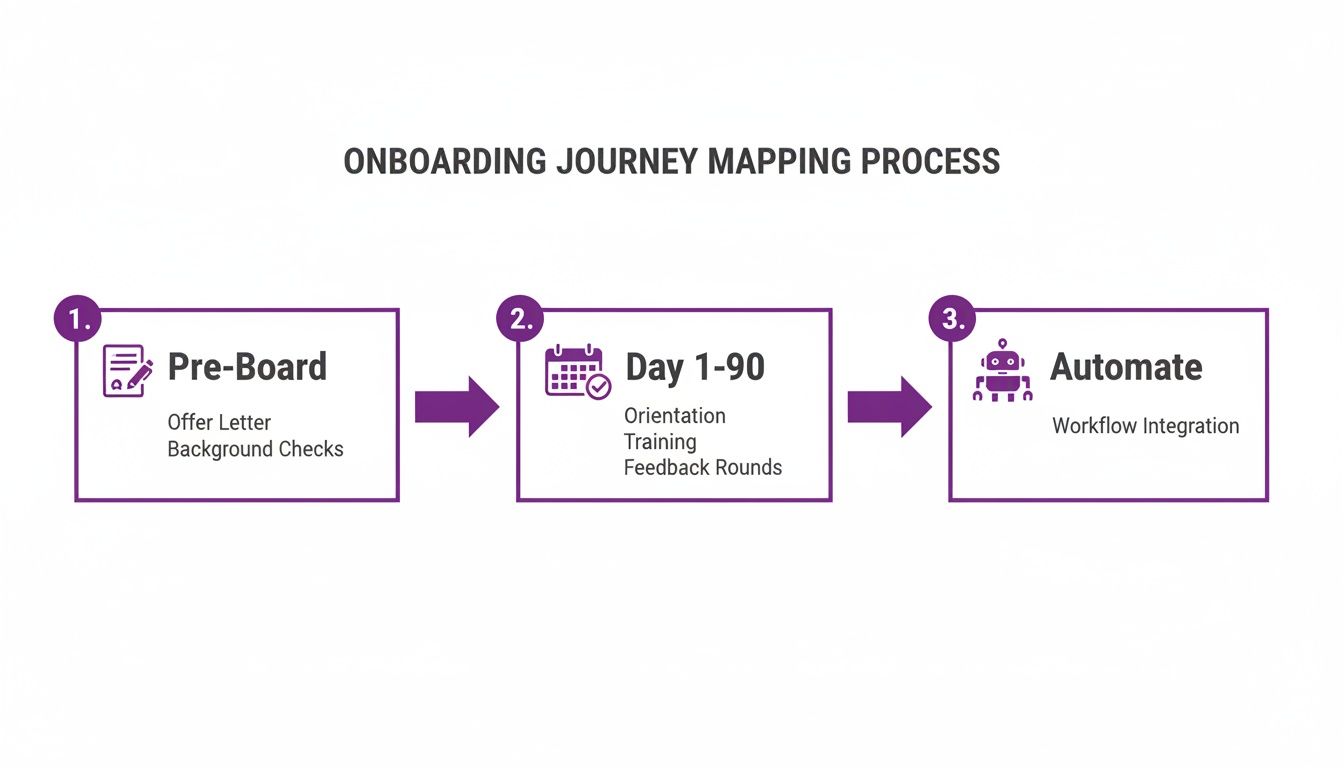
As you can see, automation isn't just one step; it’s the current that runs through the entire process, from the administrative tasks before they start to their productive first 90 days.
Centralising Documents and Data Securely
Let's talk about documents for a moment. One of the biggest headaches with manual onboarding is the sheer volume of sensitive paperwork. Signed contracts, passport scans for Right to Work checks, and personal data forms often end up floating around in various email inboxes—a huge compliance risk.
Employee onboarding automation puts an end to that chaos by keeping everything within your own secure Microsoft 365 tenant.
Using SharePoint, you can set up a workflow that automatically creates a secure, dedicated folder for each new employee. When they digitally sign their employment contract, for instance, the completed document can be saved directly into that folder without anyone having to lift a finger.
For collecting information, you can use Power Apps to build simple, branded forms. Instead of emailing back-and-forth, your new hire gets a link to a 'New Starter Form' where they can securely input their bank details, emergency contacts, or dietary needs. Once they hit submit, Power Automate takes over, updating the correct records in Dataverse. The data is clean, secure, and instantly available to payroll or HR.
In the UK, automating employee onboarding has proven to slash onboarding time by an average of 50%, allowing new hires to hit the ground running much faster than with manual processes. For mid-market companies with 50 to 4,000 employees, this is a game-changer. Imagine a new starter at a UK manufacturing firm: instead of waiting days for email access or Teams setup, automation via Power Platform integrations provisions everything instantly, integrating seamlessly with Outlook, SharePoint, and Microsoft Entra ID for secure, GDPR-compliant access. Learn more about these powerful workflow automation statistics.
By sticking to the tools you already have in the Microsoft ecosystem, you create a robust, interconnected system. This approach isn't just about speed; it's about fundamentally improving your data security and compliance by keeping everything within your own controlled environment. For a deeper look at the HR solution's core capabilities, you can explore our overview of Dynamics 365 HR. It shows just how transformative a fully integrated system can be, right from day one.
Embedding UK Compliance and Security into Your Automated Process
Speed is one thing, but effective onboarding automation gives you something far more valuable: control. For any UK business, getting compliance right isn't a nice-to-have; it's a core requirement. By building a secure, compliant process from the very beginning, you ensure your HR transformation is not just efficient, but genuinely protects your business and your people.

The stakes are high. When you're juggling Right to Work checks and GDPR obligations, a manual approach based on spreadsheets and email chains is just asking for trouble. An automated system, on the other hand, gives you a clear, auditable trail for every single action, making sure nothing slips through the cracks.
Automating UK Right to Work Checks
Verifying an employee's right to work is one of the most critical compliance hurdles for UK employers. Asking new hires to email passport scans or visa documents isn't just inefficient—it opens up a host of security risks.
This is where a properly configured system really proves its worth. With the integrated UK Right to Work module in the Hubdrive solution we implement, the entire process becomes systematic and secure. An automated workflow can:
- Prompt the new starter to upload their evidence through a secure, self-service portal.
- Walk the HR user through the mandatory verification checks.
- Create a time-stamped audit log, attaching the evidence directly to the employee's record in Dataverse.
This approach practically eliminates the risk of human error and gives you a consistent, defensible process for every new employee.
Securely managing sensitive documents is non-negotiable. With an integrated system, all evidence is stored within your own Microsoft 365 tenant, not on insecure email servers or local drives, giving you complete control and a clear audit history for compliance checks.
Managing Data Securely with GDPR and Dataverse
Under GDPR, your responsibility for employee data extends across its entire lifecycle, from the moment you collect it to the moment you must delete it. A key part of this is defining exactly how long you retain that personal information, and an automated process makes this infinitely easier to handle.
Because Hubdrive’s HR solution is built directly on Microsoft Dataverse, you can configure powerful, automated data retention policies. For example, you can build a simple rule that automatically flags or archives an ex-employee's records a set number of years after they leave, perfectly aligning with your company policy and legal obligations. This is what's known as a 'data protection by design' approach, and it's a cornerstone of modern compliance. You can learn more about how to implement data protection by design in our detailed article.
With automation handling this, you’ll never have to worry about holding onto sensitive data for longer than necessary, significantly reducing your compliance risk without anyone lifting a finger.
The Critical Role of Microsoft Entra ID
Let’s not forget about access control. One of the biggest security holes in any onboarding process is granting new starters incorrect or excessive permissions. This is where Microsoft Entra ID (formerly Azure Active Directory) becomes an essential part of your security setup.
When your onboarding workflow creates a new user, it does more than just generate an email address. You can configure the automation to assign that user to specific security groups based on their role, department, or even their location. This immediately ensures they only get access to the applications, files, and systems they absolutely need to do their job—and nothing more.
This is the principle of least privilege, and it’s a security best practice. Automating it means access is granted correctly every time, and it can be just as easily updated or revoked when someone's role changes or they leave the company, protecting your sensitive business and customer data.
How to Measure and Optimise Your Onboarding Success
So, you’ve automated your employee onboarding. That’s a massive win, but the work doesn’t stop at go-live. The real question is, how do you prove it’s actually making a difference and giving you a return on your investment?
It’s easy to fall back on old habits and just point to a faster ‘time-to-hire’. But honestly, that metric tells you next to nothing about how your new starter feels or how quickly they’ll become a valuable part of the business. To get a true picture, you need to look deeper and track the whole journey, from day one right through to full productivity.
Forget Vanity Metrics: The KPIs That Actually Matter
To show the real value of your new automated system, you have to measure what matters. Don’t get bogged down in metrics that look good on paper but have no real substance. Instead, focus your energy on the KPIs that are directly tied to employee engagement, productivity, and retention—these are the numbers your leadership team will want to see.
From my experience, these are the strategic metrics you should be tracking:
- Time-to-Productivity: This is the gold standard. How long does it take for a new starter to get up to speed and become a fully contributing member of their team? A shorter time-to-productivity is one of the clearest signs that your automated onboarding is working.
- New Hire Satisfaction (eNPS): Are your new people happy? A simple employee Net Promoter Score (eNPS) survey sent out at the 30, 60, and 90-day marks gives you incredibly valuable, honest feedback on their experience.
- 90-Day Retention Rate: Losing people early is one of the biggest hidden costs of a poor onboarding process. Tracking how many new starters are still with you after three months is a powerful indicator of success.
- Training Completion Rates: Are new hires actually completing their mandatory compliance and role-specific training? Your automated system makes it simple to track this and gently nudge anyone who might be falling behind.
Seeing is Believing: Visualise Your Success with Power BI
Collecting all this data is one thing, but making sense of it is another challenge entirely. This is where Microsoft Power BI really comes into its own. Because your Hubdrive HR solution is built on Dataverse, all your onboarding data is already sitting in one central, structured place, just waiting to be analysed.
You can connect Power BI directly to Dataverse and start building intuitive, real-time dashboards that bring your KPIs to life. Imagine being able to see, at a glance:
- Your current 90-day retention rate, which you can filter by department or specific role.
- The average time-to-productivity for the last quarter's new hires.
- A chart showing eNPS scores trending over time.
- Completion rates for essential training, like UK Right to Work verification checks.
This kind of visibility turns your onboarding from a "set and forget" admin task into a dynamic, constantly improving system. It stops being about guesswork; you have solid data telling you exactly what’s working and what needs attention.
Find the Bottlenecks, Drive Continuous Improvement
Those dashboards are much more than just pretty charts—they're your early warning system. For instance, if you spot that new hires in the sales team consistently take longer to become productive, you can dig into the 'why'. Are they getting stuck on a particular workflow step? Is their training material not quite hitting the mark?
This data-driven insight allows you to pinpoint exact friction points in your process. You can then make small, targeted adjustments—maybe by adding clearer instructions to a task or creating a new short video guide. This creates a powerful feedback loop where your onboarding gets smarter and more effective with every single person who joins your company.
This strategic approach is vital, especially in the UK. Recent data reveals that while 31% of UK businesses have automated key functions like employee onboarding, only a mere 12% are considered 'fully mature' in their automation journey. That gap is a huge opportunity for companies to gain a real competitive edge. You can read more about these crucial HR trends for 2026 to see where things are headed.
When you're building UK compliance and security into your automated onboarding, having a solid grasp of the regulatory landscape and the top GRC frameworks for the UK is absolutely essential.
Taking Your HR Automation to the Next Level with DynamicsHub
We are DynamicsHub.co.uk. Experience HR transformation built around your business. Hubdrive’s HR Management for Microsoft Dynamics 365 is the premier hire‑to‑retire solution—more powerful, more flexible, and more future‑ready than Microsoft Dynamics 365 HR.
At DynamicsHub, we’re experts in turning the complex world of HR process automation into a practical reality for UK businesses. We go far beyond standard software installation; we partner with you to build a comprehensive hire‑to‑retire solution that slots perfectly into your existing operations, all built on the Microsoft ecosystem you already use and trust.
As the accredited UK partner for Hubdrive, we implement HR Management for Microsoft Dynamics 365. Frankly, it’s a solution that offers far more power, flexibility, and future-proofing than the standard Microsoft Dynamics 365 HR module.
A Truly Integrated HR Solution
Our approach, from AI-assisted recruiting and streamlined employee onboarding automation right through to managing complex compliance, is built natively on Dataverse. This is a crucial point. It means all your sensitive employee data never leaves the security of your own Microsoft 365 tenant, giving you complete control and genuine peace of mind.
Ready to see how this could work for you?
Phone 01522 508096 today, or send us a message to talk through your specific HR goals.
Your Onboarding Automation Questions, Answered
When UK businesses start exploring onboarding automation within the Microsoft ecosystem, a few key questions always come up. Here are our honest answers, drawn from our experience helping companies just like yours.
How Much Does It Cost to Implement Employee Onboarding Automation?
It’s the first question on everyone's mind, and the honest answer is: it depends on your company’s size and the complexity of what you need. That said, we can give you a realistic idea.
For a typical mid-market UK business, a solution like Hubdrive's HR Management is surprisingly cost-effective. You're generally looking at two components: the software licences (usually a per-user, per-month fee) and the initial implementation service.
To put some numbers on it, a company with around 200 employees might budget for a monthly licence cost of roughly £5 to £10 per user. This is on top of a one-time implementation fee to get everything set up and tailored to your needs. Most of our clients find the system pays for itself in under 12 months, simply from the time saved on admin, getting new hires productive faster, and reducing staff turnover. For a quote that fits your exact circumstances, a quick chat is always the best next step.
Our Onboarding Process Is Unique. Can the System Be Customised?
Yes, absolutely. In fact, this is one of the biggest strengths of building your HR solution on the Microsoft Power Platform. You shouldn't have to change your proven processes to fit a rigid piece of software; the software should adapt to you.
The Hubdrive HR Management solution is designed for this kind of flexibility. Using tools like Power Apps and Power Automate, we can configure the workflows, forms, and approval stages to mirror exactly how you work.
Real-World Example: We've built custom workflows for firms in the financial sector that require very specific compliance checks, and entirely different ones for companies that need to onboard field engineers with vehicle and equipment assignments. It's all possible.
Because it’s all built on Dataverse, every piece of customisation is fully integrated into your existing Dynamics 365 environment. This ensures you always have a single, reliable source of truth for all HR data.
How Long Does Implementation Take?
This is another area where clients are often pleasantly surprised. A standard implementation for just the employee onboarding automation can often be completed in as little as four to eight weeks.
The key is getting the first stage right: the discovery and process mapping. This is where we sit down with you to create a clear blueprint of your ideal process. It’s the most important step, and we don't rush it.
Once that blueprint is signed off, our team can move quickly on the technical configuration of the workflows, integrations, and any specific compliance modules you need. Our UK-based experts provide hands-on support and training from start to finish, making sure your HR and IT teams feel confident and ready for a smooth, successful launch.
We are DynamicsHub.co.uk. Experience HR transformation built around your business. Hubdrive’s HR Management for Microsoft Dynamics 365 is the premier hire‑to‑retire solution—more powerful, more flexible, and more future‑ready than Microsoft Dynamics 365 HR.
Phone 01522 508096 today, or send us a message to start your journey.