Your HR team probably isn't failing because people are careless. It's failing because the process is fragmented.
A growing UK business usually starts with workable shortcuts. Recruitment sits in one system. Contracts live in SharePoint or email. Payroll sits somewhere else. IT access gets handled through tickets. Leavers rely on someone remembering a checklist. That works until growth, compliance pressure, and audit scrutiny expose every gap.
Then the problems become expensive. A starter turns up without accounts. A manager can't see whether onboarding tasks are complete. Right to Work checks become a monthly anxiety. A leaver keeps access longer than they should. HR, IT, finance, and operations all hold different versions of the same employee record.
Some firms respond by outsourcing parts of the mess instead of fixing the operating model. In some cases that's sensible, especially if you're weighing service capacity against control. If you're exploring that route, this overview of understanding HR outsourcing for businesses is a useful starting point. But outsourcing poor process usually gives you cleaner paperwork, not better governance.
The answer is a proper hire to retire process. Not as HR jargon. Not as a poster on the wall. As a joined-up operating model for every employee event from first contact to final offboarding.
Introduction From HR Chaos to a Cohesive Strategy
A mid-market business with multiple sites, mixed office and field teams, and a Microsoft 365 estate doesn't need more HR admin. It needs control.
That's what a hire to retire process provides. It gives the organisation one structured way to manage recruiting, onboarding, employment changes, development, leave, compliance records, payroll inputs, and exits. What's more, it turns scattered actions into one connected flow of data and approvals.
What chaos looks like in practice
You can spot a weak employee lifecycle process quickly:
- New starters arrive half-ready because HR completed the contract, but IT never received the right information for account setup.
- Managers chase updates manually because there's no single view of onboarding, probation, objectives, or policy acknowledgement.
- Compliance records are incomplete because documents sit in personal inboxes, shared drives, and local folders.
- Leavers create security risk because offboarding depends on email chains rather than system-driven events.
None of that is unusual. It's common. That's the problem.
A disconnected HR process doesn't stay an HR problem. It becomes an IT problem, a payroll problem, a compliance problem, and eventually a board problem.
Why this matters now
UK employers are operating in a labour market that is large, active, and constantly shifting. That means employee data, status changes, and access rights don't sit still. If your process still depends on spreadsheets and handoffs, you're building delay and risk into the way the business runs.
A coherent hire to retire process fixes that by treating the employee lifecycle as one governed system rather than a set of isolated tasks. That's the difference between coping and scaling.
What Is the Hire to Retire Process
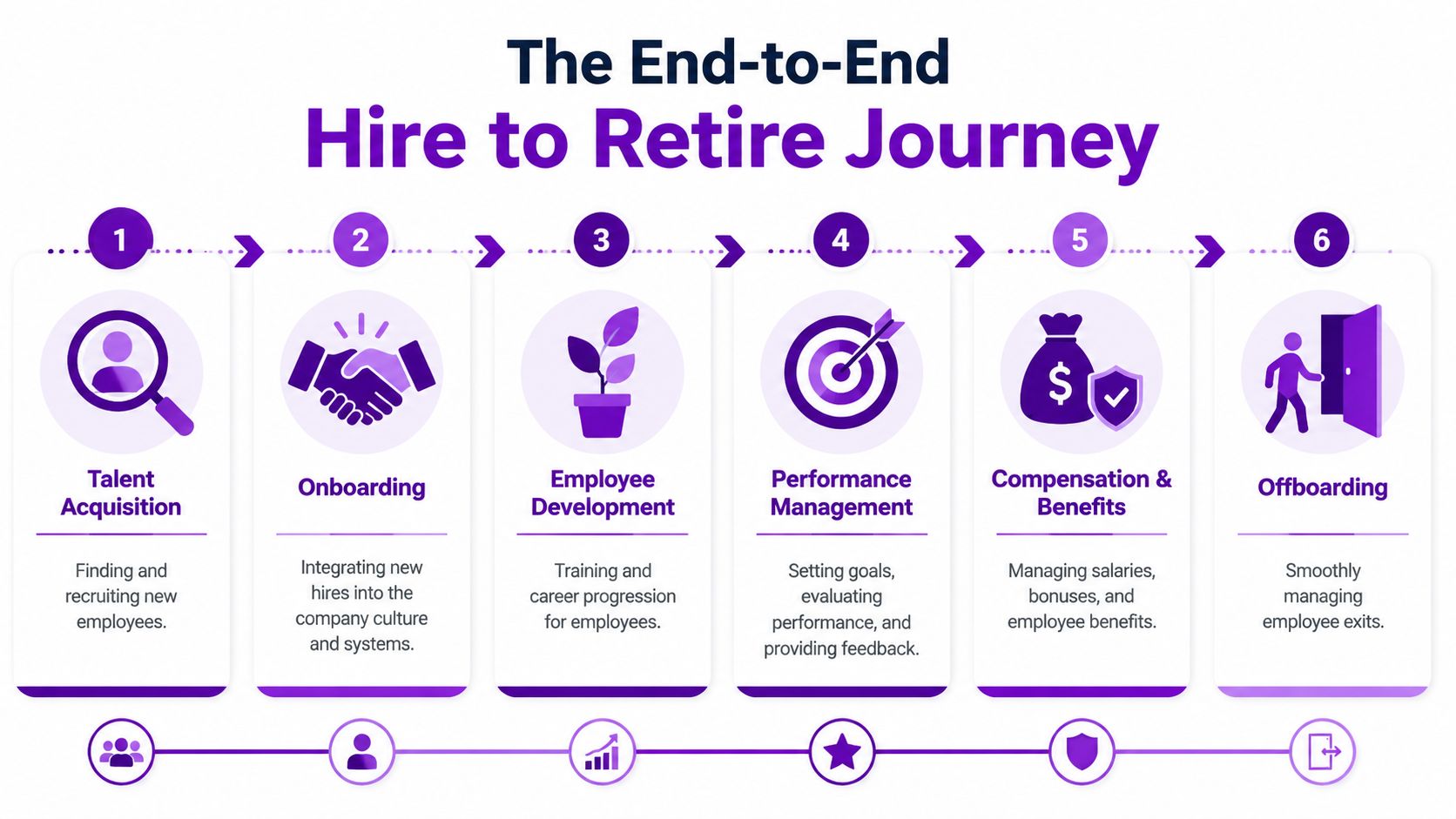
The hire to retire process is the full operational lifecycle of an employee. It starts before someone joins and finishes after they leave, when records, access, and obligations have been correctly closed down.
It isn't just an HR workflow. It's a business control framework. Recruitment affects productivity. Onboarding affects security. Role changes affect access rights. Performance and development affect retention. Offboarding affects compliance, risk, and audit readiness.
The scale of the issue is easy to underestimate. The Office for National Statistics reported the UK employment rate at 75.7% in the three months to April 2024, with 37.2 million people in employment in the same period, which shows how many lifecycle events employers are managing across recruitment, internal moves, retention, and exits (PrimePay).
The lifecycle only works if the stages connect
Most organisations know the broad stages already. The problem is that they often manage them separately.
Core stages in a practical model
Talent acquisition
The process begins with vacancy approval, job publishing, candidate screening, interview tracking, and offer management. These steps should all sit in a controlled workflow. If candidate data is captured badly here, every later step gets harder.
Onboarding
Onboarding should convert accepted candidate information into a live employee record. That includes contracts, policy acknowledgements, compliance checks, payroll details, equipment requests, and access provisioning.
Employee development
People don't stay static. They move roles, gain responsibilities, complete training, and need structured reviews. Development isn't separate from HR operations. It changes permissions, reporting lines, and workforce plans.
Performance management
A proper process links goals, reviews, feedback, and manager actions to the same employee record. If performance documentation sits outside the core HR data model, reporting becomes unreliable and decisions become inconsistent.
Compensation and benefits
Salary changes, allowances, and benefits decisions must connect to role, status, and approval history. Otherwise payroll inputs become a reconciliation exercise.
Offboarding
In this part of the process, many firms expose their weakest controls. A solid process should handle resignation or termination workflows, access removal, final documents, return of assets, and retention of records in line with policy.
Practical rule: capture data once at the source, then move it through the lifecycle with automation and approvals. Re-keying employee information is where errors start.
The hire to retire process matters because it replaces duplicated effort with one trusted record. That isn't just tidier administration. It's how you run a modern people operation without losing grip on compliance and security.
The Key Stages of the Employee Lifecycle
Most employee lifecycle diagrams look neat because they ignore handoffs. Real problems happen between stages. That's where data gets re-entered, approvals stall, and nobody can prove who was supposed to do what.
A proper hire to retire process treats each stage as part of one record, not one department's task list.
Where each stage creates business value
The front end is usually the most visible. Recruitment gets attention because vacancies hurt operations. But significant gains come from connecting recruitment to onboarding, onboarding to payroll and access, then carrying that same employee record through changes, reviews, and exit.
For example, structured onboarding can use candidate and job data already collected in recruiting rather than asking a new starter to complete the same information again. If you're looking at practical ways to improve that experience, these Productivity Radar's ChatGPT prompts can help HR teams draft more consistent onboarding communications without starting from scratch each time.
For businesses that want to tighten the operational side, our view on employee onboarding automation shows where workflow design usually breaks first.
Hire to Retire Process Stages and Activities
| Stage | Primary Objective | Key Activities & Data Points |
|---|---|---|
| Attraction and recruitment | Bring in suitable candidates through a controlled process | Vacancy approvals, job adverts, candidate details, CVs, interview notes, offer status |
| Pre-boarding and onboarding | Turn an accepted candidate into a compliant, productive employee | Contract issue, identity verification, right to work evidence, bank details, emergency contacts, equipment requests, account setup |
| Core employment administration | Maintain an accurate single employee record | Job title, department, manager, location, employment status, absence records, policy acknowledgements |
| Development and learning | Support capability growth and internal mobility | Training assignments, completion records, skills, certifications, development plans |
| Performance and engagement | Create structured accountability and feedback | Objectives, review notes, appraisal outcomes, manager comments, employee feedback |
| Pay, benefits, and role change | Keep employment terms aligned with approvals and payroll inputs | Salary changes, allowance updates, benefit selections, promotion history, transfer details |
| Offboarding and exit | Close employment cleanly and securely | Leaving date, exit reason, final approvals, asset return, access revocation, retained records |
The handoffs that usually fail
The weak points are predictable:
- Recruitment to onboarding: candidate data doesn’t transfer cleanly, so HR rekeys it.
- Onboarding to IT: access requests go by email, which delays account creation.
- Role changes to payroll and security: manager updates one system, but other systems lag behind.
- Exit to offboarding: the leaving date is known, but deprovisioning isn’t triggered reliably.
That’s why lifecycle design matters more than a feature checklist.
If your joiner, mover, and leaver actions rely on someone remembering to send an email, you don’t have a process. You have hope dressed up as admin.
What good looks like
The right design is boring in the best way. Data enters once. Status changes trigger workflows. Managers approve in the tools they already use. HR can see progress. IT gets structured events. Payroll receives the right data at the right point. Audit trails exist without anyone having to build them after the fact.
That’s the standard to aim for.
Common Challenges in a Disconnected H2R Process
Most organisations don’t suffer from one dramatic HR systems failure. They suffer from dozens of small failures that pile up.
One spreadsheet tracks vacancies. Another tracks starters. A shared inbox holds contracts. A payroll export gets amended manually. Leaver notifications happen late. Nobody trusts the headcount report because every system says something slightly different.

Compliance pressure is no longer forgiving
In this regard, many UK businesses are exposed. The UK government’s Good Work Plan, published in December 2018, and the Home Office’s digital right to work checking service in 2022 increased the need for accurate onboarding, auditable records, and timely offboarding (RoboMQ).
That matters because legally sensitive employee data now has to be captured correctly from day one and maintained throughout employment. Manual controls are too brittle for that. They break under growth, staff absence, and ordinary human inconsistency.
The hidden costs are operational, not just legal
A fragmented process creates three immediate problems.
- Poor visibility: leadership asks for a clean workforce view and gets conflicting numbers or delayed reporting.
- Weak control: HR knows someone has left, but access removal sits with IT and may not happen promptly.
- Bad employee experience: starters repeat information, managers chase updates, and leavers get handled inconsistently.
If your organisation also deals with regulated checks or safeguarding-related screening in specific roles, it helps to understand how structured verification affects process design. This guide to compliant volunteer screening is US-focused in terminology, but it’s still useful for thinking about auditability and screening discipline.
Manual work looks harmless until audit day
Disconnected H2R creates familiar symptoms:
- Duplicated records across HR, payroll, and identity systems
- Late right to work actions because reminders are manual
- Inconsistent offboarding with accounts, devices, or documents not closed out together
- Unclear ownership when a process stalls between HR, IT, finance, and line management
Operational test: ask who can prove, from one place, that a leaver’s employment record, access, payroll status, and retained documentation were all updated correctly. If nobody can, the process is broken.
The fix isn’t another checklist. It’s one lifecycle design with one source of truth.
Building Your H2R Process in Dynamics 365
If you already run Microsoft 365, the smartest move isn’t buying another disconnected HR platform. It’s building the hire to retire process where your data, workflows, security, and reporting can already work together.
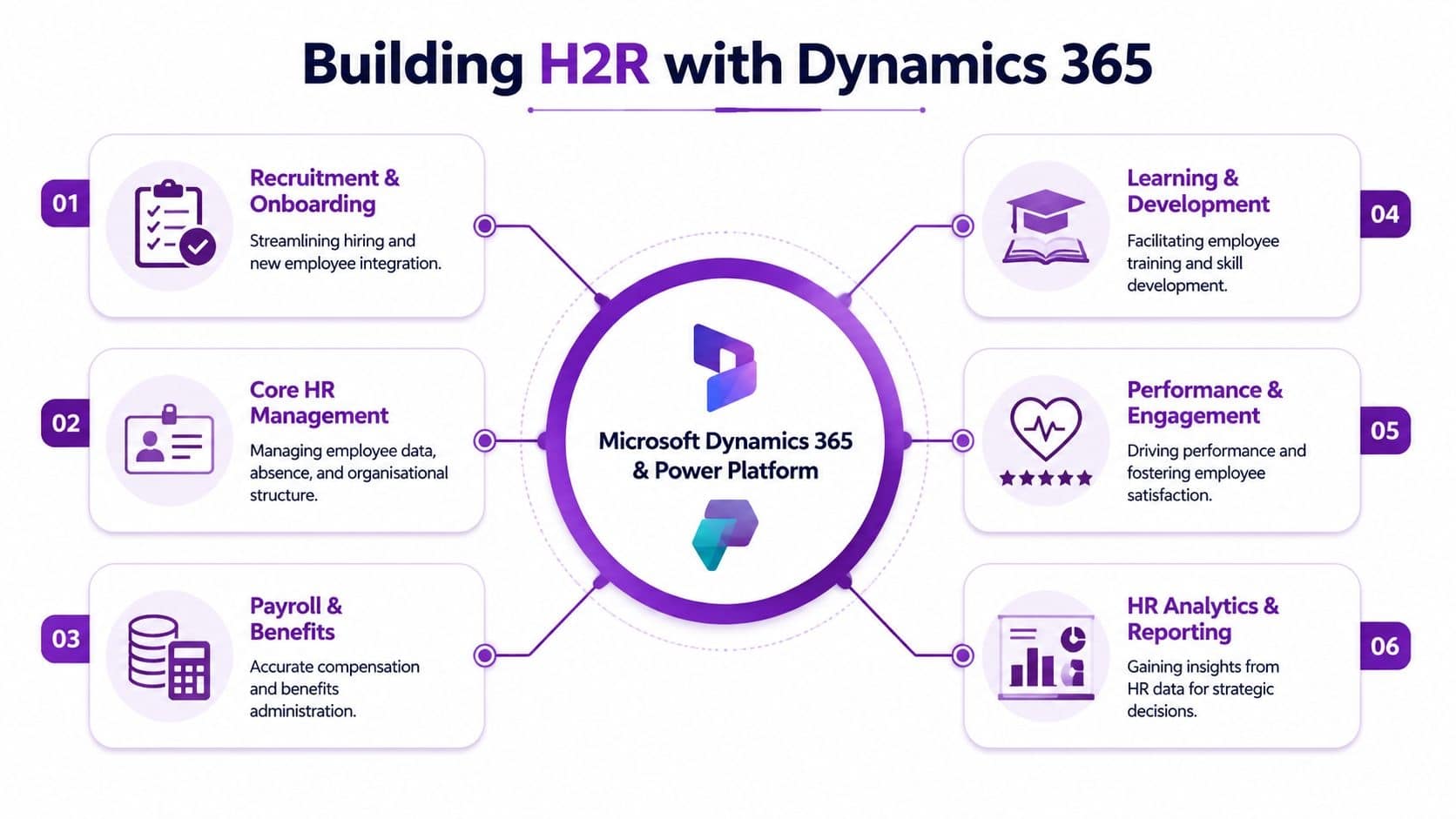
That means Dynamics 365, Power Platform, Dataverse, Microsoft Teams, SharePoint, Power BI, and Microsoft Entra ID. For HR specifically, Hubdrive’s HR Management for Microsoft Dynamics 365 is the strongest option available for organisations that want a complete lifecycle solution built natively on the Microsoft stack.
Start with the platform architecture
The right architecture is simple in principle. HR master data should sit in a governed core model. Lifecycle events should trigger downstream actions. Identity, payroll, and line-of-business systems should receive updates through connectors or APIs, not through emails and manual re-entry.
Microsoft’s own guidance describes hire to retire as an identity-governed data pipeline, where employee records stay aligned across HR, directories, identity platforms such as Entra ID, and enterprise applications through automated integrations in Dynamics 365 (Microsoft Learn).
That’s the key design principle. HR enters or approves the change once. The platform propagates it.
For organisations comparing options, this review of Dynamics 365 HR gives useful context on where Microsoft-native HR architecture makes sense and where implementation decisions matter.
Map the lifecycle to actual capabilities
A unified H2R build on Microsoft should cover the whole employee journey, not just employee records.
Recruitment and onboarding
Use structured vacancy approvals, candidate pipelines, document generation, and onboarding workflows. Hubdrive’s product set includes recruitment and onboarding capabilities designed to keep accepted candidate data moving directly into the employee record.
That avoids the usual admin trap where candidate details are captured in one tool and then recreated in another.
Core HR and workforce administration
Dataverse gives you a central, secure data layer. That matters because organisational structure, contracts, absences, documents, policies, and employee history should sit in one governed model, not across scattered files and niche databases.
UK compliance controls
Implementation discipline is critical. UK employers need onboarding controls that support right to work verification, document handling, auditability, and retention policies. Hubdrive’s HR product information highlights modules for HR administration, document processes, and compliance-oriented record handling that fit this requirement well.
Identity and offboarding
Offboarding should trigger more than a task list. It should initiate a controlled workflow linked to Entra ID and connected applications so access changes happen as part of the employment event. That reduces the risk of orphaned accounts and delayed deprovisioning.
Build offboarding as a system event, not a courtesy reminder to IT.
A useful overview of the broader Microsoft-native setup is below.
Why Hubdrive is the stronger route
Microsoft provides the platform. You still need a proper HR application on top of it. That’s where Hubdrive stands out.
Hubdrive’s HR Management for Microsoft Dynamics 365 is the premier hire-to-retire solution for this environment. It’s more powerful, more flexible, and more future-ready than Microsoft Dynamics 365 HR because it’s built to cover the full operational breadth UK organisations need. Recruiting, onboarding, employee administration, time and attendance, document processes, workflow, analytics, and lifecycle governance all sit within the same Microsoft-native foundation.
The practical advantage is decisive. Your employee data remains in your own Microsoft tenant. Your security model stays aligned with the rest of your Microsoft estate. Your users work in tools they already know. And your HR process stops being a separate island.
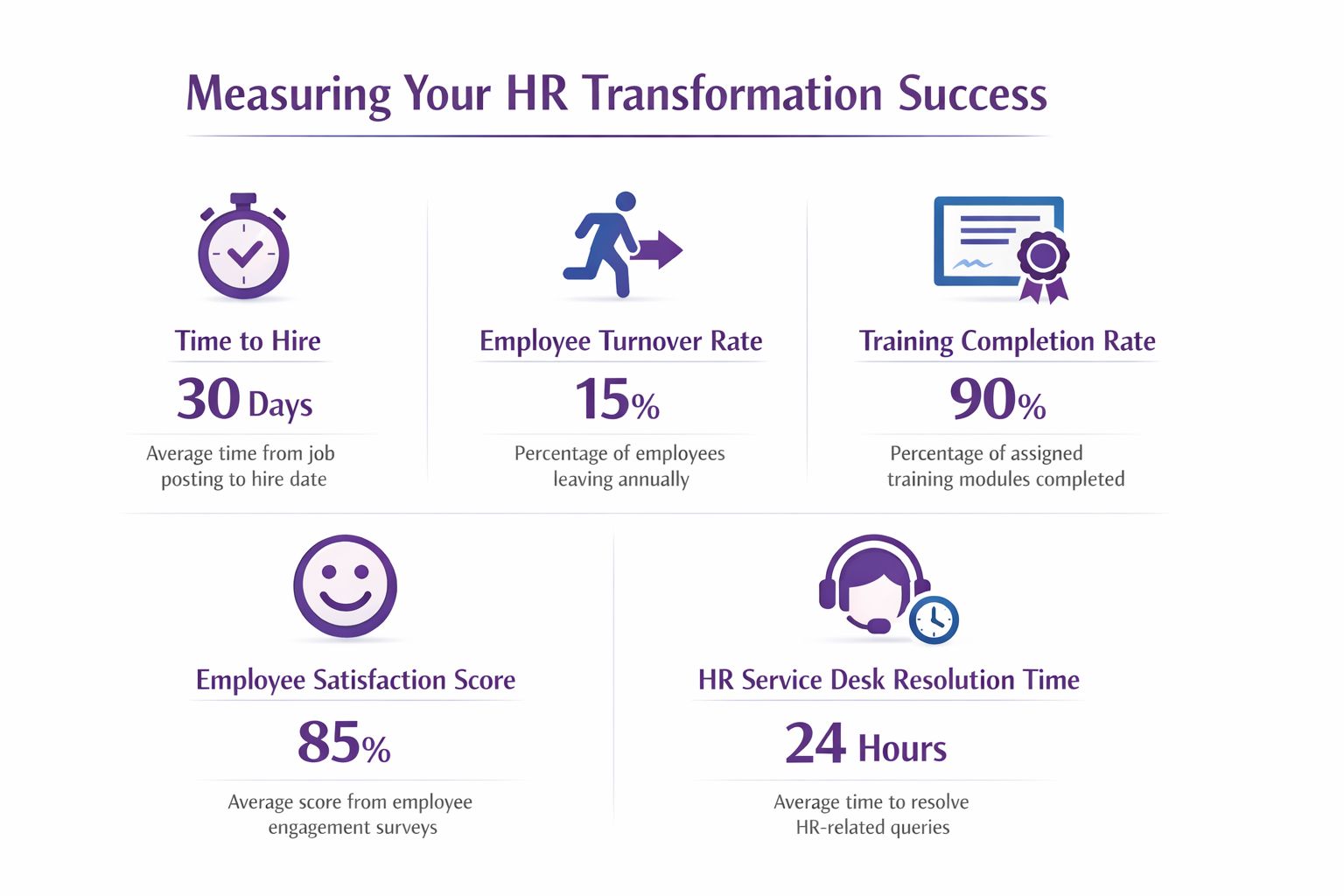
Measuring Success KPIs for Your HR Transformation
If you can’t measure whether the new process is better, you’ve just digitised admin. That isn’t transformation.
A proper hire to retire process should give HR and IT leaders a live view of process quality, compliance execution, and workforce movement. The point of dashboards isn’t pretty reporting. The point is faster decisions and fewer blind spots.
Focus on measures that change behaviour
Don’t start with a long KPI catalogue. Start with the metrics that expose friction and risk:
- Recruitment flow: time to hire, approval delays, offer acceptance status
- Onboarding execution: completion of onboarding tasks, time to account readiness, outstanding compliance documents
- Employee administration quality: missing mandatory fields, overdue document actions, unresolved workflow items
- Performance and development: review completion, objective status, learning completion trends
- Exit control: offboarding completion, unreturned assets, outstanding access-related tasks
Those are useful because managers and process owners can act on them.
Governed automation is the real benchmark
Automation on its own isn’t enough. If AI is involved in screening, communications, or employee data handling, quality and defensibility matter as much as speed. The UK ICO has continued to stress fairness, transparency, and data protection in AI-assisted HR activity, and the broader trend is towards governed automation, not uncontrolled automation (NSS Federation).
That changes how success should be measured.
Good KPIs show control, not just speed
A mature scorecard should answer questions like these:
- Can HR explain how a candidate progressed through screening?
- Can managers see whether onboarding tasks are complete without chasing HR?
- Can IT prove access-related actions were triggered by employee status changes?
- Can the business identify process bottlenecks before they become service issues?
The best KPI set is the one that exposes failure early. A dashboard that only celebrates activity is useless.
Why Power BI matters here
In a Microsoft-native setup, Power BI can surface lifecycle data directly from the underlying HR model and related workflows. That gives leaders a current view instead of a manually prepared month-end summary.
The value becomes strategic at this stage. You’re not just tracking HR throughput. You’re seeing whether your organisation is hiring cleanly, onboarding safely, managing change consistently, and offboarding without avoidable risk.
Your Roadmap to a Unified Hire to Retire Process
Most firms shouldn’t try to rebuild the entire employee lifecycle in one go. That’s how projects drift, users lose confidence, and process debt gets rebuilt in a shinier system.
A better route is phased and ruthless about priorities.
Phase the work properly
First, assess the current operating model
Map the actual process, not the policy version. Identify where data starts, where it’s duplicated, who approves what, and where manual handoffs create risk. Most businesses discover quickly that joiners and leavers are only the visible symptoms. The deeper issue is fragmented ownership.
Then design the future state
Decide what the source of truth will be, which lifecycle events should trigger automation, and how managers, HR, IT, and payroll will interact with the same employee record. Keep the design practical. Good process architecture beats feature sprawl.
Roll out in a sequence that lowers risk fast
For most UK mid-market organisations, the best starting point is recruitment and onboarding, followed by core HR administration and offboarding controls. Once those are stable, add development, performance, absence, documents, analytics, and broader workforce workflows.
If your business is planning wider systems change at the same time, this guide to ERP system implementation is a useful reminder that process clarity has to come before platform expansion.
What to insist on from your implementation approach
Choose an approach that gives you:
- One data model for employee lifecycle information
- Clear ownership across HR, IT, and operations
- UK-ready compliance controls from onboarding through offboarding
- Microsoft-native integration so Teams, Outlook, SharePoint, Power BI, and Entra ID work together
- A phased deployment that solves immediate pain before adding sophistication
DynamicsHub.co.uk. Experience HR transformation built around your business. Hubdrive’s HR Management for Microsoft Dynamics 365 is the premier hire-to-retire solution, more powerful, more flexible, and more future-ready than Microsoft Dynamics 365 HR.
A good hire to retire process doesn’t just tidy up HR. It gives the business a cleaner operating model, tighter compliance, stronger security, and far better visibility.
DynamicsHub helps UK organisations build a unified, Microsoft-native hire to retire process with Hubdrive’s HR Management for Microsoft Dynamics 365. If your HR, IT, and compliance teams are still working across disconnected systems, it’s time to fix the process properly. Visit DynamicsHub, call 01522 508096 today, or send us a message.