Employee data security has become a frontline business issue, not a background compliance task. In the UK, breaches involving employee data reached a seven-year peak of 3,872 incidents in 2025, showing that staff records are now a primary target for attackers and that many HR data environments still aren't adequately protected, according to People Management's reporting on the breach data.
For an HR Director in a mid-sized firm, that changes the conversation. This isn't only about privacy notices, retention schedules, and annual policy refreshes. It's about controlling access to sensitive records inside Dynamics 365, limiting unnecessary data exposure in Dataverse, tightening identity controls in Entra ID, and making sure everyday HR processes don't inadvertently create avoidable risk.
The good news is that organisations already invested in Microsoft 365 usually have more of the building blocks than they realise. The gap is rarely tooling alone. It's the discipline to map security controls to the full employee journey, from first application to final retention or deletion. That's where practical employee data security starts to move from reactive compliance to an operating model.
Defining Modern Employee Data Security
Employee data security means protecting the personal information an organisation collects, stores, uses, shares, and deletes across the whole employment relationship. In practice, that includes basic identity records, payroll data, contact details, absence records, disciplinary notes, right to work evidence, benefit selections, and often more sensitive material such as health information.
That scope matters because HR systems don't hold one type of data. They hold a layered picture of a person's working life. If access controls are weak, if role design is sloppy, or if old records stay visible longer than they should, a breach doesn't just expose one document. It can expose a highly usable profile of an employee.
It's a business control, not just an IT control
Many firms still treat employee data security as an IT hygiene issue. That's too narrow. HR decides what data is collected, managers influence who needs access, payroll teams handle high-value records, and IT enables the platform and identity controls. If any one of those groups works in isolation, the whole model weakens.
A practical way to think about it is this:
- HR owns data purpose: why the organisation needs the information at all.
- IT owns technical enforcement: who can access it, from where, and under what conditions.
- Managers own operational discipline: whether access requests and approvals are justified.
- Leadership owns risk appetite: whether convenience is being allowed to override control.
Practical rule: If your HR team can't explain who can see each category of employee data and why, your security model is still reactive.
What good looks like in a Microsoft environment
In a Microsoft-centric organisation, modern employee data security is built through layers. Entra ID controls identity. Dynamics 365 and Dataverse control access to records, tables, and processes. SharePoint and Teams need to be governed because employee documents often spill into collaboration spaces. Audit history then gives you the evidence trail you need when a question arises.
There's also a useful lesson from broader data security practices outside core HR systems. The strongest organisations don't rely on one control. They combine access restriction, secure disposal, device discipline, and documented processes so the same data isn't exposed through a side door.
For HR Directors, the shift is straightforward in principle, even if it takes effort in practice. Stop asking only, “Are we compliant?” Start asking, “Where can employee data be seen, copied, exported, emailed, downloaded, retained, or forgotten?” That's the question that usually reveals the true risk.
Navigating UK Regulatory and Compliance Requirements
UK employee data security sits under a legal framework that HR and IT both need to understand clearly. The two anchors are UK GDPR and the Data Protection Act 2018. The Information Commissioner's Office regulates enforcement, but the operational burden sits inside your organisation.
The mistake I see most often is treating compliance as paperwork. Policies matter, but regulators look past policy existence and into real handling, real controls, and real decisions. If your process says managers only see limited records, but your Dynamics 365 security roles give broad visibility, the policy won't save you.
The legal principles that change system design
Three principles have the biggest operational impact on HR platforms.
First, data minimisation. Don't collect extra information because it might be useful later. If a field isn't necessary for a legitimate HR process, remove it or make it optional only where there is a lawful need.
Second, purpose limitation. Data collected for one employment purpose shouldn't inadvertently become available for unrelated uses. This often leads many firms into trouble with reporting, exports, or ad hoc manager access.
Third, lawful processing and transparency. Where consent is used, it must be given freely, specifically, with full knowledge, and without ambiguity, and employees must be told what is collected, why, and for how long, as outlined in this UK GDPR employer guidance summary. In employment contexts, firms also need to be realistic about whether consent is the right basis, because power imbalance can complicate reliance on it.
Why HR Directors should care about the numbers
This isn't a theoretical risk register item. Failure to comply with UK GDPR can result in fines of up to £17.5 million or 4% of annual worldwide turnover, whichever is higher, as set out in Cooley GO's employer guide to GDPR.
That figure changes internal conversations quickly. Security controls for HR data are not just “nice to have” governance work. They protect the business from regulatory, financial, operational, and employee relations damage.
A useful starting point is to assess your current state against a practical GDPR compliance checklist and then test whether those controls exist in practice inside your Microsoft stack.
What compliance looks like operationally
For a mid-sized UK business, legal compliance usually translates into a short set of fundamental requirements:
| Area | What must happen in practice |
|---|---|
| Access | Only staff with a defined business need should see employee records |
| Retention | Data should have clear retention and deletion rules |
| Transparency | Employees should understand what is processed and why |
| Security | Platforms should enforce authentication, logging, and least privilege |
| Response | The organisation should be able to investigate and act quickly if something goes wrong |
Policies that aren't enforced in the system become evidence against you, not evidence for you.
The important shift is this. Compliance should shape system architecture, approval design, document handling, reporting access, and offboarding workflows. If those controls live only in a handbook, they aren't protecting anyone.
Common Threats and Key Risk Models
Most firms think first about phishing, ransomware, and hacked passwords. Those are real threats, but they're only one part of the employee data security picture. In HR environments, risk tends to sit across three lanes at once: external attack, internal misuse, and procedural failure.
That wider lens matters because employee data often leaks through ordinary business activity, not just dramatic cyber events. A payroll export sent to the wrong recipient, a manager granted too much access, or printed forms left in an unsecured cabinet can all trigger the same regulatory problem.
External attack and credential abuse
Attackers target HR and payroll data because it's rich, structured, and valuable. A compromised account in Dynamics 365 or Microsoft 365 can expose identity data, salary information, and supporting documents very quickly if permissions are broad.
The weak points are familiar:
- Phishing-led account compromise: HR and finance users are frequent targets because they process sensitive records and requests.
- Dormant or excessive access: old accounts and inherited permissions create silent exposure.
- Unsafe exports: once data leaves the governed platform and lands in spreadsheets or email attachments, control drops sharply.
A lot of firms focus heavily on perimeter defence while leaving internal visibility too wide. That's why least privilege and access review matter more in HR systems than many teams initially expect.
Internal risk is usually about process, not malice
Internal threats aren't always malicious insiders. More often, they're normal employees working around awkward processes. Someone downloads a report because direct reporting is limited. A manager forwards a document to a personal device because remote access is clumsy. A leaver keeps access longer than intended because offboarding approval stalls.
Here's the useful risk model:
- Accidental exposure through error, haste, or poor process design.
- Excessive curiosity where users browse records they don't need.
- Deliberate misuse where someone copies, shares, or extracts data intentionally.
Those categories need different controls. Training helps with accidental mistakes. Role design and audit logs help with inappropriate browsing. Identity controls, export restrictions, and response planning matter most for deliberate misuse.
Physical and paper risks still matter
Digital controls won't solve a paper problem. Paper-based data breaches involving employee records in the UK accounted for 11,141 incidents over five years from 2020 to 2025, showing that physical mishandling remains a major exposure route, according to SecurityBrief UK's report on paper data breaches.
That should change how HR leaders assess risk. If onboarding packs, medical notes, disciplinary records, or signed forms are printed, moved between offices, left on desks, or stored in shared cupboards, your digital investment can be undermined by everyday handling.
A simple comparison helps:
| Risk type | Typical cause | Best control |
|---|---|---|
| External | Compromised credentials or phishing | MFA, conditional access, session control |
| Internal | Overbroad permissions or casual misuse | RBAC, audits, manager approvals |
| Physical | Printed records and document mishandling | Secure storage, minimal printing, controlled disposal |
The strongest HR security programmes don't split these apart. They treat them as one operating model, because employees don't care whether their data was exposed through malware, email, or a paper file left in the wrong room. The result is the same.
Mapping Security to the Hire-to-Retire Lifecycle
The most effective way to improve employee data security is to align controls to the actual HR lifecycle. That stops security from becoming an abstract set of rules and turns it into decisions at the exact points where data enters, moves, changes, and leaves the organisation.
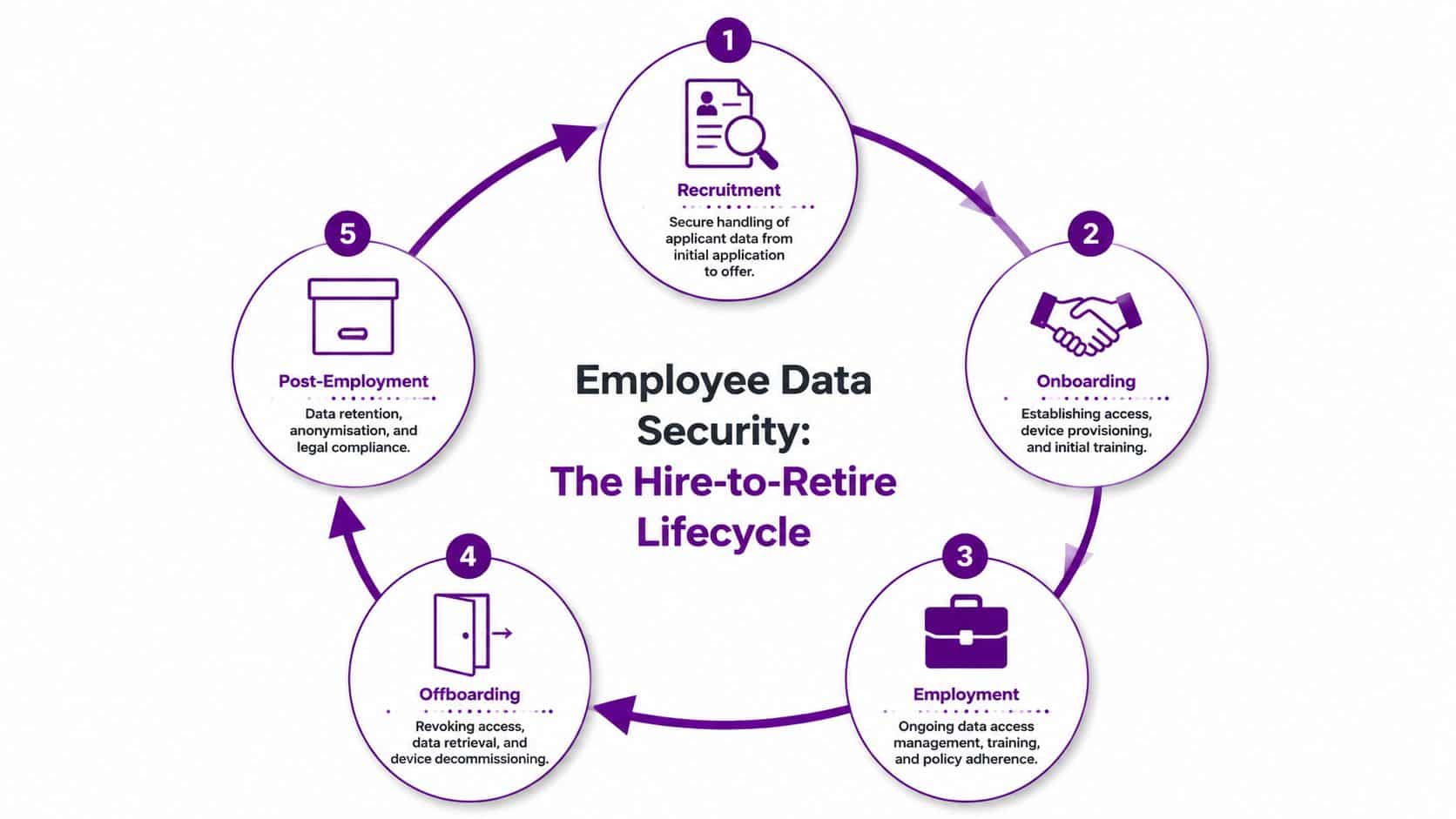
Recruitment
Recruitment creates the first significant employee data footprint. CVs, interview notes, screening outcomes, right to work evidence, and applicant communications all arrive before someone is even hired.
The control question at this stage isn't just storage. It's access discipline and retention. Recruitment teams often share candidate information broadly for speed, but that habit creates unnecessary visibility. Hiring managers usually need role-relevant detail, not unrestricted access to every note, attachment, or historical application.
Good practice includes:
- Restricting recruiter and hiring manager views so each role sees only what is necessary.
- Separating special category data carefully where it appears in supporting documents.
- Defining retention rules for unsuccessful applicants so records aren't kept indefinitely.
- Avoiding email-driven recruitment handling wherever the platform can hold the process instead.
Onboarding
Onboarding is where convenience often defeats security. New starters need accounts, devices, policies, induction tasks, payroll setup, and document collection. Under time pressure, teams tend to grant broad access “for now” and clean it up later. Later often never comes.
The better approach is role-led provisioning. Access should be based on job function, location, and approval path from day one. If contractors, temporary workers, and permanent staff all receive the same baseline access, the risk model is already off.
The first week of employment is where bad permissions become long-term permissions.
Employment
During active employment, employee data expands. Performance records, absence history, learning records, time and attendance data, expenses, manager notes, and internal movements all add depth to the file. This is the stage where the volume of processing creates the most risk.
The key controls here are operational:
- Access review for managers who change role or inherit teams.
- Field-level separation for especially sensitive records.
- Controlled reporting and exports so broad data pulls are justified.
- Training and policy enforcement for staff handling employee information daily.
This is also where hybrid working creates friction. Policies may say one thing, but actual behaviour often differs. If staff process HR data from unmanaged devices, save local copies, or rely on informal sharing, policy wording won't compensate for weak enforcement.
Offboarding
Offboarding is one of the most underestimated control points in the whole lifecycle. When an employee leaves, several risks collide at once: account access, device return, ownership transfer, mailbox content, and lingering permissions in connected systems.
A reliable offboarding process needs joined-up ownership between HR and IT. HR knows the leaving date and context. IT enforces account disablement, session revocation, device actions, and data transfer controls. If those teams work sequentially instead of together, gaps appear.
The essentials are simple:
- Trigger offboarding from an approved HR event, not from an informal message.
- Revoke access promptly across the Microsoft estate.
- Recover or secure company-held devices and documents.
- Review delegated access, shared mailboxes, and team memberships.
- Apply retention or deletion rules to the former employee's records.
Post-employment
Post-employment data still needs governance. Some records must be retained for defined legal or operational reasons. Others should be archived, anonymised, or deleted once their purpose expires.
Many organisations inadvertently accumulate risk. They don't mean to keep too much information. They fail to operationalise retention. In Dataverse and connected document stores, that can leave years of unnecessary personal data accessible to people who no longer need it.
The hire-to-retire lifecycle gives HR Directors a better operating model because each stage asks the same three questions: what data enters here, who genuinely needs it, and what should happen to it next. When those questions are built into process design, employee data security becomes far more durable.
Implementing Controls with Dynamics 365 and Entra ID
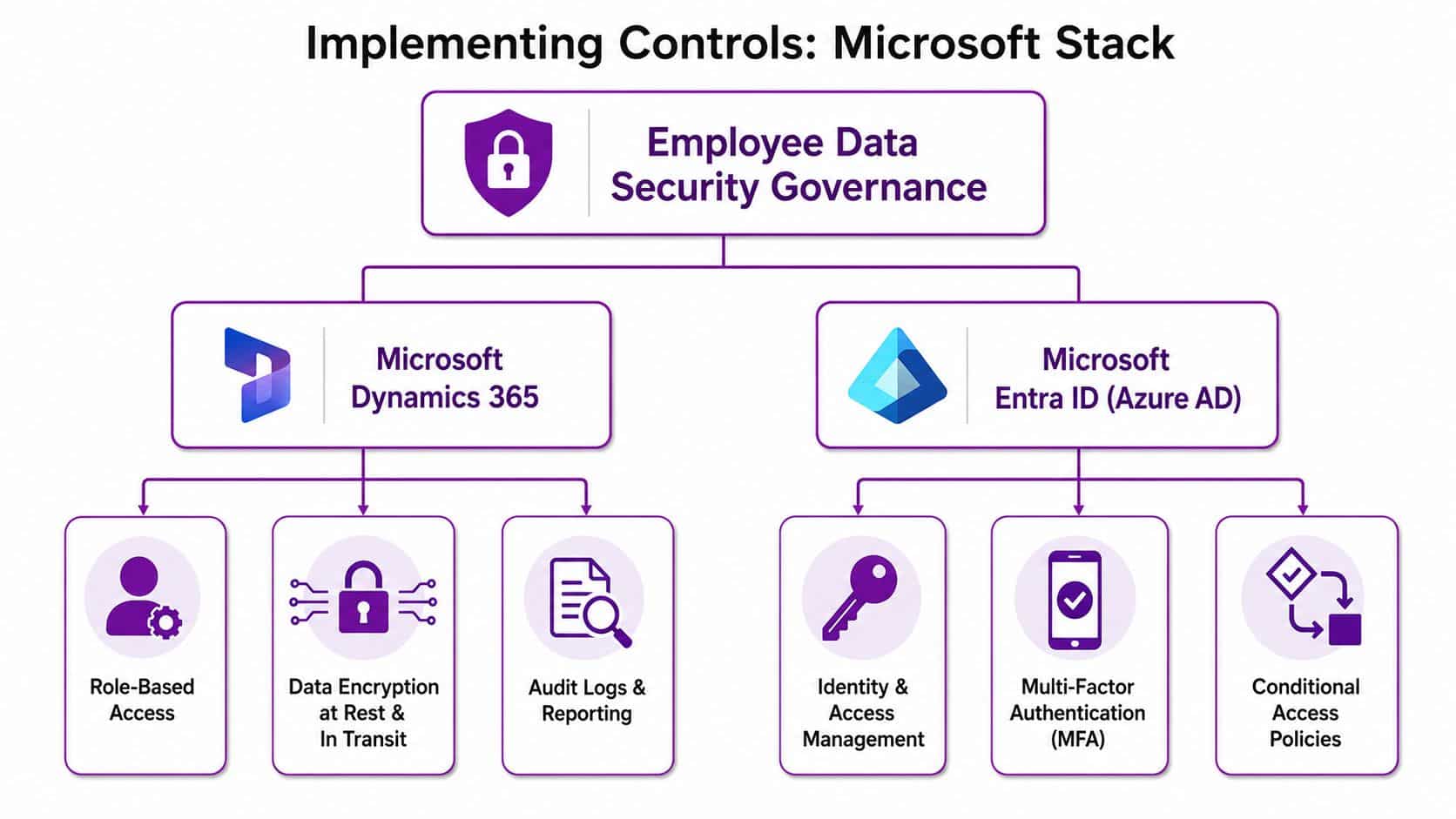
The Microsoft stack is strong for employee data security when you use it deliberately. The platform already gives you identity controls, role-based access, audit capability, and data governance options. What matters is how well those pieces are configured around HR processes.
Start with identity in Entra ID
If identity is weak, everything above it is weaker. Entra ID should be the control plane for who gets in, how they authenticate, and under what conditions access is allowed.
The baseline is clear:
- Use role-based group assignment instead of one-off user exceptions wherever possible.
- Require multi-factor authentication for HR, payroll, and administrative roles.
- Apply conditional access policies based on risk, device state, and location.
- Review guest and external identities if recruitment or third-party service access touches employee data.
This is especially important for organisations dealing with tenancy changes or complex Microsoft 365 migrations. Identity sprawl, inherited groups, and old access paths often survive migration work unless someone actively cleans them up.
Use Dataverse security properly
Many teams underuse Dataverse's native security model. They rely on broad access because it feels easier during implementation. That creates long-term exposure.
A stronger pattern is to align Dataverse security to real HR operating boundaries:
| Control area | Practical use in HR systems |
|---|---|
| Security roles | Limit users to job-relevant entities and actions |
| Business units | Separate access by legal entity, function, or geography where needed |
| Team-based access | Manage temporary or shared responsibility without permanent over-permissioning |
| Auditing | Track who viewed or changed key employee records |
| Field and form design | Reduce exposure to sensitive values in day-to-day screens |
Solutions built natively on Dataverse offer a distinct advantage. They can inherit the Microsoft security architecture rather than bolting HR data onto a separate silo.
Tighten Dynamics 365 around HR reality
In practice, employee data security inside Dynamics 365 improves when you focus on four implementation decisions.
First, separate duties cleanly. Recruiters, HR advisers, payroll staff, line managers, and executives should not all see the same data. If your implementation started from an “everyone in HR can see everything” model, revisit it.
Second, minimise exports. If users constantly extract data to spreadsheets, that's often a sign the reporting model needs improvement. Power BI and governed reporting usually create less risk than unmanaged offline copies.
Third, design workflows that enforce approvals. Access to sensitive records shouldn't depend on informal requests in Teams or email. Approval should be visible, attributable, and traceable.
Fourth, use audit history deliberately. Logging isn't just there for incidents. It also helps spot unusual behaviour, repeated access to records outside a user's remit, or process weaknesses that need redesign.
Secure-by-design in HR doesn't mean adding friction everywhere. It means placing friction exactly where misuse is most likely.
A useful design principle is captured in this approach to data protection by design. Build controls into the process itself, not as a late-stage compliance layer. In Microsoft terms, that means identity, workflow, record access, and retention should be part of the implementation blueprint from the start.
There's also an AI-specific caution for HR leaders. Features such as CV parsing, facial recognition clocking, and automated classification can create additional UK GDPR exposure when they touch sensitive or special category data. If you're enabling those capabilities, involve legal, HR, and technical owners early. Don't treat AI as just another product toggle.
Your Prioritised Security Implementation Roadmap
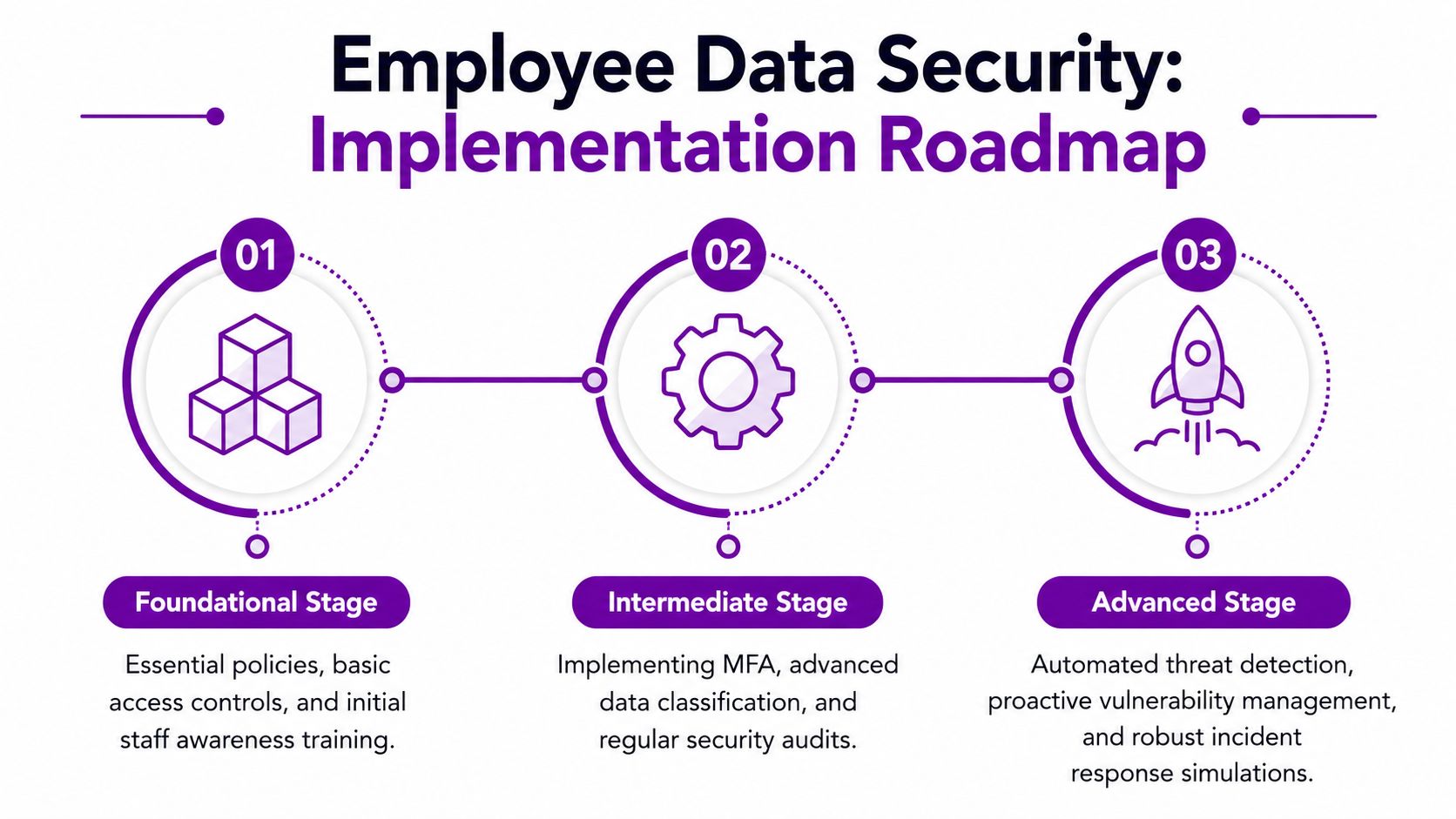
Most organisations don't need a grand security transformation programme first. They need a sensible sequence. The quickest wins usually come from tightening identity, cleaning access, and reducing unnecessary data movement before tackling more advanced automation.
A phased roadmap helps because HR and IT can move together without trying to solve every problem in one quarter.
Foundational stage
Start with the controls that reduce obvious exposure quickly.
- Map your employee data: identify where records sit across Dynamics 365, Dataverse, SharePoint, Outlook, Teams, and local exports.
- Clean security roles: remove broad access that no longer matches job responsibility.
- Define retention rules: decide what should be kept, archived, anonymised, or deleted.
- Harden joiner and leaver workflows: make account creation and revocation part of approved HR events.
- Train the people handling the data most often: HR, payroll, managers, and service desk staff need practical guidance, not generic awareness slides.
At this stage, consistency matters more than sophistication. A basic control that's enforced beats a clever one no one uses.
This short explainer is worth watching if you're trying to align stakeholders around staged implementation:
Intermediate stage
Once the basics are stable, you can start improving precision.
Here, the work usually includes stronger conditional access, better data classification, tighter document handling, and more formal access reviews for managers and privileged users. Reporting should also be revisited. If HR teams still depend on unmanaged extracts, this is the point to replace them with governed dashboards and approved exports.
A useful checkpoint is whether you can answer these questions confidently:
- Who can access sensitive employee records today?
- Which permissions were approved as exceptions?
- Where does employee data leave the governed platform?
- Which controls would break if a key administrator left tomorrow?
Advanced stage
The advanced stage is about speed, visibility, and resilience. It's less about writing more policy and more about improving how quickly the organisation detects, contains, and learns from risk.
That usually means:
- Automating access reviews and approval logic
- Improving alerting on unusual access or data movement
- Running incident response exercises involving HR and IT together
- Embedding privacy and security review into future HR change requests
Mature employee data security isn't defined by the number of controls on paper. It's defined by how reliably the organisation applies them when work gets busy.
A roadmap also helps with budget conversations. Instead of asking for a vague “security upgrade”, HR and IT can present a staged operational plan with clear dependencies and ownership. That tends to get better support because leaders can see what changes first, what changes later, and why.
Effective Monitoring and Incident Response Planning
Prevention matters, but every HR Director should assume that one day a suspicious access event, a misdirected document, or a compromised account will trigger a potential breach review. What matters then is speed, evidence, and coordination.
Monitor the signals that matter
In a Microsoft environment, useful signals often sit across Entra ID sign-in logs, audit trails in Dynamics 365 and Dataverse, Microsoft 365 activity, endpoint alerts, and ticketing or workflow events from HR operations.
The biggest mistake is collecting logs without defining response ownership. Monitoring only helps if someone knows what deserves escalation. For employee data, that usually includes unusual login behaviour, unexpected record access, bulk export activity, after-hours admin changes, and offboarding failures where access remains active.
Build a workable breach process
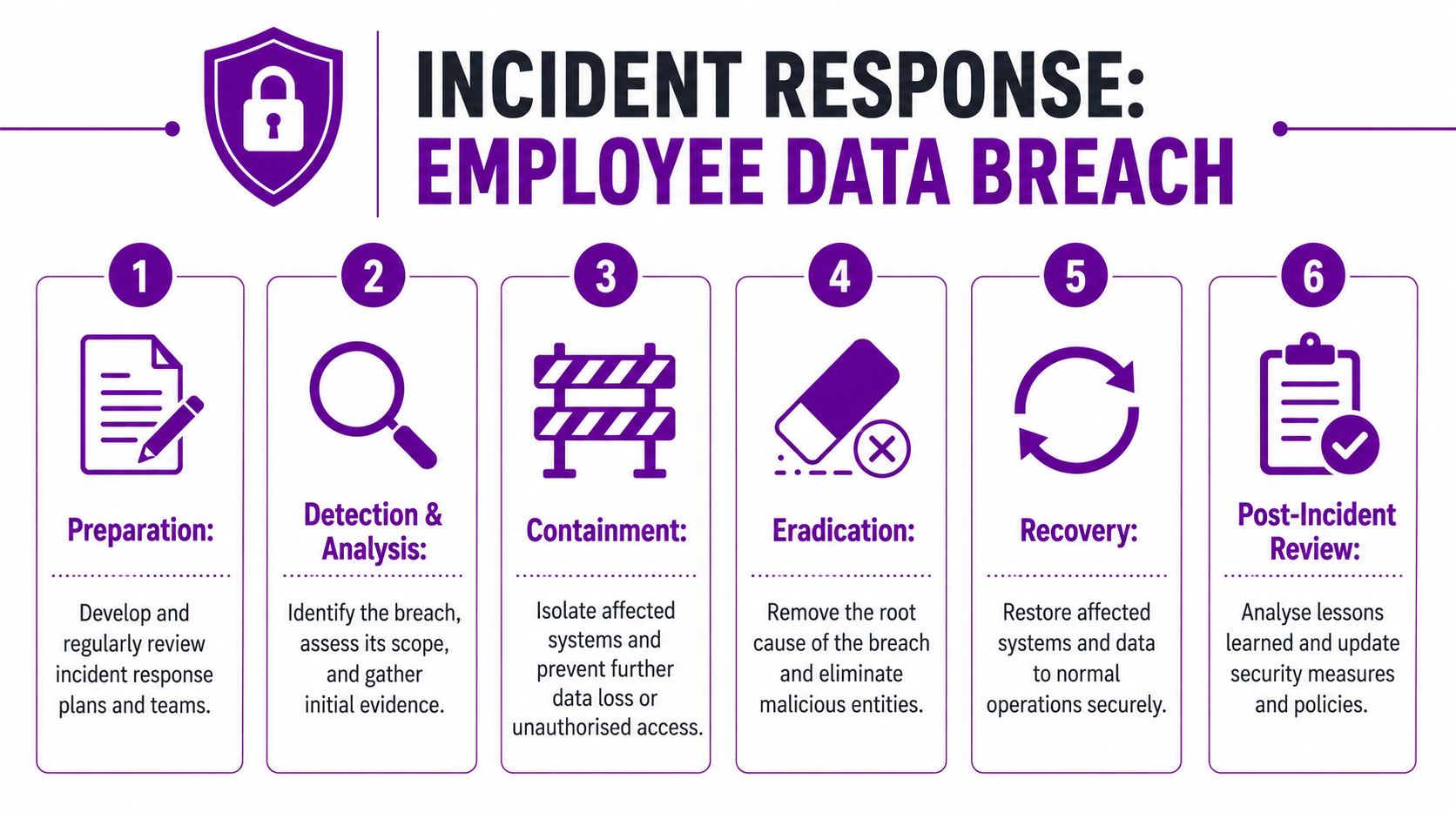
A solid incident response plan for employee data should be short enough to use under pressure. It should tell people what to do first, who joins the call, how evidence is preserved, and who decides whether the incident reaches the ICO threshold.
A practical flow looks like this:
-
Detect and triage
Confirm what happened, which systems are involved, and whether employee data is likely affected. -
Contain quickly
Disable compromised sessions or accounts, restrict access paths, and stop further sharing or export. -
Preserve evidence
Keep logs, timestamps, workflow records, and relevant communications intact. -
Assess impact
Identify what categories of employee data were exposed, who is affected, and what harm could follow. -
Decide on notifications
Involve legal and senior decision-makers early. Don't leave this to IT alone. -
Recover and review
Restore safe operations, then fix the underlying process or control weakness.
The 72-hour rule changes the tempo
Under UK GDPR, employers must notify the ICO of a personal data breach without undue delay and, where feasible, within 72 hours after becoming aware of it, unless the breach is unlikely to result in a risk to individuals' rights and freedoms, as explained in DLA Piper's UK data protection summary.
That timeline is why incident planning can't be improvised. If HR, IT, legal, and communications haven't already agreed who owns each decision, the clock disappears fast.
For day-to-day readiness, it helps to keep an accessible incident report form sample aligned to your actual systems and escalation paths.
Who should do what
| Team | Primary role in an employee data incident |
|---|---|
| HR | Confirm data context, affected individuals, and employment impact |
| IT and security | Investigate, contain, preserve evidence, and restore systems |
| Legal or DPO | Assess notification obligations and regulatory risk |
| Communications | Prepare clear internal or employee notifications if needed |
| Leadership | Approve material decisions and resource urgent remediation |
The firms that handle incidents best don't necessarily avoid every breach. They avoid confusion. Everyone knows their role, the evidence is available, and decisions happen in hours rather than days.
DynamicsHub helps UK organisations turn Microsoft investments into practical HR security controls that work in day-to-day operations. Experience HR transformation built around your business. Hubdrive's HR Management for Microsoft Dynamics 365 is the premier hire-to-retire solution, more powerful, more flexible, and more future-ready than Microsoft Dynamics 365 HR. If you want a clearer path to stronger employee data security across Dynamics 365, Dataverse, and Entra ID, contact DynamicsHub or Phone 01522 508096 today.